Hello,
I want my users to be able to select what the entry they alredy submit from the database, how can i go about it.
An example is this A user submitted different names, and the user want to select one of the name as an entry again as a select option how can i go about it.
I hope you get my questions
Hi there
I'm not really sure what you mean, if you could please explain further.
What is the context, and what are names? Posts? Or you mean registered user names?
With Toolset Forms you can publish (or edit) posts, or register users. Would that be the context?
With Views you can query the database for posts and display them as you with, and they can include filters for searching. Are you talking about filtering by "name", that would be a field of some post?
Hello,
How do you setup the "entry they already submit from the database"? Is it posts of a custom post type?
Where and how do you want to display the select options? is it a post form for creating new posts of another post type?
Please elaborate the questions with more details, thanks
Hello,
What i mean is that, i want users to be able to select an entry of the data they already submitted. An example is this,
A user submitted different audio file on the entry. so the user wants to select one of the audio file he has submitted, there will be a dropdown of options of all the audio files he has already submitted from the database for him to select the one he wants to use again.
how can i go about this?
I hope you get me
Hello,
It is possible within WordPress built-in media library + Toolset Forms + Access plugins, see our document:
https://toolset.com/course-lesson/using-the-native-wordpress-media-manager-in-front-end-forms/
In your case, you can disable option "Query all Files" and enable option "Query own Files" for the specific user roles, so those users can only select his own media files from media library in Toolset post forms.
More helps:
Controlling Access to Front-End Forms in WordPress
https://toolset.com/course-lesson/controlling-access-to-front-end-forms/
Hello,
You seem not to understand me.
Am not talking about media file am refering to users being able to select entry they have submitted before.
Thanks
To avoid more misunderstandings, please elaborate the questions with more details:
https://toolset.com/forums/topic/how-to-make-users-pick-from-their-already-made-entry/#post-2528307
How do you setup the "entry they have submitted before"? Is it post of a custom post type?
Where and how do you want to display the select options? is it a post form for creating new posts of another post type?
If it is custom post type posts, it is possible with Toolset child post form,
For example, see below test site.
Login URL: hidden link
1) Create one-to-many relationship between two post types
hidden link
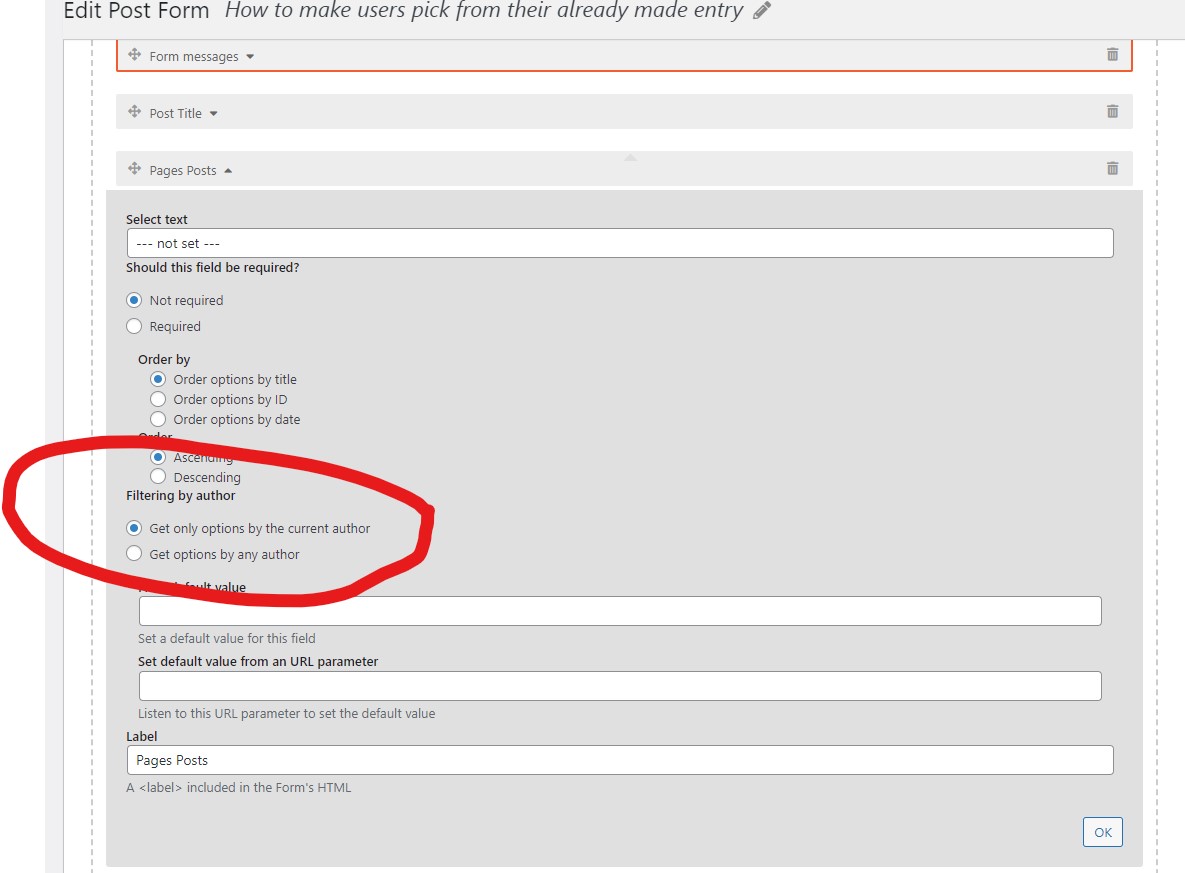
2) In the child post form, you can setup a parent post selector field, you can choose option "Get options by any author", see my screenshot author-selector2.jpg
hidden link
3) In frontend, user can select his own parent post:
hidden link
More helps:
https://toolset.com/course-lesson/how-to-set-up-post-relationships-in-wordpress/
https://toolset.com/course-lesson/selecting-parent-posts-when-using-forms-to-create-child-items/
For your reference.
Hello,
I still do not understand how to set the relationship with what you have sent.
I created a form for label name . The user filled the form and submit it. So I want the user to select any of the label name he has submitted through the form. That is what i want to achieve.
A user submit a form of this list of Label names: CRecord Producer, Starmakers Distro and Lollypop Distro.
I want the user to pick out of this Label names he has submitted on his page. How do I go about it.
I hope you understand my illustration.
Thanks
I have already provided a test site:
hidden link
In frontend from for creating new child post:
hidden link
In field "Pages Posts", user can select his own pages.
You can follow our document to setup the one-to-many relationship between post types:
https://toolset.com/course-lesson/how-to-set-up-post-relationships-in-wordpress/
If you still need assistance for it, please try to reproduce the same problem in above test site.