Normal functionality is not working as a normal Admin
Started by: CAWeb
in: Toolset Professional Support
Problem:
As a normal Administrator on a multisite instance, you are unable to create or modify Views, receiving a "You do not have permissions for that" error.
Solution:
The issue was resolved by adding the missing capability "toolset_edit_views" to the Administrator role.
You can use the Toolset Access plugin to add the capability to the user.
Relevant Documentation:
https://toolset.com/errata/non-admins-cannot-edit-pages-containing-a-view-block/
1
8
1 year, 2 months ago
Christopher Amirian
Elementor Theme Builder
Started by: juliaK-2
in: Toolset Professional Support
1
13
1 year, 2 months ago
Christopher Amirian
Issue with Shortcodes Instead of Text in Structured Data Output
Started by: michalK-6
in: Toolset Professional Support
1
9
1 year, 2 months ago
Christopher Amirian
picture size
Started by: kayser
in: Toolset Professional Support
Problem:
I encountered an issue where image sizes render differently in Chrome compared to Firefox.
Solution:
To fix the issue, add the following CSS code to your theme:
div.tb-gallery img {
    height: 100% !important;
}

.tb-gallery--grid--nocrop .tb-gallery__cell {
    height: 100%;
}
1
6
1 year, 2 months ago
kayser
Display view in Divi
Started by: Marcel
in: Toolset Professional Support
Problem:
A Toolset View on the page stopped working, showing only the shortcode. The legacy Toolset View editing options were unavailable, and the Toolset Blocks plugin was not active.
Solution:
- Go to WordPress Dashboard > Plugins > Add New > Commercial (tab).
1
5
1 year, 2 months ago
Marcel
I can’t create new CPT
Started by: patrickR-3
in: Toolset Professional Support
1
2
1 year, 2 months ago
Mateus Getulio
sorting issue
Started by: ashodK
in: Toolset Professional Support
1
4
1 year, 2 months ago
Mateus Getulio
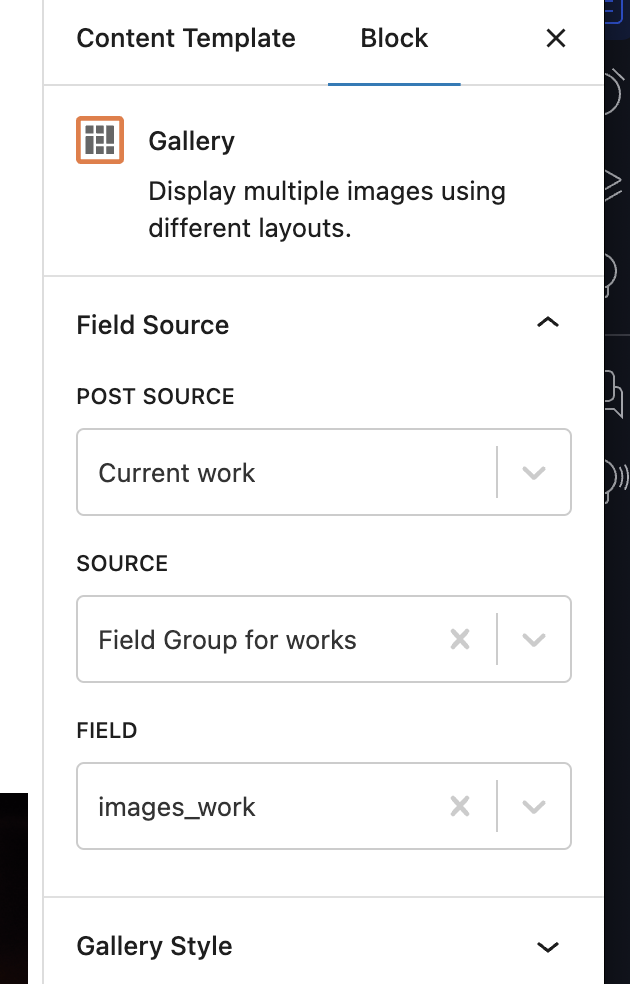
Lacking images of “Post Field Group“
Started by: Weber Edouard Marie Anne
in: Toolset Professional Support
Problem:
You are unable to display a multiple image field (images_work) using a single Field block in Toolset.
Solution:
To display a multiple image field, use either the Repeating Field block or the Gallery block instead of a single Field block.
- Open the content template where you want to display the images.
- Insert a Gallery block or a Repeating Field block.
- Select the images_work field from the available options.
- Save and test the display.
1
3
1 year, 2 months ago
Weber Edouard Marie Anne
Access via PHP the post inside a loop in a view
Started by: mauroM-3
in: Toolset Professional Support
1
2
1 year, 2 months ago
mauroM-3
CPT Slug
Started by: jillT
in: Toolset Professional Support
1
2
1 year, 2 months ago
Mateus Getulio
Creating New Elementor Pages/Templates doesnt appear to work with Toolset plugin
Started by: charlotteC-2
in: Toolset Professional Support
1
2
1 year, 2 months ago
Mateus Getulio
I want to change From in mail notification of post form with short code
Started by: marcB-6
in: Toolset Professional Support
1
2
1 year, 2 months ago
Mateus Getulio
Split: Messaging to the group/Individual user. – connect message
Started by: jum
in: Toolset Professional Support
0
23
1 year, 2 months ago
jum
the post types are not showing the published posts in the backend
Started by: JawwadM3964
in: Toolset Professional Support
1
10
1 year, 2 months ago
Christopher Amirian
Unwanted p and a tags showing on view and archives despite [wpv-noautop]
Started by: ashleighP
in: Toolset Professional Support
Problem:
The user is experiencing unwanted paragraph tags (
) being added automatically to the content rendered on the front end, causing discrepancies between the content template and the displayed output.
Solution:
To prevent WordPress from adding automatic paragraph tags (
), add the following code to the functions.php file of your theme:
remove_filter( 'the_content', 'wpautop' );
remove_filter( 'the_excerpt', 'wpautop' );
This code disables the wpautop function for both post content and excerpts.
Relevant Documentation:
https://developer.wordpress.org/reference/functions/wpautop/
1
4
1 year, 2 months ago
Christopher Amirian