Display view in Divi
Started by: Marcel
in: Toolset Professional Support
Problem:
A Toolset View on the page stopped working, showing only the shortcode. The legacy Toolset View editing options were unavailable, and the Toolset Blocks plugin was not active.
Solution:
- Go to WordPress Dashboard > Plugins > Add New > Commercial (tab).
1
5
1 year, 10 months ago
-
Lacking images of “Post Field Group“
Started by: Edouard Marie Anne Weber
in: Toolset Professional Support
Problem:
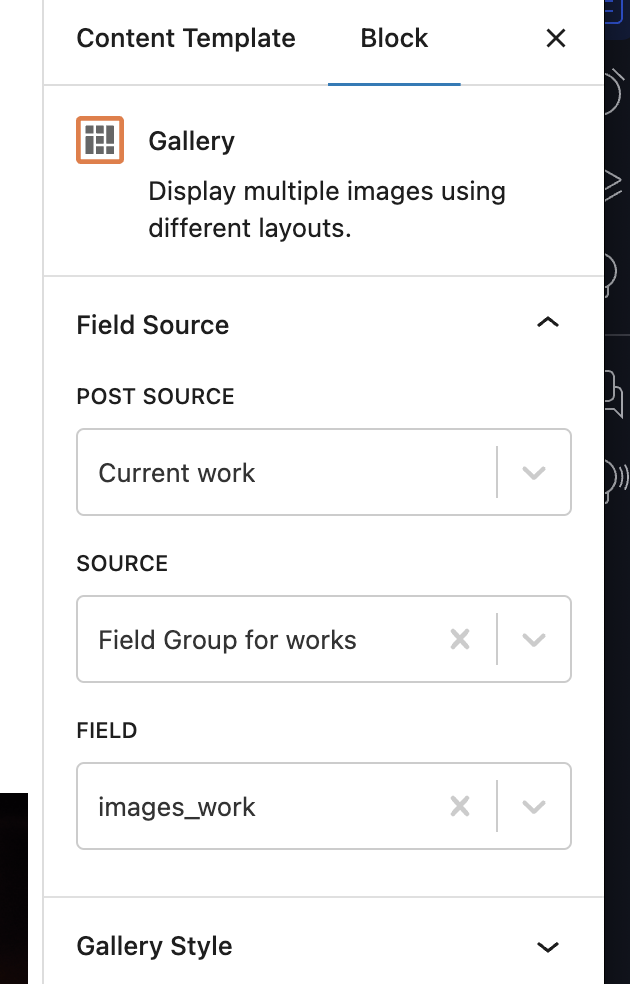
You are unable to display a multiple image field (images_work) using a single Field block in Toolset.
Solution:
To display a multiple image field, use either the Repeating Field block or the Gallery block instead of a single Field block.
- Open the content template where you want to display the images.
- Insert a Gallery block or a Repeating Field block.
- Select the images_work field from the available options.
- Save and test the display.
1
3
1 year, 10 months ago
-
Unwanted p and a tags showing on view and archives despite [wpv-noautop]
Started by: ashleighP
in: Toolset Professional Support
Problem:
The user is experiencing unwanted paragraph tags (
) being added automatically to the content rendered on the front end, causing discrepancies between the content template and the displayed output.
Solution:
To prevent WordPress from adding automatic paragraph tags (
), add the following code to the functions.php file of your theme:
[php]remove_filter( 'the_content', 'wpautop' );
remove_filter( 'the_excerpt', 'wpautop' );
[/php]
This code disables the wpautop function for both post content and excerpts.
Relevant Documentation:
https://developer.wordpress.org/reference/functions/wpautop/
1
4
1 year, 10 months ago
-