Skip Navigation

[Resolved] How to add an intermediary posts column in Table View?

This is the technical support forum for Toolset - a suite of plugins for developing WordPress sites without writing PHP.

Everyone can read this forum, but only Toolset clients can post in it. Toolset support works 6 days per week, 19 hours per day.

Sun Mon Tue Wed Thu Fri Sat
- 10:00 – 13:00 10:00 – 13:00 10:00 – 13:00 10:00 – 13:00 10:00 – 13:00 -
- 14:00 – 18:00 14:00 – 18:00 14:00 – 18:00 14:00 – 18:00 14:00 – 18:00 -

Supporter timezone: Asia/Kolkata (GMT+05:30)

This topic contains 4 replies, has 1 voice.

Last updated by raffyC 1 week, 6 days ago.

Assisted by: Minesh.

Author
Posts
#2843449
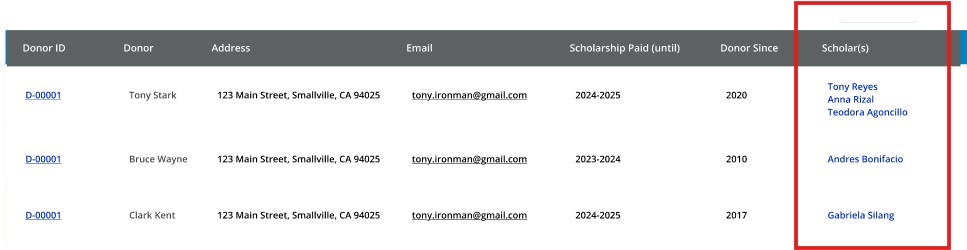
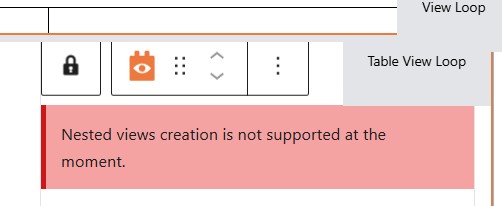
nested-view.jpg
table-view.jpg

Hi,
I am trying to create a table view with a column showing the list of linked custom post (see image). However when I tried to add a View and selecting the intermediary post as dynamic source it shows "Nested view creation is not supported". Is there another way to achieve this design?

Thanks.

#2843541

Minesh
Supporter

Languages: English (English )

Timezone: Asia/Kolkata (GMT+05:30)

Hello. Thank you for contacting the Toolset support.

You do not need to add another view to display the intermediary post type custom field, but you can add for instance, single field block and from the dynamic sources you can select the intermediary post type as source of your custom field instead of current post and then select your desired custom field.

Please let me know if you do not able to find a way. In that case, please share problem URL and admin access details and tell me what intermediary post type custom field you want to display.

*** Please make a FULL BACKUP of your database and website.***
I would also eventually need to request temporary access (WP-Admin and FTP) to your site. Preferably to a test site where the problem has been replicated if possible in order to be of better help and check if some configurations might need to be changed.

I have set the next reply to private which means only you and I have access to it.

#2843574

Minesh
Supporter

Languages: English (English )

Timezone: Asia/Kolkata (GMT+05:30)

I've added shortcode's block and added the following shortcode to display the intermediary post active and link:

[types field='active' item='@student-donor.association'][/types]

[types field='link' item='@student-donor.association'][/types]

Please check the following realted ticket:
- https://toolset.com/forums/topic/display-an-intermediary-posts-custom-field-value/#post-2748472

#2843578

Hi,
Thanks for checking. Unfortunately the shortcode only displays the field of the donor-student relationship (active/link) but what I would like is to display the names of the students associated to the current donor in a column. Is there another way to do it?

#2843586

Minesh
Supporter

Languages: English (English )

Timezone: Asia/Kolkata (GMT+05:30)

Ahhh, ok.

Can you please check now: hidden link

To manage table view is bit combersome with Toolset blocks and it also does not support nested view.

To achive your goal, we need to use nested view in this case and for that first of all, I've enabled the legacy view:
- https://toolset.com/course-lesson/enabling-legacy-version-of-toolset-views/

I've created the following view that lists all donors and in table format:
- hidden link

I've created the following view that lists all students belongs to single donor:
- hidden link

And within the view that lists all donors, I've added the view that shows students belongs to donor"
- hidden link

<td>[types field="donor-photo"][/types]</td>
<td>[types field="company-name"][/types]</td>
<td>[wpv-view name='students-belongs-singe-donor']</td>

You can add sorting, custom search fields or pagination whatever you required to the view that lists downor.

And later I've added the view to your page that lists all donors using "Fields and Text" block:
=> hidden link

[wpv-view name='show-all-donors']

More info:
- https://toolset.com/documentation/legacy-features/views-plugin/views-pagination/
- https://toolset.com/documentation/legacy-features/views-plugin/allowing-visitors-to-sort-the-front-end-results/
- https://toolset.com/documentation/legacy-features/views-plugin/front-page-filters/

#2843645

Thank you. My issue is resolved.