Hi,
im facing issues with the Toolset views plugin for a multiple site that I have.
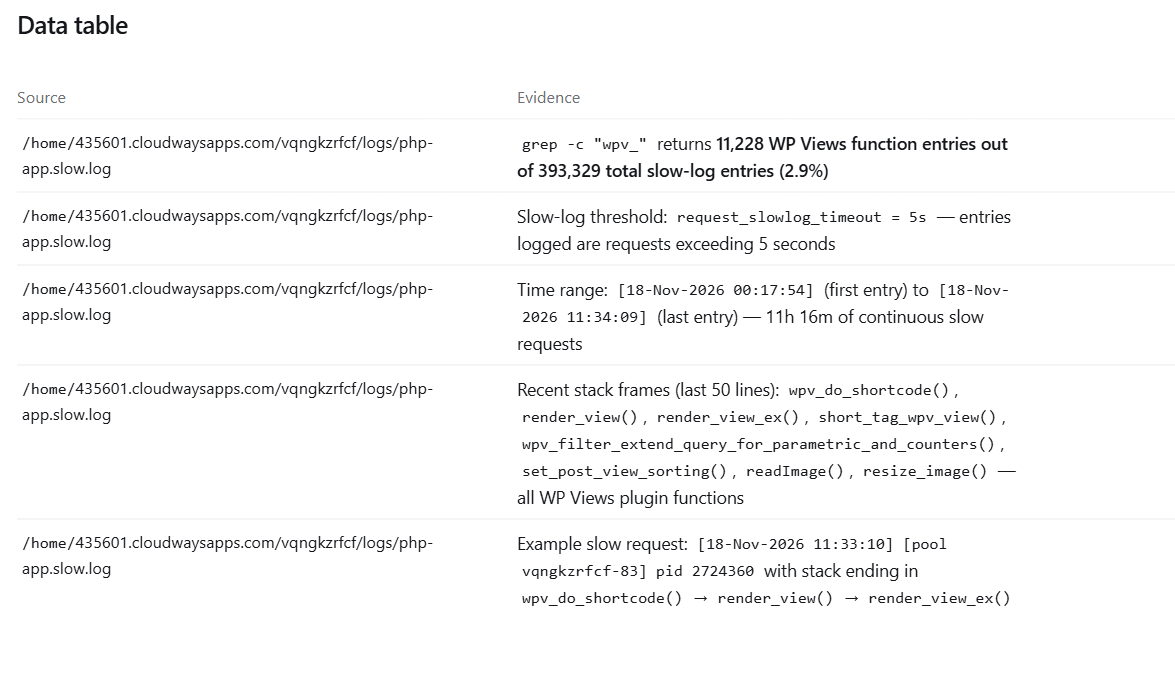
The sustained high CPU is caused by the Views plugin, which is performing expensive image resizing and complex query filtering on every search and filter page request.
attached you can find the slow requests
Hello,
Thank you for the report. To look into this, I need a few details.
Please provide:
1. Your WordPress version, PHP version, and the exact Views (or Toolset Blocks) plugin version.
2. Your active theme.
3. The URL of one page where you see the high CPU usage, or a staging/test copy of the site we can access.
4. Whether the high CPU happens on specific pages (search or filter pages) or across the whole site.
Please also follow these steps to rule out a conflict with another plugin or the theme:
1. Take a full backup, or use a staging copy of the site.
2. Switch to a default theme, such as Twenty Twenty-Five.
3. Deactivate all plugins except the Toolset plugins you need for this View.
4. Test again and check the CPU usage.
5. If the issue stops, reactivate the theme and the plugins one at a time, testing after each one, until the issue returns.
Finally, you should make sure that you have the latest version of Toolset plugins:
https://toolset.com/account/downloads/
Thanks.