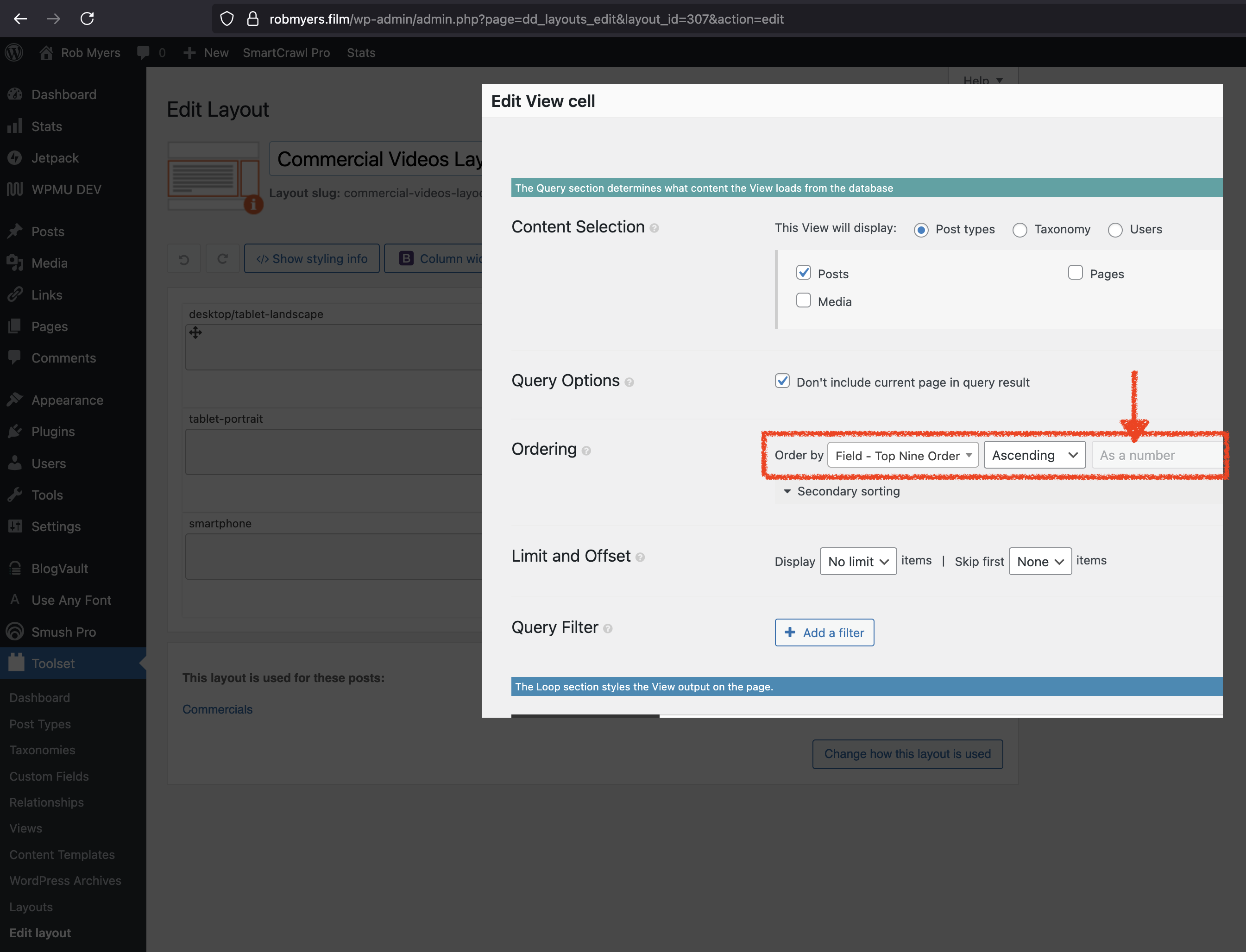
This thread is resolved. Here is a description of the problem and solution.
Problem:
On a legacy Toolset site using Layouts + Views, several Views were ordered by a custom number field. Recently, posts stopped displaying in the expected numeric order. In the View editor, the “As a number” ordering option appeared greyed out. Disabling all non-Toolset plugins did not resolve the issue, indicating a Toolset-side regression or incompatibility.
Solution:
The numeric ordering was enforced programmatically using the wpv_filter_query hook. A custom PHP snippet was added via Toolset → Settings → Custom Code to explicitly set meta_key and meta_value_num ordering.
Because multiple Views were affected, the code was adapted to apply to a list of specific View IDs, restoring correct numeric sorting across all impacted Views.
Relevant Documentation:
https://toolset.com/forums/topic/order-view-by-post-title-then-by-custom-toolset-field/
https://toolset.com/forums/topic/sorting-is-not-working-properly/
This is the technical support forum for Toolset - a suite of plugins for developing WordPress sites without writing PHP.
Everyone can read this forum, but only Toolset clients can post in it. Toolset support works 6 days per week, 19 hours per day.
This topic contains 1 reply, has 1 voice.
Last updated by 2 months, 1 week ago.
Assisted by: Christopher Amirian.