Skip Navigation

[Assigned] Opening Results taxonomy archive not rendering posts in Toolset WP Archive

This is the technical support forum for Toolset - a suite of plugins for developing WordPress sites without writing PHP.

Everyone can read this forum, but only Toolset clients can post in it. Toolset support works 6 days per week, 19 hours per day.

Sun Mon Tue Wed Thu Fri Sat
- 10:00 – 13:00 10:00 – 13:00 10:00 – 13:00 10:00 – 13:00 10:00 – 13:00 -
- 14:00 – 18:00 14:00 – 18:00 14:00 – 18:00 14:00 – 18:00 14:00 – 18:00 -

Supporter timezone: Asia/Kolkata (GMT+05:30)

This topic contains 18 replies, has 1 voice.

Last updated by tafadzwaK-2 8 hours, 32 minutes ago.

Assisted by: Minesh.

Author
Posts
#2856761
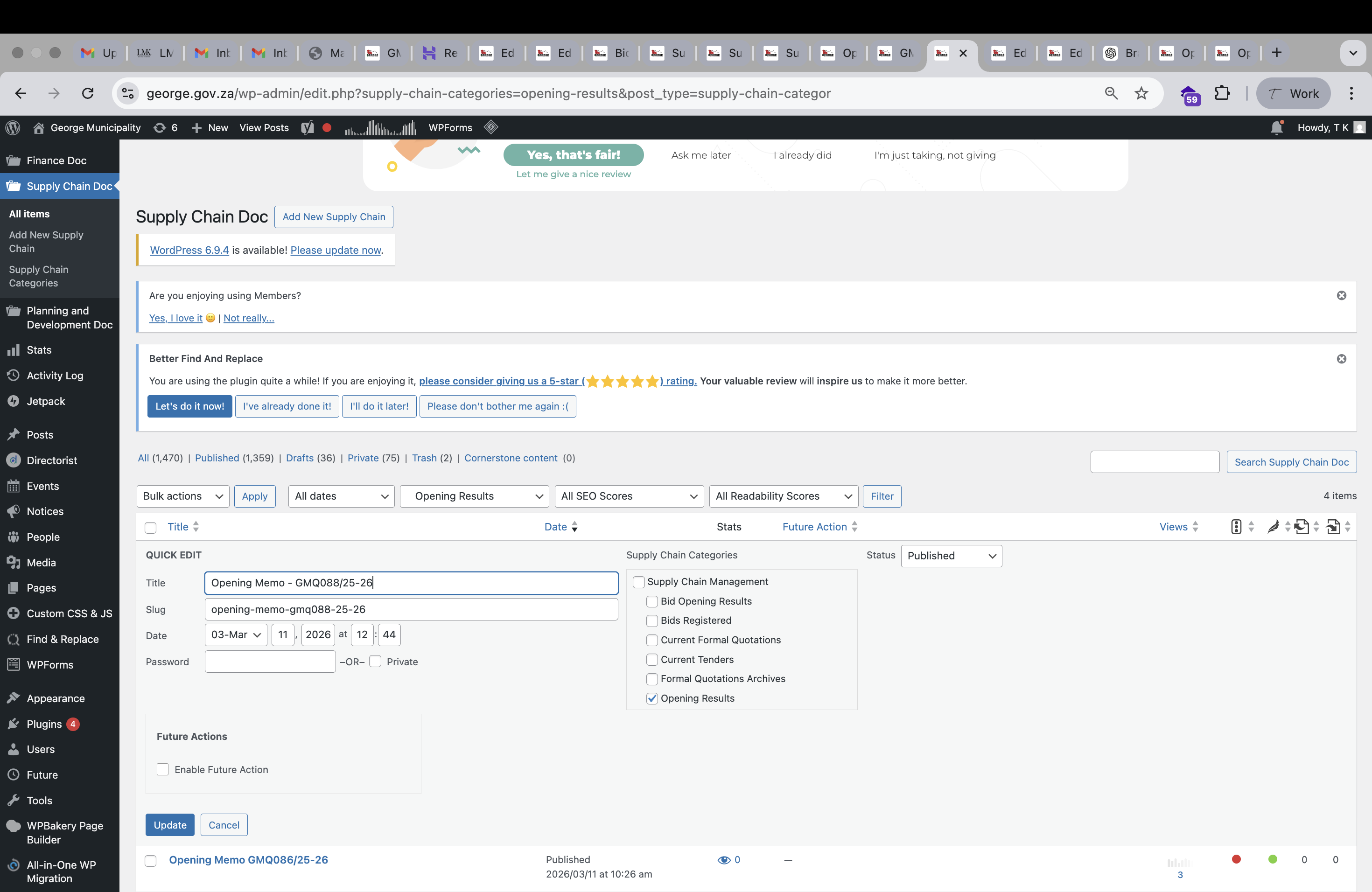
Screenshot 2026-04-15 at 16.32.05.png

I am trying to:

get PDFs to display on this page: hidden link

I expected to see: PDFs like this hidden link

Instead, I got: no results - hidden link

#2856901

Minesh
Supporter

Languages: English (English )

Timezone: Asia/Kolkata (GMT+05:30)

Hello. Thank you for contacting the Toolset support.

Can you please check by switching the theme to twentytwenty-two and see if you able to see the archive results as expected.

As I understand, you build a taxonomy archive and you want to display the posts belongs to that taxonomy for which you are displaying the taxonomy archive. If this is correct:

*** Please make a FULL BACKUP of your database and website.***
I would also eventually need to request temporary access (WP-Admin and FTP) to your site. Preferably to a test site where the problem has been replicated if possible in order to be of better help and check if some configurations might need to be changed.

I have set the next reply to private which means only you and I have access to it.

#2857191

Minesh
Supporter

Languages: English (English )

Timezone: Asia/Kolkata (GMT+05:30)

I checked and found that the follwoing archive is assinged to display multipe post types and taxonomies:
- hidden link

I've to disable the plugin "Disable Gutenberg" as it was conflicting the edit archive page in admin.

Now, what if you try to create a new archive and assign it to your desired taxonomy in this case "supply-chain-categories" taxnomy and add your buttons to download the PDF.

It will allow you to manage the archive efficiently for specific post type/taxonomy.

#2857205

Hi Minesh, thank you for your quick response and assistance so far. Is there a way to keep the current archive in place for now while ensuring the Supply Chain Opening Results display correctly? I can see that they are now appearing here, but for some reason each item is showing twice as a duplicate entry: hidden link

#2857207

Also noticed an unusual space between the pdf's: hidden link compared to the live website: hidden link

#2857530

Minesh
Supporter

Languages: English (English )

Timezone: Asia/Kolkata (GMT+05:30)

I try to access the staging site you shared before but I could not able to access it.

Can you please do needful in order to make the staging site accessible.

I have set the next reply to private which means only you and I have access to it.

#2857700

Hi Minesh, the staging website is ready. Same credentials. Thank you

#2857707

Minesh
Supporter

Languages: English (English )

Timezone: Asia/Kolkata (GMT+05:30)

I checked again and again I just disabled the plugin "Disable Gutenberg" as it was conflicting the edit archive page in admin.

What if you try to build a brand new archive and check if that works.

#2857708

Hi Minesh. Would it be possible to keep the current archive in place for now while ensuring that the Supply Chain Opening Results display correctly?

#2857710

Minesh
Supporter

Languages: English (English )

Timezone: Asia/Kolkata (GMT+05:30)

The thing is that you added the conditional block and within conditoinal block you added the following multiple conditoins:

  ( ( has_term('financial-reports', 'george-doc-categories', null) eq '1' ) OR ( has_term('integrated-development-plan', 'george-doc-categories', null) eq '1' ) OR ( has_term('sdbip', 'george-doc-categories', null) eq '1' ) OR ( has_term('spacial-development-framework', 'george-doc-categories', null) eq '1' ) OR ( has_term('tarrifs-fees-and-fines', 'george-doc-categories', null) eq '1' ) OR ( has_term('annual-reports', 'george-doc-categories', null) eq '1' ) OR ( has_term('access-to-information', 'george-doc-categories', null) eq '1' ) OR ( has_term('contracts', 'george-doc-categories', null) eq '1' ) OR ( has_term('current-tenders-supply-chain-management', 'george-doc-categories', null) eq '1' ) OR ( has_term('other-publications', 'george-doc-categories', null) eq '1' ) OR ( has_term('bylaws-and-regulations', 'george-doc-categories', null) eq '1' ) OR ( has_term('council', 'george-doc-categories', null) eq '1' ) OR ( has_term('performance-management', 'george-doc-categories', null) eq '1' ) OR ( has_term('public-notices', 'planning-and-development-cat', null) eq '1' ) OR ( has_term('spacial-development-framework-planning', 'planning-and-development-cat', null) eq '1' ) OR ( has_term('bursaries-archives', 'hr-doc-categories', null) eq '1' ) OR ( has_term('public-notices', 'finance-cat', null) eq '1' ) OR ( has_term('fees-and-fines', 'finance-cat', null) eq '1' ) OR ( has_term('budget', 'finance-cat', null) eq '1' ) OR ( has_term('financial-reports-cat', 'finance-cat', null) eq '1' ) OR ( has_term('section-71-reports-2', 'finance-cat', null) eq '1' ) OR ( has_term('annual-financial-statements', 'finance-cat', null) eq '1' ) OR ( has_term('2018-2019-archives', 'finance-cat', null) eq '1' ) OR ( has_term('long-term-loan-contracts', 'george-doc-categories', null) eq '1' ) OR ( has_term('media-documents', 'george-doc-categories', null) eq '1' ) OR ( has_term('land-use-applications', 'planning-and-development-cat', null) eq '1' ) OR ( has_term('quarterly-printed-newspapers-media-documents-2', 'george-doc-categories', null) eq '1' ) OR ( has_term('finance-policies', 'george-doc-categories', null) eq '1' ) OR ( has_term('supply-chain-management', 'george-doc-categories', null) eq '1' ) OR ( has_term('public-notices', 'george-doc-categories', null) eq '1' ) OR ( has_term('municipal', 'george-doc-categories', null) eq '1' ) OR ( has_term('community-services-policies-strategies-plans-and-guidelines-2', 'george-doc-categories', null) eq '1' ) OR ( has_term('policies-strategies-plans-and-guidelines', 'george-doc-categories', null) eq '1' ) OR ( has_term('civil-engineering-services-plans-and-guidelines-2', 'george-doc-categories', null) eq '1' ) OR ( has_term('municipal-manager', 'george-doc-categories', null) eq '1' ) OR ( has_term('civil-engineering-services', 'george-doc-categories', null) eq '1' ) OR ( has_term('general-policies', 'george-doc-categories', null) eq '1' ) OR ( has_term('service-level-agreements', 'finance-cat', null) eq '1' ) OR ( has_term('long-loan-term-contracts', 'finance-cat', null) eq '1' ) ) 

But to check a term against taxonomy - the new method is you need to use the CONTAINS():

  ( CONTAINS( #(george-doc-categories), 'opening-results' ) OR CONTAINS( #(george-doc-categories), 'financial-reports' ) ) 

I see there are four conditional blocks added within the archive:
- hidden link

Can you tell me what conditoinal block you want to applly for the "opening-results" term?

#2857711
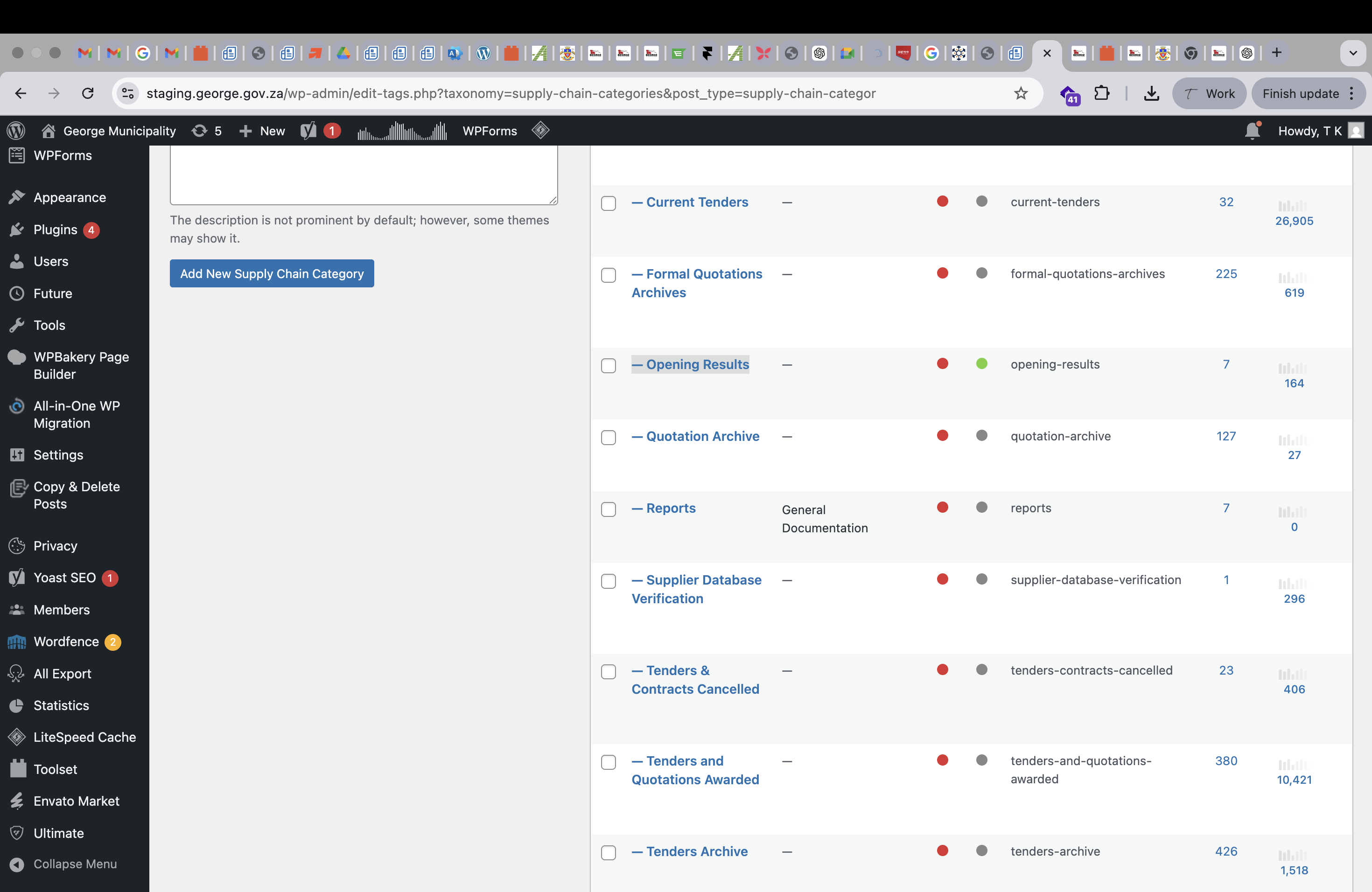
Screenshot 2026-04-21 at 14.29.40.png

we need PDFs in this category to be displayed: hidden link so users can view / download the PDFs

#2857840

Minesh
Supporter

Languages: English (English )

Timezone: Asia/Kolkata (GMT+05:30)

Can you please check now: hidden link

With your current archive - I've added the shortcode block and added the following code to it:
=> hidden link

[wpv-conditional if="( '[wpv-taxonomy-archive info='slug']' eq 'opening-results' )"]
 <div style="display: block; background: #f5f5f5; padding: 5px 10px;">
                <div style="display: inline-block; width: 80%;"><em><u>hidden link</u></em></div>
                <div style="display: inline-block;"><em><u>hidden link</u></em></div>
              </div>       

[/wpv-conditional]
#2857860

Hi Minesh,

Thank you so much for this, great progress. I did notice, however, that we’re still unable to open the PDFs on this page: hidden link the target just opens the same page in a new window

#2857942

Minesh
Supporter

Languages: English (English )

Timezone: Asia/Kolkata (GMT+05:30)

Can you please check now: hidden link

I've adjusted the code added to your achive as given under:
=> hidden link

[wpv-conditional if="( '[wpv-taxonomy-archive info='slug']' eq 'opening-results' )"]

 <div style="display: block; background: #f5f5f5; padding: 5px 10px;">
                <div style="display: inline-block; width: 80%;"><em><u>hidden link</u></em></div>
                <div style="display: inline-block;"><em><u>hidden link</u></em></div>
              </div>       

[/wpv-conditional]
#2857945

Thank you so much for this. Can i simply copy all the code from hidden link to the live hidden link ?