Skip Navigation

[Resolved] Need help with toolset and especially with front end views

This support ticket is created 2 years, 9 months ago. There's a good chance that you are reading advice that it now obsolete.

This is the technical support forum for Toolset - a suite of plugins for developing WordPress sites without writing PHP.

Everyone can read this forum, but only Toolset clients can post in it. Toolset support works 6 days per week, 19 hours per day.

Sun Mon Tue Wed Thu Fri Sat
- 10:00 – 13:00 10:00 – 13:00 10:00 – 13:00 10:00 – 13:00 10:00 – 13:00 -
- 14:00 – 18:00 14:00 – 18:00 14:00 – 18:00 14:00 – 18:00 14:00 – 18:00 -

Supporter timezone: Asia/Kolkata (GMT+05:30)

This topic contains 3 replies, has 2 voices.

Last updated by Minesh 2 years, 9 months ago.

Assisted by: Minesh.

Author
Posts
#2613407
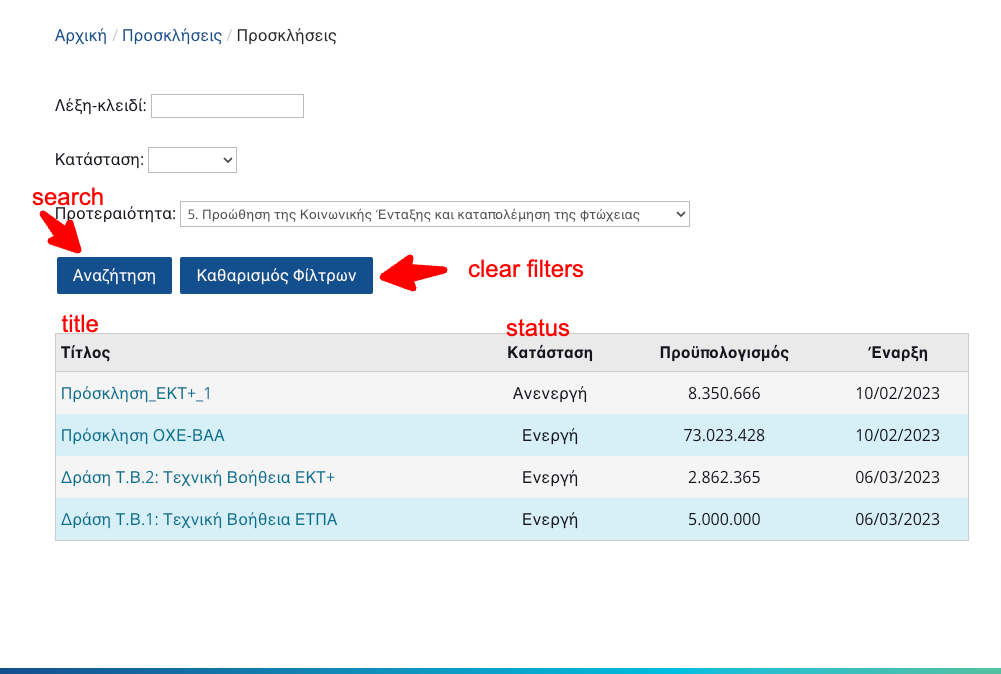
image-1.png

Hi, I write to you not to report an issue but to ask for help.

I want to create a page like this in attached image-1.
Users in the front end adding in a search form keywords, select status, and priority, and when they click on search the results display in a table like that in image-1.

I created custom types, custom fields for each custom type, and relationships.

1. I would like to send me links to understand how to create these views in front end.

and
2. How the backend users add data in each custom type.
I need to create this view immediately because I have a deadline.

I'm new in toolset and try to create it studying your documentation (very detailed), but in this moment I have not many time.
So should you please help me understand the philosophy by sending me specific links to follow the steps to create the image-1 front page?

Website: pepionia.valueplusis.com

Thank you in advance

#2613455

Minesh
Supporter

Languages: English (English )

Timezone: Asia/Kolkata (GMT+05:30)

Hello. Thank you for contacting the Toolset support.

You can create view in either using view block or using classic view.

If you have Toolset Blocks plugin installed, the setting to enable the classic view you have to follow the steps given with the following doc:
=> https://toolset.com/course-lesson/enabling-legacy-version-of-toolset-views/

Now, having set that you will be able to create view using block or using classic views. Its your choice now.

To know how you can create custom post types, custom fields, taxonomies etc..etc.., I suggest please follow the following course:
=> https://toolset.com/course/custom-types-in-wordpress/

Now, to create custom search using view block, please check the following Doc:
=> https://toolset.com/course-lesson/creating-a-custom-search/

If you prefer to use classic views, you should try to follow the following doc:
=> https://toolset.com/documentation/legacy-features/views-plugin/front-page-filters/

You can take any of the course and follow accordingly:
=> https://toolset.com/course/

#2613573
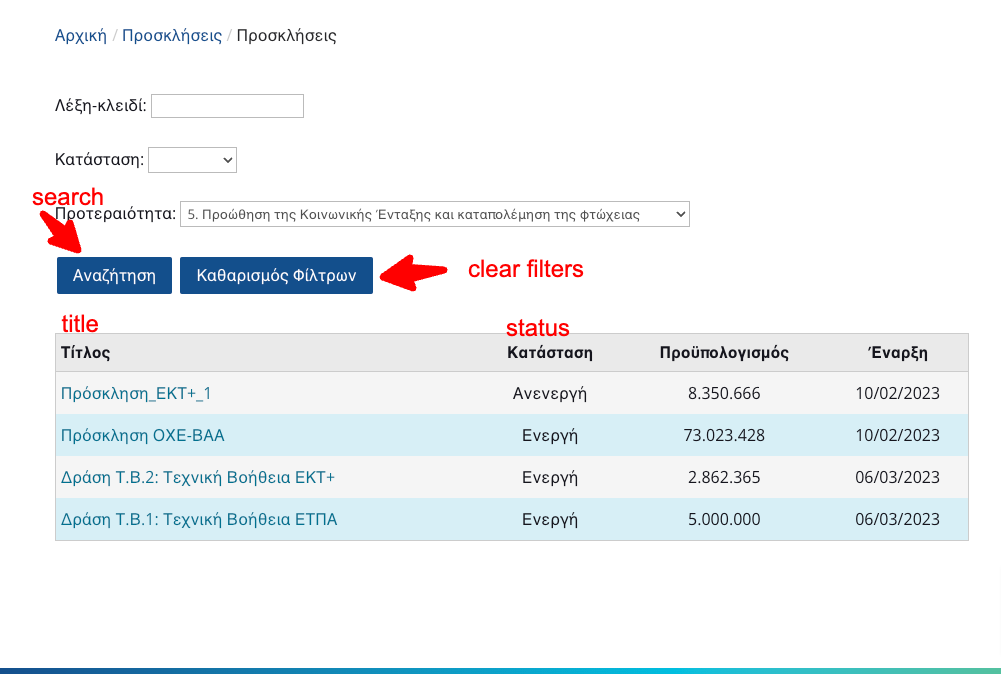
image-1.png

Hi,
Could you please tell me the steps or send me the link of documentation on how i will create search form using toolset and display the search results in a table below the form in the same page.
Like the attached image.
thank you

#2613665

Minesh
Supporter

Languages: English (English )

Timezone: Asia/Kolkata (GMT+05:30)

As you want some customization I suggest you go for classic views. I already send you the link for that:
- https://toolset.com/documentation/legacy-features/views-plugin/front-page-filters/

Here is the doc about how you can build table based output for your view:
- https://toolset.com/documentation/legacy-features/views-plugin/view-layouts-101/#table

You can see all the docs related to classic views here:
- https://toolset.com/documentation/legacy-features/views-plugin/