Skip Navigation

[Resolved] Make a conditional output in Views that only shows items based on checkbox state

This thread is resolved. Here is a description of the problem and solution.

Problem:
A Toolset View conditional failed to display pages based on whether a specific option in a checkbox group was unchecked.

Solution:
Wrap the Types shortcode in single quotes inside the wpv-conditional expression so its returned value evaluates correctly. Alternatively, wrap the output with the Types shortcode using option='3' state='unchecked', noting that this only hides results and does not exclude them from View counts or pagination.

Relevant Documentation:
https://toolset.com/documentation/customizing-sites-using-php/functions/#checkboxes

This is the technical support forum for Toolset - a suite of plugins for developing WordPress sites without writing PHP.

Everyone can read this forum, but only Toolset clients can post in it. Toolset support works 6 days per week, 19 hours per day.

This topic contains 1 reply, has 1 voice.

Last updated by nevilP 3 days, 6 hours ago.

Assisted by: Christopher Amirian.

Author
Posts
#2877668
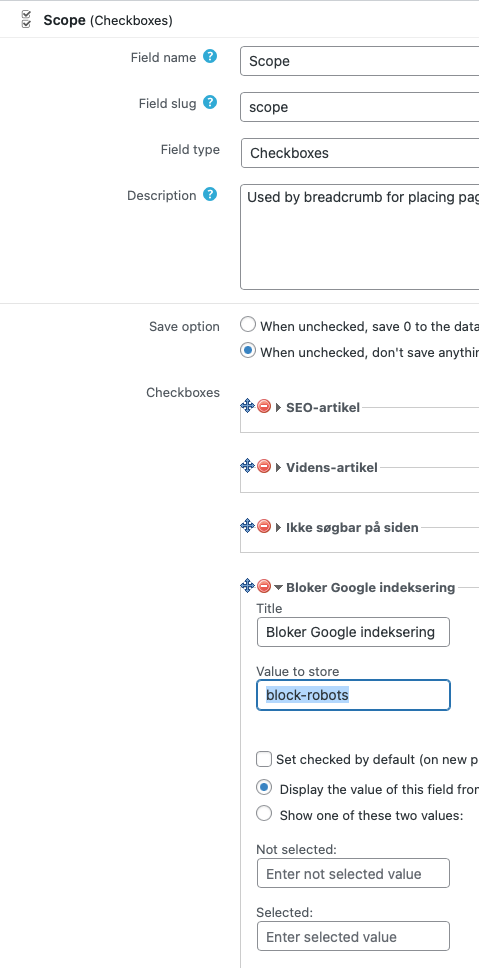
Checkbox-group.png

I'm using WP Views to make a page list and need to only list pages that has a specific checkbox checked within a checkbox group.
Here is the code, that I would expect to work, but nothing is shown:

[wpv-conditional if="([types field='scope' option='3'][/types] ne 'block-robots')"]
	<li><em><u>hidden link</u></em></li>
[/wpv-conditional]

See attached image to see the checkbox group definition.
Thanks in advance 🙂

#2877679

Christopher Amirian
Supporter

Languages: English (English )

Hi,

Welcome to Toolset support.

I suggest that you wrap the Types shortcode in single quotes inside the condition — without them it never evaluates:

[wpv-conditional if="( '[types field='scope' option='3'][/types]' ne 'block-robots' )"]
    <li><em><u>hidden link</u></em></li>
[/wpv-conditional]

For further reading:
https://toolset.com/documentation/customizing-sites-using-php/functions/#checkboxes

Also, maybe this would be a simpler way:

[types field='scope' option='3' state='unchecked']<li><em><u>hidden link</u></em></li>[/types]

Note this hides items in the output only; the View still queries them, so found counts and pagination include them.

Thanks.

#2877691

Thanks – now it works 🙂