Skip Navigation

[Waiting for user confirmation] Fields and Text block broken (after permalink rename)

This is the technical support forum for Toolset - a suite of plugins for developing WordPress sites without writing PHP.

Everyone can read this forum, but only Toolset clients can post in it. Toolset support works 6 days per week, 19 hours per day.

Sun Mon Tue Wed Thu Fri Sat
- 10:00 – 13:00 10:00 – 13:00 10:00 – 13:00 10:00 – 13:00 10:00 – 13:00 -
- 14:00 – 18:00 14:00 – 18:00 14:00 – 18:00 14:00 – 18:00 14:00 – 18:00 -

Supporter timezone: Asia/Kolkata (GMT+05:30)

This topic contains 13 replies, has 1 voice.

Last updated by Minesh 5 days, 23 hours ago.

Assisted by: Minesh.

Author
Posts
#2855527
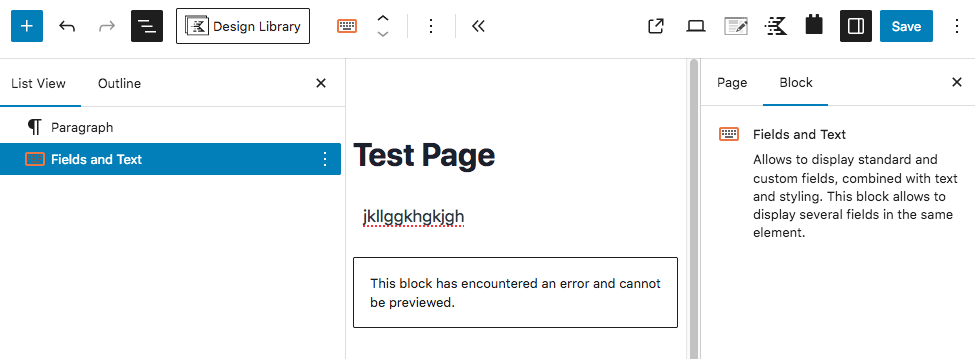
Screen Shot 2026-04-07 at 12.31.12 PM.png

Tell us what you are trying to do? Add a Fields and Text block.

What is the link to your site? hidden link

After Toolset support renamed one of my CPT slugs, (https://toolset.com/forums/topic/going-to-settings-permalinks-results-in-a-fatal-error/page/2/) I can no longer add a Fields and Text block, and I can no longer edit existing Fields and Text blocks. I can't even view the HTML of the block (see attached image).

One of my content templates depends on this block. Solution provided by Minesh here:
https://toolset.com/forums/topic/output-cf-image-on-archive-page/

Prior to the slug re-naming, everything was working properly.

#2855656

Minesh
Supporter

Languages: English (English )

Timezone: Asia/Kolkata (GMT+05:30)

Hello. Thank you for contacting the Toolset support.

Can you please share problem URL and admin access details.

*** Please make a FULL BACKUP of your database and website.***
I would also eventually need to request temporary access (WP-Admin and FTP) to your site. Preferably to a test site where the problem has been replicated if possible in order to be of better help and check if some configurations might need to be changed.

I have set the next reply to private which means only you and I have access to it.

#2855797

Minesh
Supporter

Languages: English (English )

Timezone: Asia/Kolkata (GMT+05:30)

I can see the issue and that is strange.

I need duplicator copy of your site.
=> https://toolset.com/faq/provide-supporters-copy-site/

I have set the next reply to private which means only you and I have access to it.

#2855817

Minesh, the site is too big for a Duplicator backup (2.93GB).
I tried doing that for the previous ticket.

#2855896

Minesh
Supporter

Languages: English (English )

Timezone: Asia/Kolkata (GMT+05:30)

Well - you should try to exlcude the images and cache when you build your duplicator package.

- Start a New Package: Navigate to Duplicator > Packages in your WordPress dashboard and click Create New.
- Access Archive Settings: Expand the Archive section on the setup screen.
- Enable Filters: Check the box for Enable File Filters.
- Add Exclusions:
Automated Shortcut: To the right of the "Directories" field, look for blue hyperlinks labeled wp-uploads and wp-cache. Clicking these will automatically add the correct paths to your filter list.

- Confirm and Build: Scroll down and click Next to run the system scan. Once the scan finishes, click Build to generate your filtered backup.

#2856558

Is there any update on this?

#2857035

Still waiting for an update.

#2857176

Minesh
Supporter

Languages: English (English )

Timezone: Asia/Kolkata (GMT+05:30)

I checked and I found that - when I correctly hosted the site and htaccess is correct. I do not see any issues.

Can you please tell me where within what folder your WordPress site is hosted as well as what do you see with the htaccess file you have?

#2857214

Site is in public_html/dk/ - (this is the subdomain web root.)
Wordpress is in subfolder /wp/

I have several subdomains ALL using my same standard htaccess file.

I restored the database from before your "fix", and the block works, but the permalinks cause fatal errors.
Restoring the database from after the fix, and the Fields and Text block is broken.
Why would htaccess ONLY affect ONE Toolset block? NO other blocks are affected.

#2857540

Minesh
Supporter

Languages: English (English )

Timezone: Asia/Kolkata (GMT+05:30)

I'm not sure. Ok keep using the version before fix and can you please send me this "without fix" version as duplicator or "ALL in one WP Migration" package.
- https://wordpress.org/plugins/all-in-one-wp-migration/

I have set the next reply to private which means only you and I have access to it.

#2858587

Minesh
Supporter

Languages: English (English )

Timezone: Asia/Kolkata (GMT+05:30)

Ok - I've fixed the issue with the "site_working_bak.tgz" you shared which I installed on my local machine.

Can you please share test site wher you should install the "site_working_bak.tgz" and I will aplly the fix and then you can verify that on test site and then once confirmed you should go ahead and apply that on your production site.

I have set the next reply to private which means only you and I have access to it.

#2859793

Minesh
Supporter

Languages: English (English )

Timezone: Asia/Kolkata (GMT+05:30)

What I suggest - you shared duplicator package with me here:
- hidden link

Can you please use this duplicator package and setup a staging site and then I will take it over from there as I need that version of website.

#2859907

Minesh
Supporter

Languages: English (English )

Timezone: Asia/Kolkata (GMT+05:30)

I could not manage to work on the staging site you shared and the staging site you shared is the old staging site. I need brand new staging site where you should intall the duplicator package you created before for me that was the original duplicator package:
- hidden link

However - I've created duplicator package from my local test installation and you can download it but I do not want to share it as public link as I do not have your email (gmail) address.

Currently when I try to access the site its the following link:
- hidden link

If you can send me FTP access details for above site then I will try to install my working copy of the site using FTP and duplicator.

I have set the next reply to private which means only you and I have access to it.

#2859909

Minesh
Supporter

Languages: English (English )

Timezone: Asia/Kolkata (GMT+05:30)

Ok I got the another idea. I have FTP access details you shared previously here:
- https://toolset.com/forums/topic/fields-and-text-block-broken-after-permalink-rename/#post-2855789

I login using that FTP access details and created the "demo" directory and within that directory I've added the duplicator and installer files. You can download it and try to create a new staging site and new database and then try to install the duplicator to new staging site and check and see if you able to see it working.