Hello. Thank you for contacting the Toolset support.
Can you please share problem URL and admin access details.
*** Please make a FULL BACKUP of your database and website.***
I would also eventually need to request temporary access (WP-Admin and FTP) to your site. Preferably to a test site where the problem has been replicated if possible in order to be of better help and check if some configurations might need to be changed.
I have set the next reply to private which means only you and I have access to it.
Well - you should try to exlcude the images and cache when you build your duplicator package.
- Start a New Package: Navigate to Duplicator > Packages in your WordPress dashboard and click Create New.
- Access Archive Settings: Expand the Archive section on the setup screen.
- Enable Filters: Check the box for Enable File Filters.
- Add Exclusions: Automated Shortcut: To the right of the "Directories" field, look for blue hyperlinks labeled wp-uploads and wp-cache. Clicking these will automatically add the correct paths to your filter list.
- Confirm and Build: Scroll down and click Next to run the system scan. Once the scan finishes, click Build to generate your filtered backup.
Site is in public_html/dk/ - (this is the subdomain web root.)
Wordpress is in subfolder /wp/
I have several subdomains ALL using my same standard htaccess file.
I restored the database from before your "fix", and the block works, but the permalinks cause fatal errors.
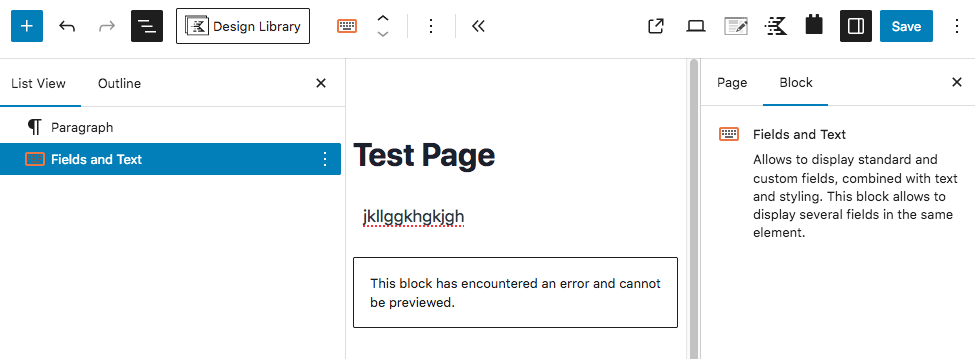
Restoring the database from after the fix, and the Fields and Text block is broken.
Why would htaccess ONLY affect ONE Toolset block? NO other blocks are affected.
Ok - I've fixed the issue with the "site_working_bak.tgz" you shared which I installed on my local machine.
Can you please share test site wher you should install the "site_working_bak.tgz" and I will aplly the fix and then you can verify that on test site and then once confirmed you should go ahead and apply that on your production site.
I have set the next reply to private which means only you and I have access to it.
I could not manage to work on the staging site you shared and the staging site you shared is the old staging site. I need brand new staging site where you should intall the duplicator package you created before for me that was the original duplicator package:
- hidden link
However - I've created duplicator package from my local test installation and you can download it but I do not want to share it as public link as I do not have your email (gmail) address.
Currently when I try to access the site its the following link:
- hidden link
If you can send me FTP access details for above site then I will try to install my working copy of the site using FTP and duplicator.
I have set the next reply to private which means only you and I have access to it.
I login using that FTP access details and created the "demo" directory and within that directory I've added the duplicator and installer files. You can download it and try to create a new staging site and new database and then try to install the duplicator to new staging site and check and see if you able to see it working.