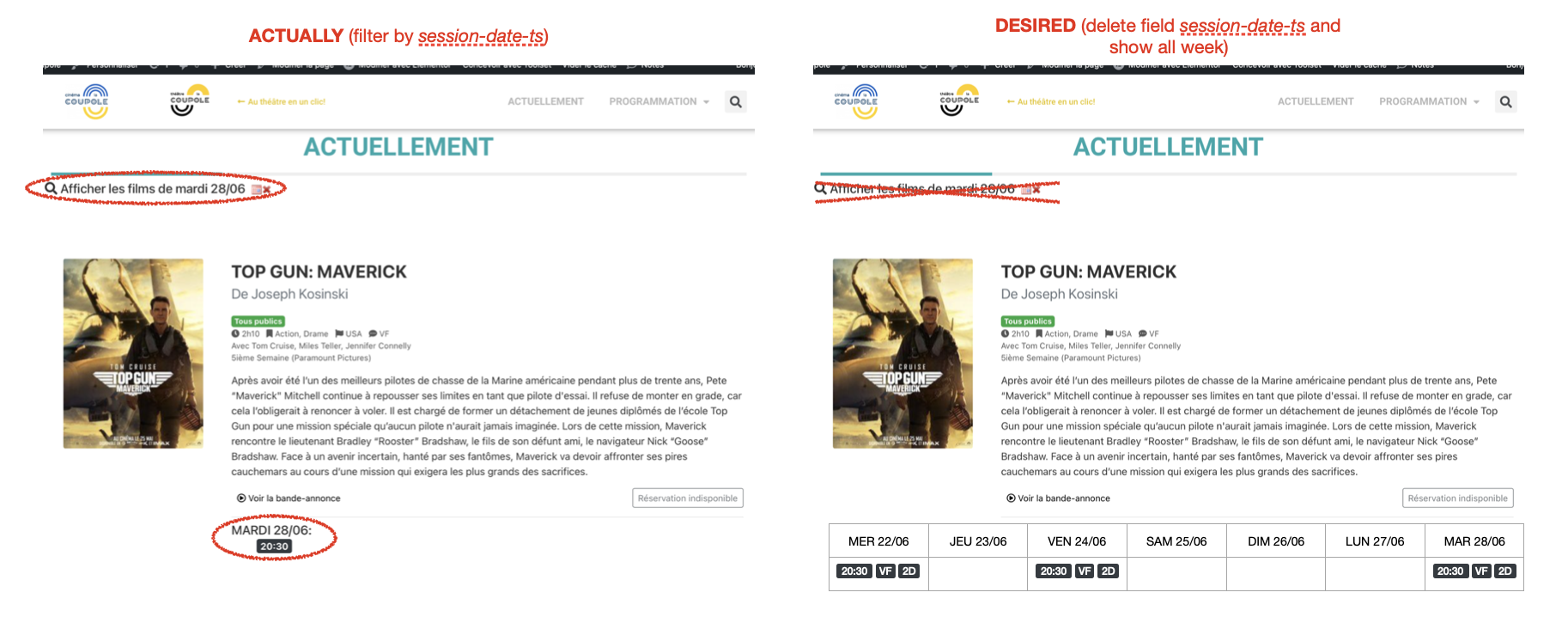
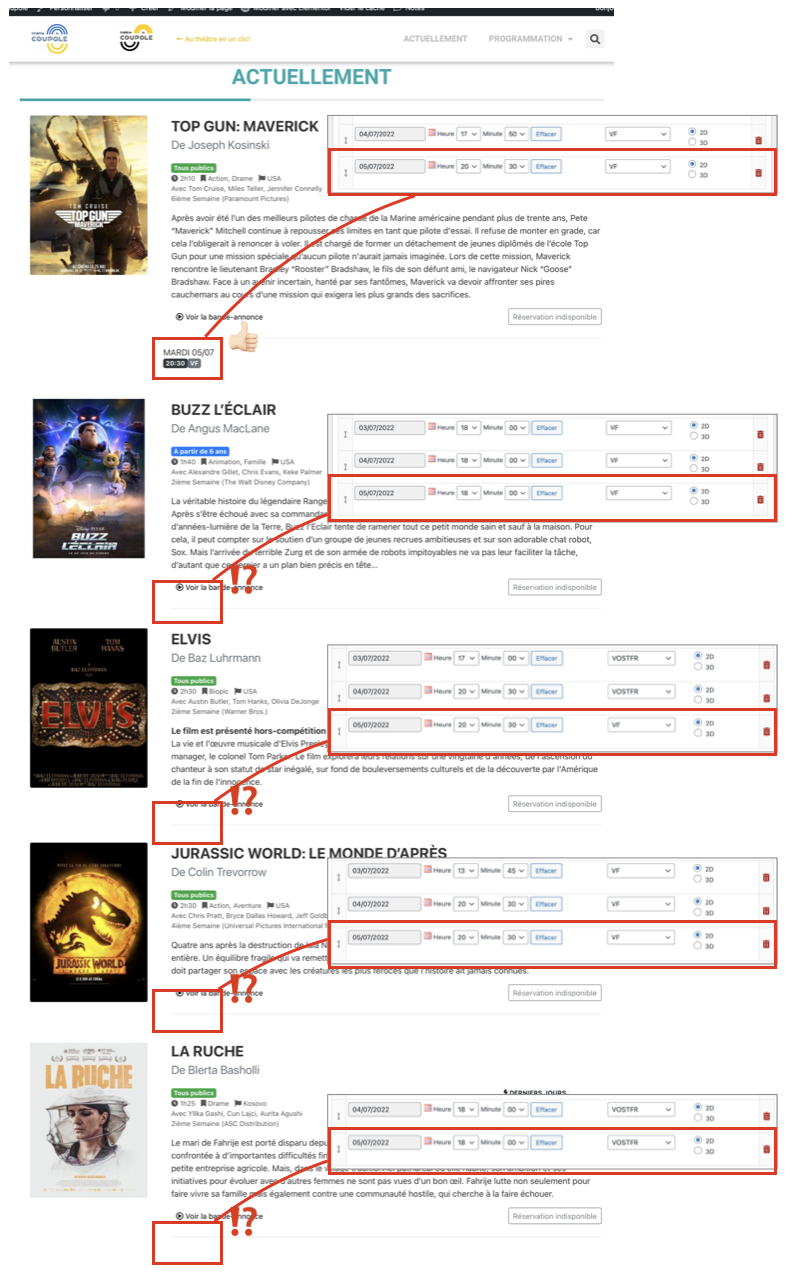
Ok. If I understand correctly, using a group of repeatable fields is not possible due to filtering by date.
And if I choose to display the entire programming week and remove the filter.
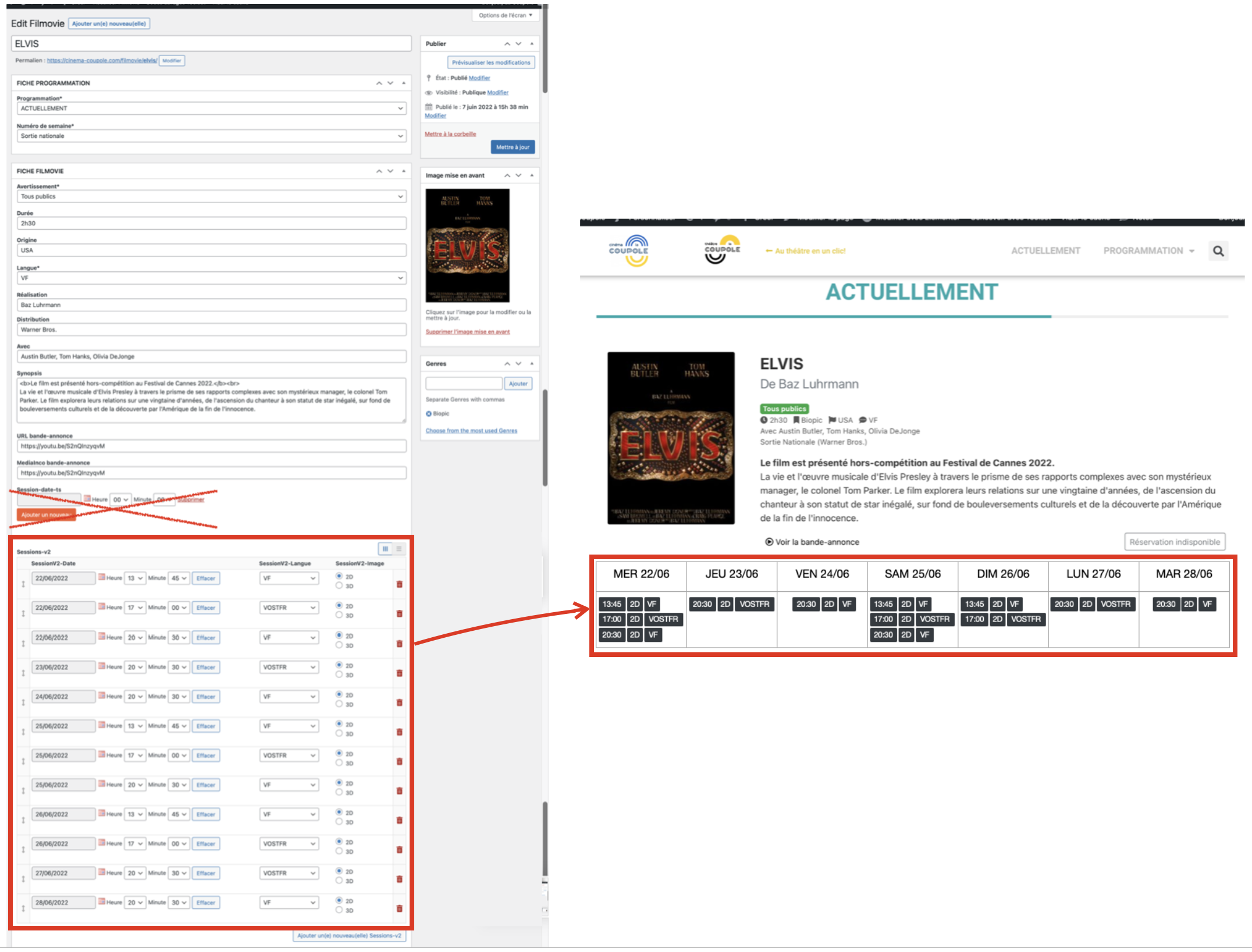
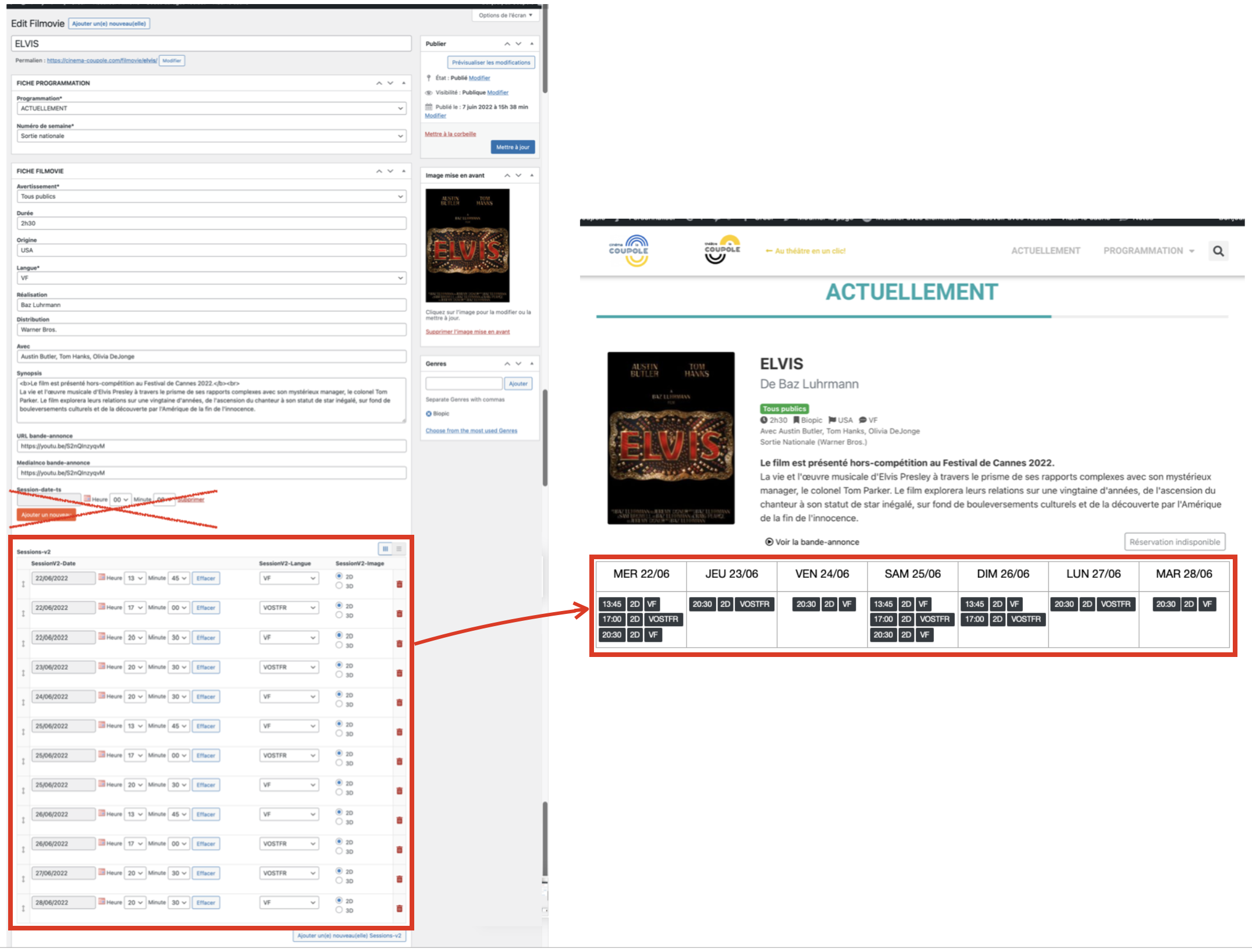
Is it possible to use a group of repeatable fields (as in the picture)?
Yes, you are right:
sing a group of repeatable fields is not possible due to filtering by date.
For the new question:
Is it possible to use a group of repeatable fields (as in the picture)?
No, there isn't such kind built-in feature to group posts by a day value of custom date, it needs custom codes too.
Can this custom code be installed by you?
In reality, here is an image of what would be my ideal.
Do you think this is possible?
Yes, it is possible with custom codes.
To avoid more misunderstandings, please confirm these question first, then I can setup a demo in your website.
Do you want to keep the custom date field "session-date-ts"? do you still need to filter the result by custom date field "session-date-ts"?
In order to filter the results by custom date field, it is required to setup custom date field "session-date-ts" into post type "Filmovies"
For me it is not necessary to keep the 'session-date-ts' field since the session dates and times will be entered in the 'repeatable fields group' ; as in the picture.
It is not necessary to keep the possibility of filtering by date.
On the other hand, I want the sessions to be displayed in chronological order of the calendar (Wednesday, Thursday, Friday, etc.).
Is it possible for you to set up a demo in this style?
Is it also possible that the session time no longer displays after 15 minutes (for example: if the session is at 13:45, the session no longer displays after 14:00)?
Thanks for the confirmation, I am checking it in your website, will update here if find anything
I have done below modifications in your website:
1) Add custom codes "grouped-by-day", with below codes:
//group by day, hide repeated items
add_shortcode('grouped-by-day', 'my_grouped_by_day');

function my_grouped_by_day($atts, $content = '') {
  static $day = null;
  $res = '';
  if ($day != $atts['day']) {
     $day = $atts['day'];
     return $content;
  }
  return $res;
}

// filter the results by day and greater than now() + 15 minutes
add_filter('wpv_filter_query', function($args, $settings, $view_id){
    if($view_id == 5406){
      foreach($args['meta_query'] as $k => $v){
      	if($v['key'] == 'wpcf-sessionv2-date'){
          $start = strtotime("today", $v['value']);
          $end = strtotime("tomorrow", $v['value']);
          $args['meta_query'][$k] = array(
            'key'     => 'wpcf-sessionv2-date',
            'value'   => array( $start, $end ),
            'type'    => 'numeric',
            'compare' => 'BETWEEN',
          );
          break;
        }
      }
      // the session time no longer displays after 15 minutes
      $args['meta_query'][] = array(
        'key'     => 'wpcf-sessionv2-date',
        'value'   => time() + 15 * 60,
        'compare' => '>',
      );
  	}
  	return $args;
}, 10, 3);
2) Create post view "Child session view":
hidden link
It outputs columns by grouped day
You need to customize the outputs with your own CSS classes
3) Create post view "Grandchild session view":
hidden link
It outputs sessions items as rows
You need to customize the outputs with your own CSS classes
4) Edit the post view "myView3-Actuellement":
hidden link
in section "Loop item in myView3", line 49, display the "Child session view" shortcode:
[wpv-view name="child-session-view"]
What extraordinary work!
It matches exactly what I wanted. Thanks!
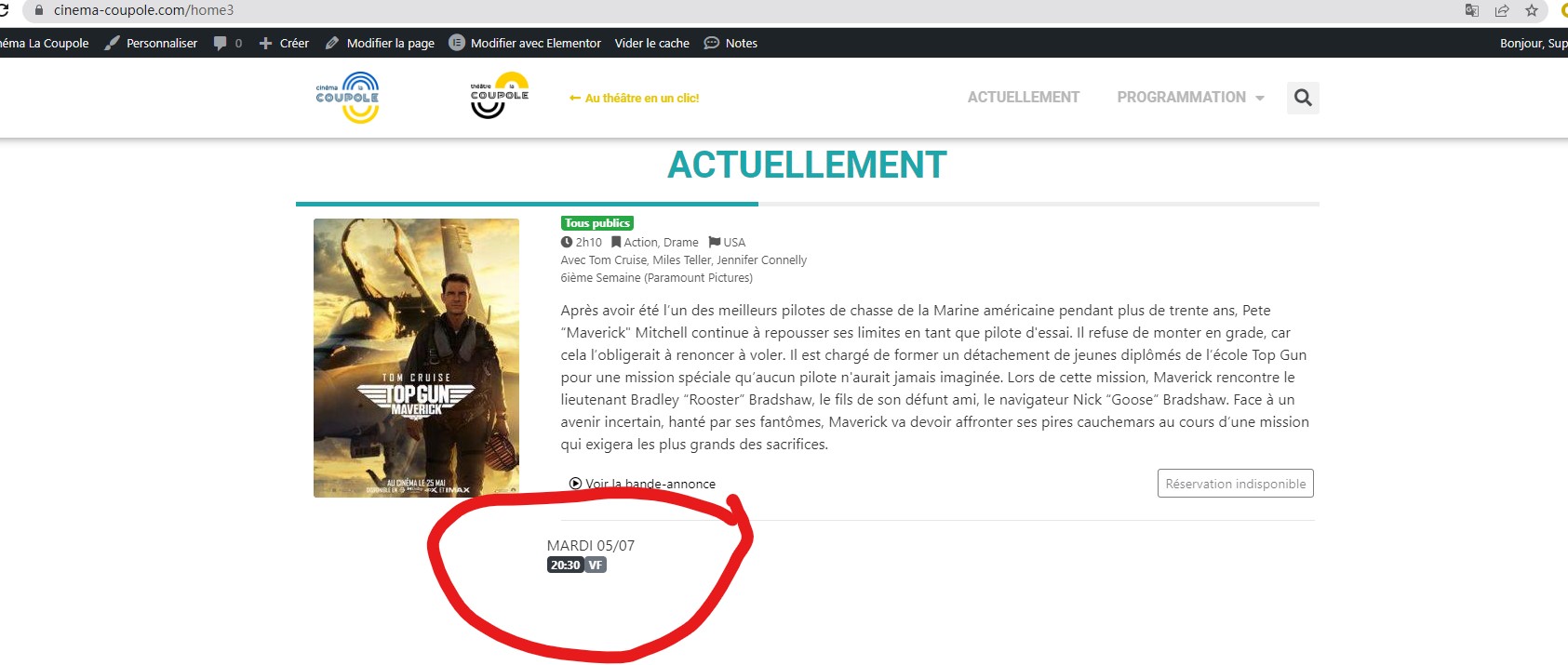
Unfortunately since this Tuesday morning the sessions are no longer displayed... do you know why? =(
On the other hand, is it possible to use your work to display the sessions in a content model?
Please elaborate the new questions with more details:
Unfortunately since this Tuesday morning the sessions are no longer displayed... do you know why?
I have tried it in your website:
hidden link
I can see the sessions are displaying correctly, See my screenshot session1.jpg
Which session does not display? please point out the problem post URL
For the new question:
On the other hand, is it possible to use your work to display the sessions in a content model?
According to our support policy, we don't provide custom codes support, and we prefer one ticket one question, please create new ticket for other new questions.
Thank-you for your prompt response!
Have you seen the other sessions? Only TOP GUN ‘Filmovie’ sessions are displayed.
Thanks for the details, I have done below modifications in your website, edit the custom codes "grouped-by-day", replace lines 10~27 with below:
//group by day, hide repeated items
add_shortcode('grouped-by-day', 'my_grouped_by_day');

function my_grouped_by_day($atts, $content = '') {
  static $day = null;
  static $film_id = null;
  $res = '';
  $new_film_id = do_shortcode('[wpv-post-id item="@sessions-v2.parent"]');
  if($new_film_id != $film_id){
  	$film_id = $new_film_id;
    $day = null;
  }
  if ($day != $atts['day']) {
     $day = $atts['day'];
     $res = $content;
  }
  return $res;
}
It should be able to reset the PHP static variable $day.
Please test again, check if it is fixed.
Great! Everything is working fine and the sessions are showing again. Many thanks!
For the other question (can sessions be displayed on the content model) I will open a new ticket.
I can close this ticket. Thanks again!
My issue is resolved now. Thank you!