Toolset 1.7 is here! This major release centers on Full Site Editing compatibility for Toolset Views and Blocks. Content Templates, Dynamic Sources, View loops, and more now work correctly inside block-based themes, the Site Editor, and Query Loop blocks. This is a complete rewrite of the rendering pipeline, not a surface fix.
Full Site Editing Support for Toolset Views and Blocks
Until now, Toolset Views and Blocks haven’t natively supported Full Site Editing. The previous architecture of how Toolset rendered content simply wasn’t compatible with how FSE themes, the Site Editor, and archive templates work. Rather than patch around it, we rewrote the rendering pipeline from the core. FSE is now fully supported across Toolset Views and Blocks.
Here’s what that means in practice:
Content Templates in Block-Based Themes
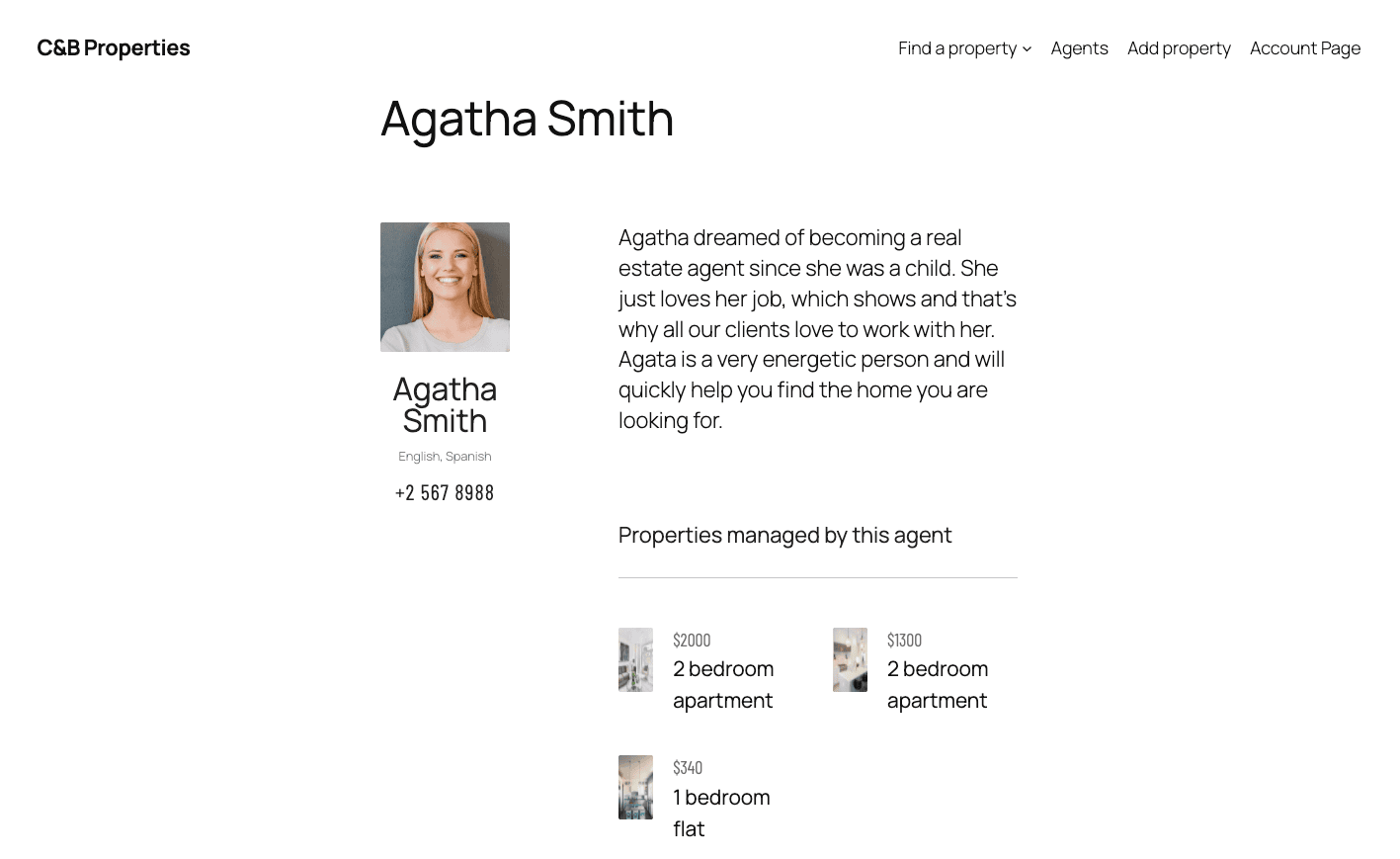
Content Templates now render correctly in block-based themes like Twenty Twenty-Five.
Single post displayed using a Content Template on a site running the Twenty Twenty-Five Theme (FSE)
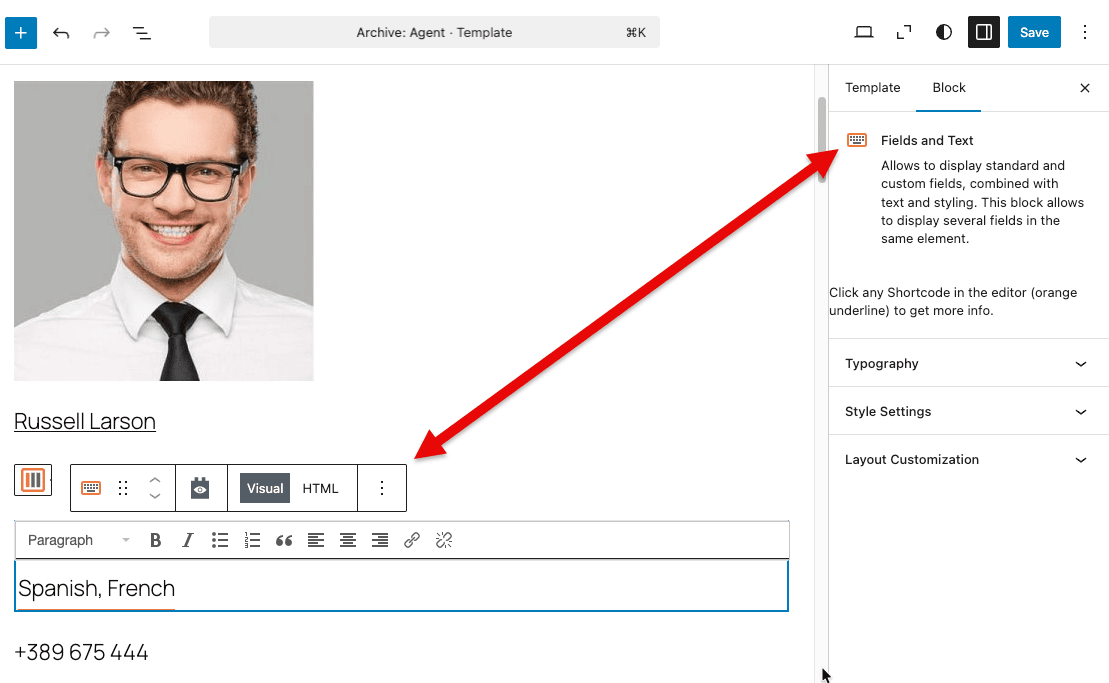
Fields and Text Block in the Site Editor
The TinyMCE toolbar, shortcode preview, and Query Loop context all now work correctly inside the Site Editor.
Toolset “Fields and Text” block now works in WordPress Site Editor (Full Site Editing)
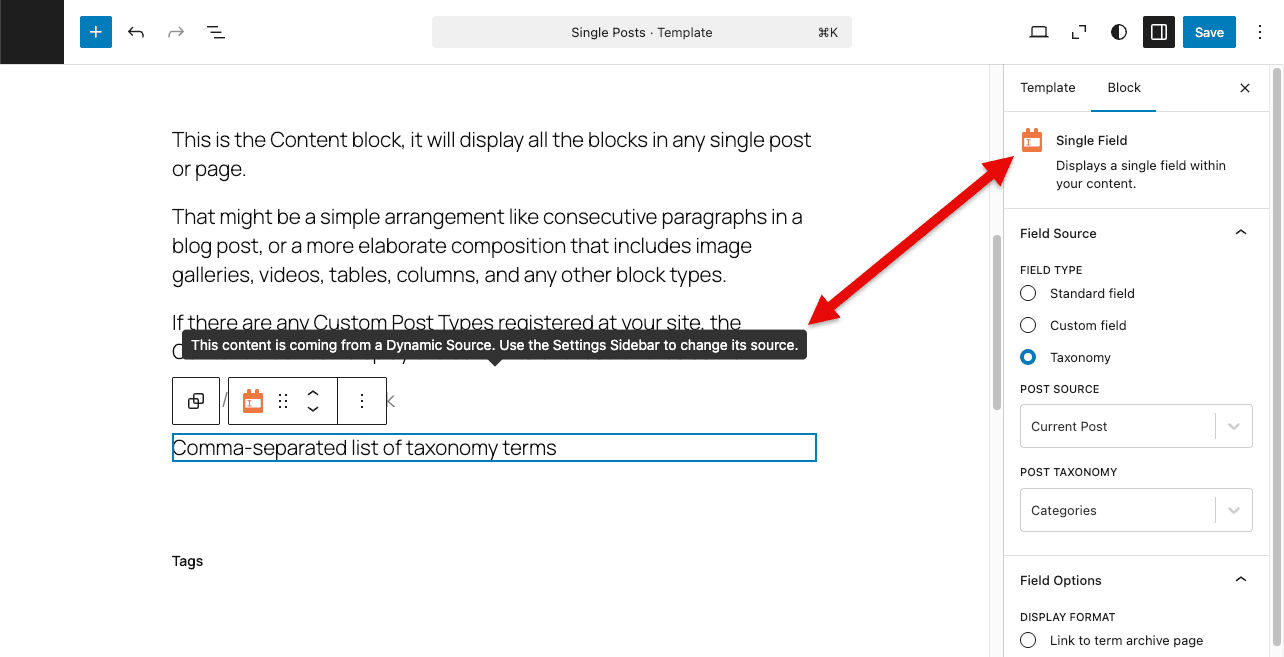
Single Field and Dynamic Sources in FSE Archive and Single Templates
Single Field and Dynamic Sources blocks now correctly resolve post context when used inside FSE archives and single post templates.
Single Field and Dynamic Sources blocks now work correctly inside FSE archives and templates
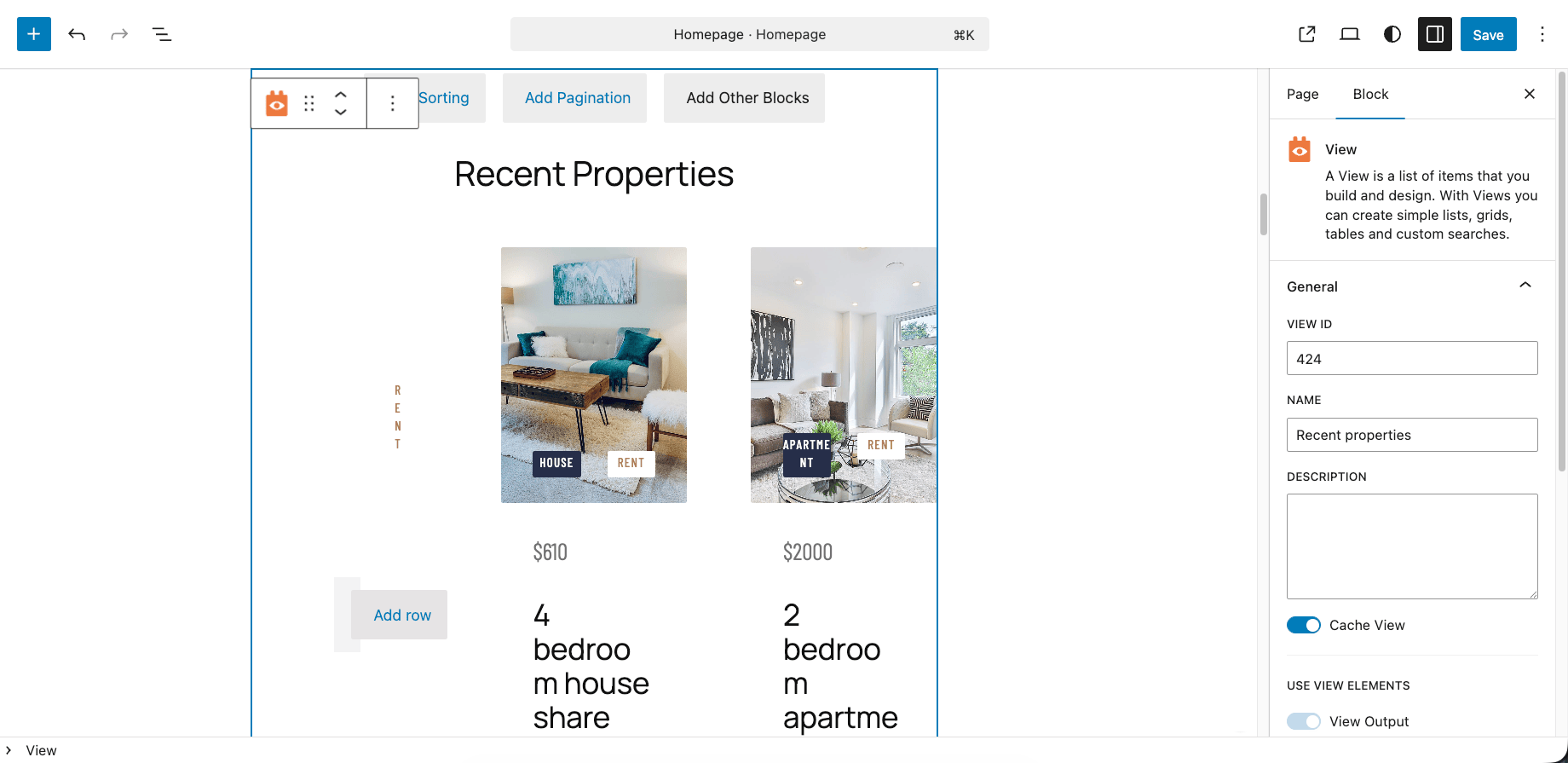
Views Loops in FSE Templates
Views loops now also render correctly in FSE templates.
Toolset Views now display correctly inside Full Site Editing templates
Image Placeholders in FSE Templates
%%tb-image-alt-text%% and %%tb-image-wp-image-class%% now resolve correctly inside FSE templates.
Block CSS in Block Themes
Block styles now load in the correct order in block themes, preventing styles from outputting before the page document begins.
CodeMirror Crash in the Block Editor Is Now Fixed
The initialization crash affecting CodeMirror in the block editor under React 18 StrictMode is resolved.
Maps: Marker Icon Hover Now Working
A long-standing issue with Google Maps marker hover states is fixed in Toolset Maps 2.2.2. Marker icons now change correctly on hover, and focus-on-marker link hover also triggers the icon change as expected.
Other Fixes in This Release
Toolset Views / Blocks
Filter inputs now use unique IDs, preventing duplicate ID issues when the same View appears multiple times on a page (accessibility fix)
WPML button block links now translate as URLs rather than plain text
FSE archive pages: dynamic shortcodes no longer resolve prematurely in archive templates; Showcases archive repeat issue fixed
WPML taxonomy archive: View results now correctly filter by current WPML language
We are rolling out this update gradually, but you can get it right away:
Go to Plugins → Add New Plugin and click the Commercial tab
Click Check for updates
Update your site to the newest Toolset plugins
If you don’t see the update yet, check again later. It can take up to 24 hours to appear on all sites.
Alternatively, log into your Toolset Account page, click Downloads in the left sidebar and then click Download Toolset manually. Finally, download the plugins you need, and manually upload them to your site.
Once you’ve updated, share your thoughts in the comments below:
Are you using block-based themes with Toolset Views or Blocks? We’d love to hear your thoughts in the comments below.
Toolset 1.7 is here! This major release centers on Full Site Editing compatibility for Toolset Views and Blocks. Content Templates, Dynamic Sources, View loops, and more now work correctly inside block-based themes, the Site Editor, and Query Loop blocks. This is a complete rewrite of the rendering pipeline, not a surface fix. Full Site Editing…
Hopefully this is a good solid fix for those using the block based offerings from Toolset. I did notice the issues with the few sites where I used these on sites built several years ago. Hopefully this also the end of that hiatus we experienced several years ago too.
Some other insights. Toolset documentation could do with a clean up, outside all the blocks based coverage. There are a lot of gems mixed into the labyrinth that we must navigate to source solutions to implement functionality programatically in builders like Bricks. My go to, for example, is the php to display child post of à related parent on the parent instance. There are many others too.
And, it would be great to see some polish where Toolset integrates well with Etch. We are not talking complex UI here, just programatically stuff to fit with the back to basics grass roots that integrated development environments that tools like Etch are offering to power users.
I see the full potential of Toolset but always find that is hiding its light under a bushel, especially when it comes to the documentation. A series of sample showcases of using snippets of code in Bricks would do a lot to present the magic.
Hi Stephen! Thank you for your kind words and for taking the time to add these insightful observations. I understand what you mean and will share all of this with the management and development.
Thanks for this update, really looking forward to trying it out.
Finally it’s here … thank you. Indeed we agree and rephrase Stevens comment which is “I see the full potential of Toolset but always find that is hiding its light under a bushel, especially when it comes to the documentation.”
Hopefully this urgent and necessary update will not be delayed any longer and will be released soon.
We do not do Blocks. How will this update affect Legacy Toolset plugin users? How much larger are the Types and Views plugins now?
Thanks!
Jeff (11 years of Toolset)
I’ve been with Toolset a decade.
I am also curious is there any updates to Legacy Views? It’s got some quirks but it’s allowed me to make large scale web applications right in WordPress.
It’s the most powerful plugin in your entire suite (that is, if you know php, js, html & css well).
If there are no updates to it, can you at least indicate if you plan to continue supporting legacy Views?
I do know that many of the old forum posts we used rely on have are gone. And the website documentation centers around GB.
Just wondering if Legacy Views still has a future?
Hi Jay! As I replies to Jeff just now, there are no new features in legacy Views. Is there anything in particular you are missing or is not working correctly?
That being said, we will continue supporting both legacy and block-based Toolset workflows as we have so far.
Hi Jeff! As this release focuses on compatibility with FSE, naturally, most of it relates to block-based workflows. That being said, the Views plugin was updated accordingly and includes some fixes. But there are no new features for the “legacy workflows”. Is there anything in particular you are missing or is not working correctly for you when using the Views plugin and the shortcode-based workflow? I also didn’t understand the question about how much larger Types and Views plugins are now. Larger in what sense? Thank you.
Dario – Thanks for the reply. I am not asking for any new features for legacy Types/Views/Forms; everything works fine as-is. My questions regarding this Blocks compatibility update are:
1. Will the update have any unsatisfactory affect on Legacy plugins?
2. How much larger are the Types and Views plugins file sizes and logic, as they might affect overall speed of the site, especially for legacy usage?
Thanks again,
Jeff
Hi Jeff, sorry for the slow response here. The size of the Toolset plugins hasn’t changed significantly in this release. Also, this update doesn’t have any negative impact on the Legacy plugins and workflows.
Great news! 🎉
This is an update I’m incredibly excited about. Focusing on Full Site Editing (FSE) and Blocks is absolutely the right direction; staying as close to the core WordPress standard as possible is a huge win for performance and future-proofing.
This release also couldn’t have come at a better time for me. I’m currently building a project using an FSE theme (Spectra One) combined with Toolset for the very first time, so I can dive straight into these new features.
Thanks for the hard work, this is going to make the building process so much smoother! 🙌
Please mention in this article about Toolset 1.7 which versions of the plugin are meant (which I had to find out through the forum):
How, if at all, does this impact Divi 5.0 support?
Hi David! There is nothing specific in this release related to Divi 5.0. Are you experiencing any issues and did you create a support ticket for this? If you have, please share it with me and I will check it with the team.



Thanks Dario,
Hopefully this is a good solid fix for those using the block based offerings from Toolset. I did notice the issues with the few sites where I used these on sites built several years ago. Hopefully this also the end of that hiatus we experienced several years ago too.
Some other insights. Toolset documentation could do with a clean up, outside all the blocks based coverage. There are a lot of gems mixed into the labyrinth that we must navigate to source solutions to implement functionality programatically in builders like Bricks. My go to, for example, is the php to display child post of à related parent on the parent instance. There are many others too.
And, it would be great to see some polish where Toolset integrates well with Etch. We are not talking complex UI here, just programatically stuff to fit with the back to basics grass roots that integrated development environments that tools like Etch are offering to power users.
I see the full potential of Toolset but always find that is hiding its light under a bushel, especially when it comes to the documentation. A series of sample showcases of using snippets of code in Bricks would do a lot to present the magic.
Hi Stephen! Thank you for your kind words and for taking the time to add these insightful observations. I understand what you mean and will share all of this with the management and development.
Thanks for this update, really looking forward to trying it out.
Finally it’s here … thank you. Indeed we agree and rephrase Stevens comment which is “I see the full potential of Toolset but always find that is hiding its light under a bushel, especially when it comes to the documentation.”
Hopefully this urgent and necessary update will not be delayed any longer and will be released soon.
We do not do Blocks. How will this update affect Legacy Toolset plugin users? How much larger are the Types and Views plugins now?
Thanks!
Jeff (11 years of Toolset)
I’ve been with Toolset a decade.
I am also curious is there any updates to Legacy Views? It’s got some quirks but it’s allowed me to make large scale web applications right in WordPress.
It’s the most powerful plugin in your entire suite (that is, if you know php, js, html & css well).
If there are no updates to it, can you at least indicate if you plan to continue supporting legacy Views?
I do know that many of the old forum posts we used rely on have are gone. And the website documentation centers around GB.
Just wondering if Legacy Views still has a future?
Hi Jay! As I replies to Jeff just now, there are no new features in legacy Views. Is there anything in particular you are missing or is not working correctly?
That being said, we will continue supporting both legacy and block-based Toolset workflows as we have so far.
Hi Jeff! As this release focuses on compatibility with FSE, naturally, most of it relates to block-based workflows. That being said, the Views plugin was updated accordingly and includes some fixes. But there are no new features for the “legacy workflows”. Is there anything in particular you are missing or is not working correctly for you when using the Views plugin and the shortcode-based workflow? I also didn’t understand the question about how much larger Types and Views plugins are now. Larger in what sense? Thank you.
Dario – Thanks for the reply. I am not asking for any new features for legacy Types/Views/Forms; everything works fine as-is. My questions regarding this Blocks compatibility update are:
1. Will the update have any unsatisfactory affect on Legacy plugins?
2. How much larger are the Types and Views plugins file sizes and logic, as they might affect overall speed of the site, especially for legacy usage?
Thanks again,
Jeff
Hi Jeff, sorry for the slow response here. The size of the Toolset plugins hasn’t changed significantly in this release. Also, this update doesn’t have any negative impact on the Legacy plugins and workflows.
Great news! 🎉
This is an update I’m incredibly excited about. Focusing on Full Site Editing (FSE) and Blocks is absolutely the right direction; staying as close to the core WordPress standard as possible is a huge win for performance and future-proofing.
This release also couldn’t have come at a better time for me. I’m currently building a project using an FSE theme (Spectra One) combined with Toolset for the very first time, so I can dive straight into these new features.
Thanks for the hard work, this is going to make the building process so much smoother! 🙌
Please mention in this article about Toolset 1.7 which versions of the plugin are meant (which I had to find out through the forum):
– Toolset Type v3.6.2
=> https://toolset.com/download/toolset-types/#changelog
– Toolset Blocks v1.6.22
=> https://toolset.com/download/toolset-blocks/#changelog
– Toolset Forms v2.6.24
=> https://toolset.com/download/toolset-cred/#changelog
– Toolset Maps v2.2.2
=> https://toolset.com/download/toolset-maps/#changelog
– Toolset Access v2.9.5
=> https://toolset.com/download/toolset-access/#changelog
Thanks for the suggestion Willem, added! 🙂
How, if at all, does this impact Divi 5.0 support?
Hi David! There is nothing specific in this release related to Divi 5.0. Are you experiencing any issues and did you create a support ticket for this? If you have, please share it with me and I will check it with the team.