Skip Navigation

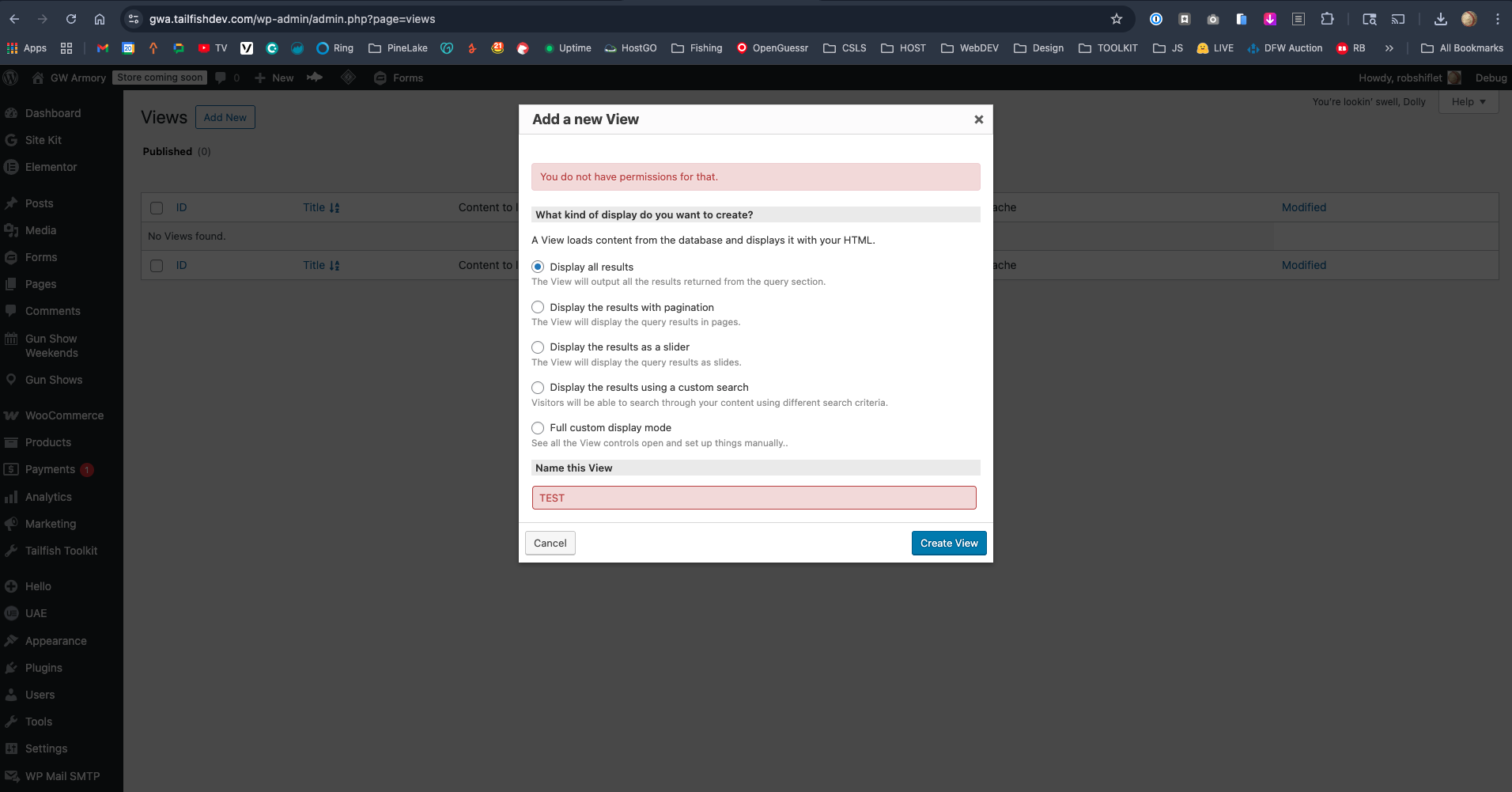
[Resolved] When I try to add a new view, I get “You do not have permissions for that.”

This thread is resolved. Here is a description of the problem and solution.

Problem:

Administrator getting "You do not have permissions for that" when creating a new View. Default theme and plugin deactivation did not resolve.

Solution:

Toolset capabilities were missing from the administrator role. Added snippet to theme's functions.php to force-assign Toolset capabilities, reloaded, then removed the snippet (caps persist on the role):

add_action( 'admin_init', 'force_toolset_admin_capabilities' );
function force_toolset_admin_capabilities() {
$role = get_role( 'administrator' );
if ( ! $role ) {
return;
}
$caps = array(
'toolset_edit_views',
'wpcf_custom_post_type_view',
'wpcf_custom_post_type_edit',
'wpcf_custom_post_type_edit_others',
'wpcf_custom_taxonomy_view',
'wpcf_custom_taxonomy_edit',
'wpcf_custom_taxonomy_edit_others',
'wpcf_custom_field_view',
'wpcf_custom_field_edit',
'wpcf_custom_field_edit_others',
'wpcf_user_meta_field_view',
'wpcf_user_meta_field_edit',
'wpcf_user_meta_field_edit_others',
);
foreach ( $caps as $cap ) {
if ( ! $role->has_cap( $cap ) ) {
$role->add_cap( $cap );
}
}
}

This is the technical support forum for Toolset - a suite of plugins for developing WordPress sites without writing PHP.

Everyone can read this forum, but only Toolset clients can post in it. Toolset support works 6 days per week, 19 hours per day.

This topic contains 6 replies, has 1 voice.

Last updated by robS-4 6 days, 14 hours ago.

Assisted by: Christopher Amirian.

Author
Posts
#2859232
2026-05-01_14-10-08.png

I am trying to: create a new view

Link to a page where the issue can be seen:
hidden link

I expected to see:
View Created

Instead, I got:
hidden link

#2859238

Here's a little more info:

* I'm not on multisite
* I am an Administrator
* Types 3.6.1 and Views 3.6.21 are current
* Common toolset_* and wpv_* capabilities did not fix it

#2859367

Christopher Amirian
Supporter

Languages: English (English )

Hello,

Welcome to Toolset support. Would you please test with a minimal setup?

- IMPORTANT STEP! Create a backup of your website. Or better approach will be to test this on a copy/staging version of the website to avoid any disruption of a live website.
- Switch to the default theme such as "TwentyTwenty" by going to "WordPress Dashboard > Appearance > themes".
- Go to "WordPress Dashboard > Plugins" and deactivate all plugins except:
. Toolset Blocks
. Toolset Types
- Check if you can still recreate the issue.
- If not, re-activate your plugins one by one and check the issue each time to find out the plugin that causes the problem.

Thanks.

#2859568

Unfortunately, the default theme and removing plugins did not resolve the issue.

hidden link

#2859604

Christopher Amirian
Supporter

Languages: English (English )

Thanks, I'd appreciate it if you could give me the URL/User/Pass of your WordPress dashboard after you make sure that you have a backup of your website.
It is absolutely important that you give us a guarantee that you have a backup so if something happens you will have a point of restore.

Make sure you set the next reply as private.

#2859699

I do have a series of backups.

#2859749

Christopher Amirian
Supporter

Languages: English (English )

Hi,

Thank you for the login information. I deactivated plugins and changed the theme with no result.

I added a temporary admin user with my email and tested with no result.

Finally I had to add the snippet below to the functions.php of the theme:

add_action( 'admin_init', 'force_toolset_admin_capabilities' );
function force_toolset_admin_capabilities() {
    $role = get_role( 'administrator' );
    if ( ! $role ) {
        return;
    }

    $caps = array(
        // Views / Content Templates / WordPress Archives
        'toolset_edit_views',

        // Types — post types, taxonomies, fields
        'wpcf_custom_post_type_view',
        'wpcf_custom_post_type_edit',
        'wpcf_custom_post_type_edit_others',
        'wpcf_custom_taxonomy_view',
        'wpcf_custom_taxonomy_edit',
        'wpcf_custom_taxonomy_edit_others',
        'wpcf_custom_field_view',
        'wpcf_custom_field_edit',
        'wpcf_custom_field_edit_others',
        'wpcf_user_meta_field_view',
        'wpcf_user_meta_field_edit',
        'wpcf_user_meta_field_edit_others',
    );

    foreach ( $caps as $cap ) {
        if ( ! $role->has_cap( $cap ) ) {
            $role->add_cap( $cap );
        }
    }
}

Reloaded the page and it worked. Then I removed the code as it should now be available for all administrator users.

For some reason, the toolset-related capabilities were not assigned to the administrator role.

But now it is.

Please delete the additional user I added, and the test views and the plugin sthat you do not want to stay activated.

Thanks.

#2859800

Thank you. I'll save this code in case it happens again in the future.