Hey,
I'm using a drp & drop for ordering the posts in the backend. I want to ask if is possible to disable the "ordering by" on the toolset views so it can take the ordering from the drag
Hi Garen,
Thank you for getting in touch.
There isn't a way to disable the ordering as wordpress will always return the posts on the frontend in some order even if it is random.
However how will you be doing the ordering on the frontend with the drag and drop? Is it being done using Javascript? Can you explain this? From how i know the wordpress ordering works, if you want to maintain that order after the page has been refreshed then you must have some sortable attribute stored on the post.
Thanks,
Shane
Im uging this plugin https://wordpress.org/plugins/simple-custom-post-order/ Its using a Drag and Drop Sortable JavaScript
Hi Garen,
In this case there might be a sort order custom field on the post.
I installed the plugin and did a check to see if I can find anything that will allow you to reflect this sort order on a view on the frontend but wasn't able to find any custom field.
Can you contact the support team for the plugin and ask them how is the sort order stored and if its in a custom field, what is the name of that custom field or the slug.
Thanks,
Shane
Hi Garen,
Looking forward to an update on this to see how best we can help.
Thanks,
Shane
Hey they reply to me the below message
"The custom posts are order by menu_order, not a custom field, and stored in the database in the wp_posts table."
Hi Garen,
Thank you for the information.
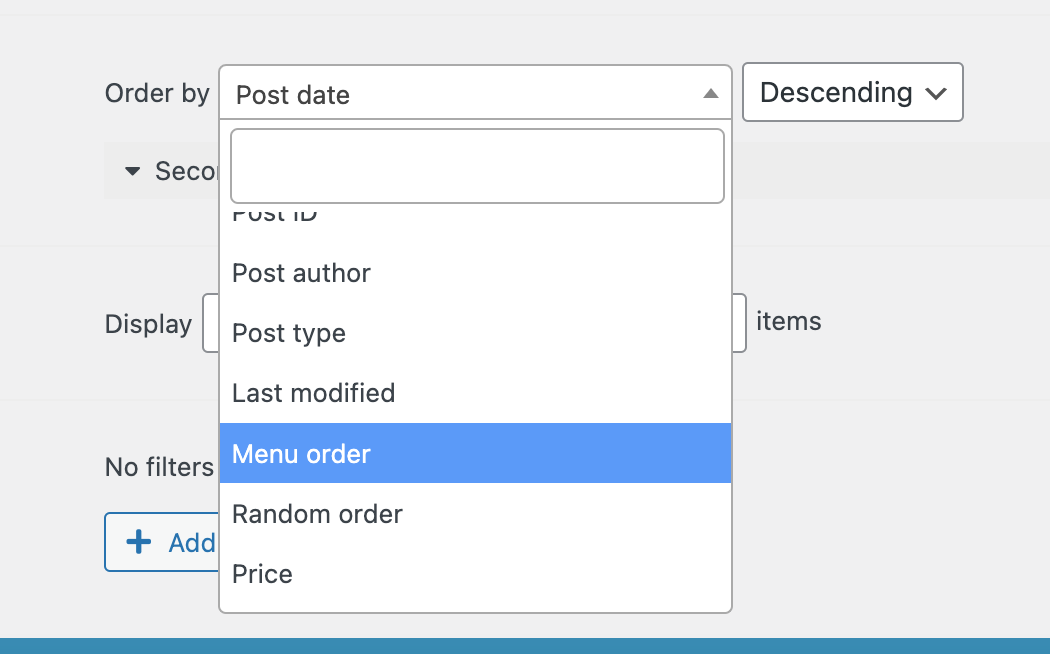
There is a menu order sort option on our Toolset Views. See Screenshot
This should allow you to maintain the correct sort order when you're viewing the posts on the frontend.
Thanks,
Shane
Thats great! thank you so much for your help