Hi, I hope you can help. I’m new to Toolset and am not sure if I’m properly understanding how this works. Here’s what I’m trying to do.
The website has 6 main custom post type categories. Each Category has its own ‘homepage’ for that subject. This page holds all of the posts in that category in descending date order in a Post Grid/Carousel. Over time there will be 100’s of posts in each category.
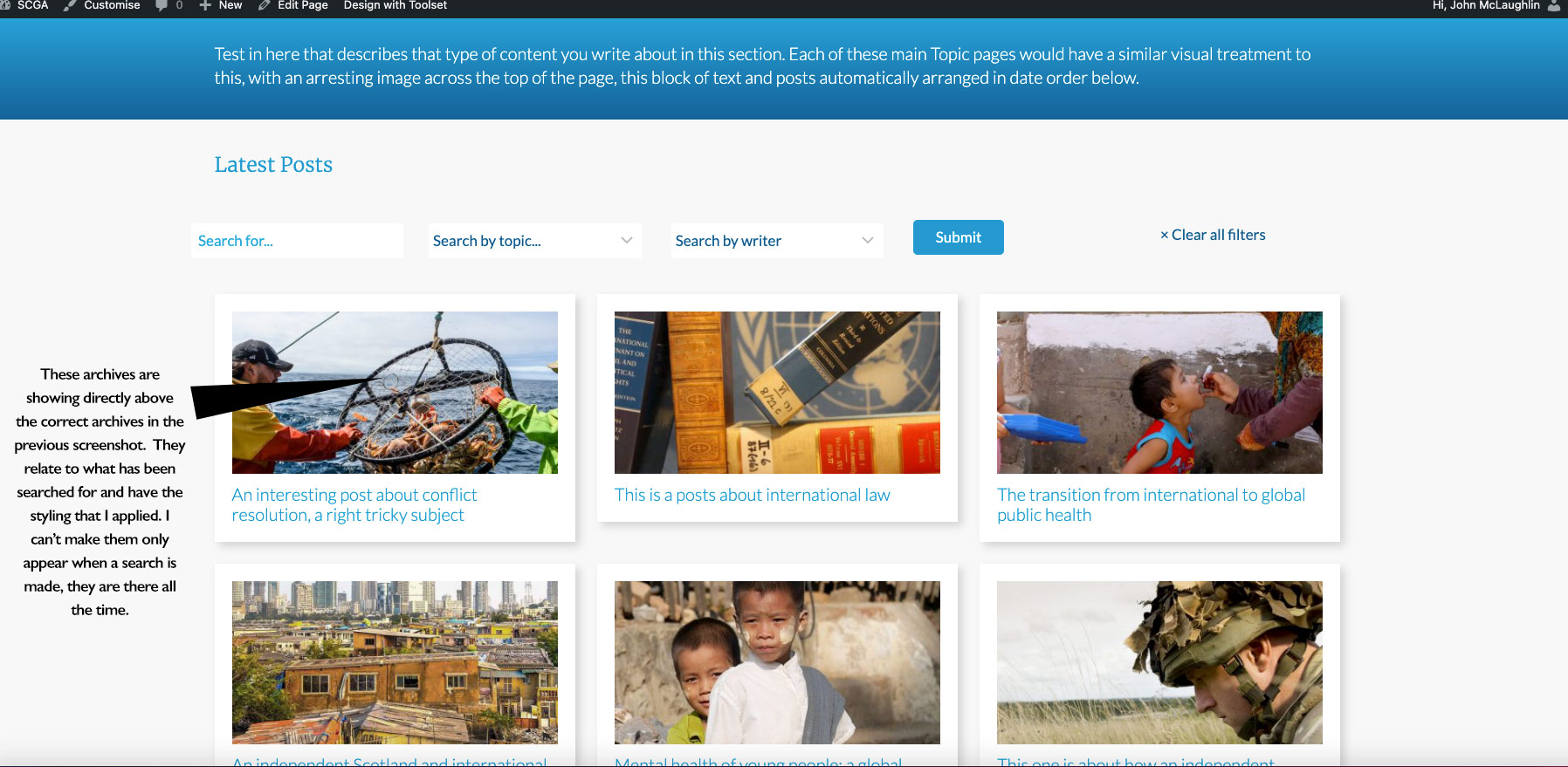
I want to have search fields at the top of each category ‘homepage’. This would allow users to search for keywords, or writers in that category. When I do that, even when I haven't yet searched for anything, search result archives appear directly below the search fields, and above the main posts and I can’t remove them.
If I’m understanding Toolset correctly, the way to do it is to have a standalone search page. I don’t want users to have to click to visit a separate page and then add their search parameters. Can this not be done from just above the Post Grid/Carousel that contains the links to the latest posts? That way, results would only be shown if someone chose to search for something.
Hopefully, this is easy to understand. My site has not yet been uploaded to the server.
Thanks for your help.
John
Hello,
WordPress custom post types are different from categories(taxonomy), how do you setup the "6 main custom post type categories"?
Please take screenshot for it, you can also provide a test site with the same problem, fill below private message box with website credentials, also point out the problem page URLs, so we can check it in a live website.
Hi, as you can see on the attached files, the search archives are there at all times on the page. They appear directly above the links to the posts which you can see on the attached 1.jpg. This is a mockup of how I want it to look. 2.jpg shows the archives that have been generated by the Toolset search bar.
I am not using standard WordPress Categories. The page you see has been made up using a custom post type in Toolset. Basically, all I want to achieve is to have the search buttons directly above my posts on each of the 6 section pages, each one of which was made on a Toolset custom post type template.
I hope you can understand this and I appreciate your help.
Thanks,
John
Hello,
I assume you are going to do these:
1) In the default page, show the search form only.
2) After user click submit button of search form, show the search form + search results
If it is, this is possible with a post view.
You can create a page, and follow our document to setup the custom search form + search result, and Hide the search results until the first search:
https://toolset.com/course-lesson/creating-a-custom-search/#hide-the-search-results-until-the-first-search
I still haven't sorted this and think I'll need to find a different solution. Thanks.