Skip Navigation

[Resolved] “Search and Pagination” to show only categories passed by shortcode

This is the technical support forum for Toolset - a suite of plugins for developing WordPress sites without writing PHP.

Everyone can read this forum, but only Toolset clients can post in it. Toolset support works 6 days per week, 19 hours per day.

Sun Mon Tue Wed Thu Fri Sat
- 10:00 – 13:00 10:00 – 13:00 10:00 – 13:00 10:00 – 13:00 10:00 – 13:00 -
- 14:00 – 18:00 14:00 – 18:00 14:00 – 18:00 14:00 – 18:00 14:00 – 18:00 -

Supporter timezone: Asia/Kolkata (GMT+05:30)

This topic contains 2 replies, has 1 voice.

Last updated by jesseW-3 2 days, 10 hours ago.

Assisted by: Minesh.

Author
Posts
#2847869
Screenshot 2026-02-12 153008.jpg

hidden link
pass: test

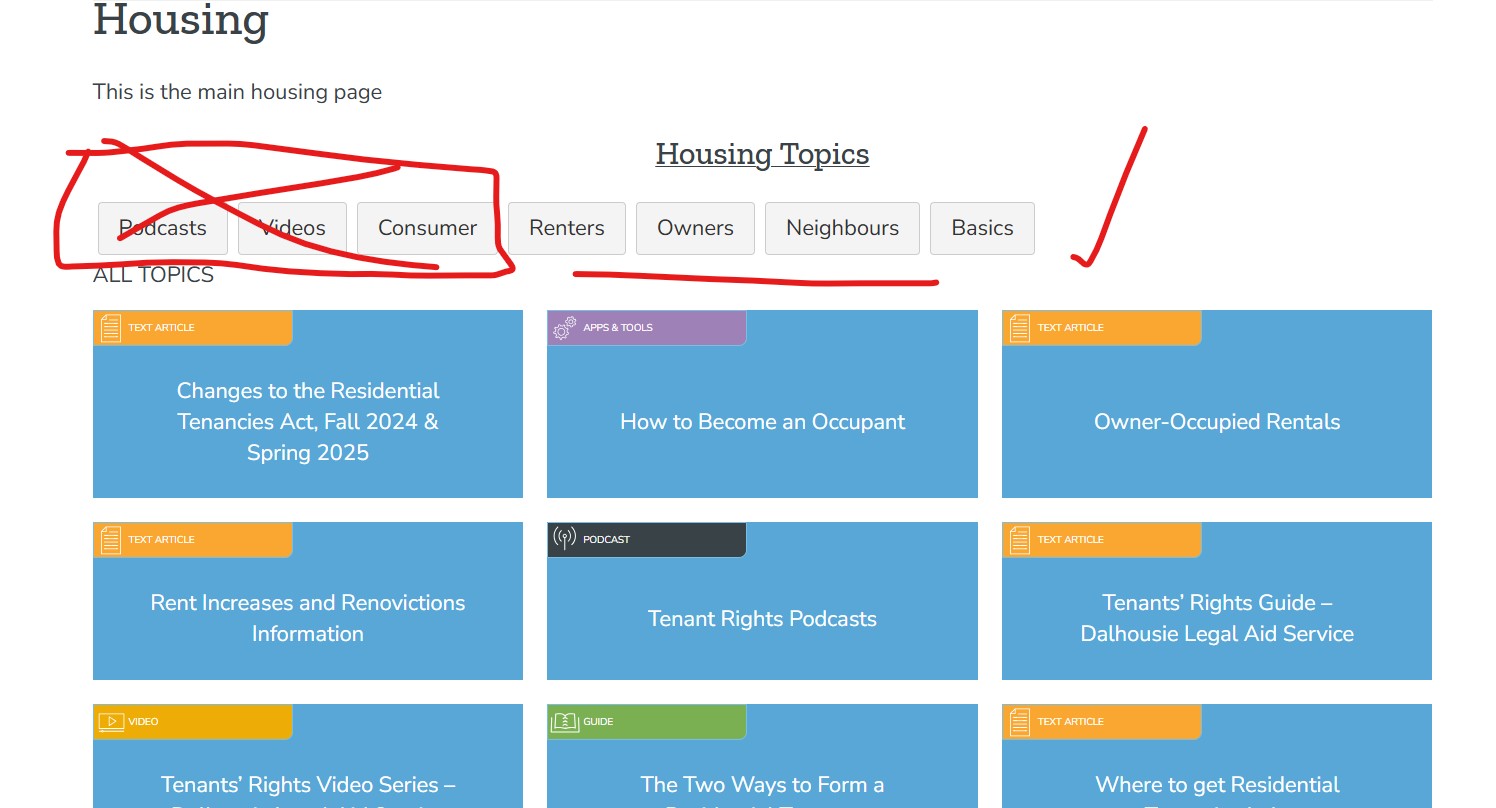
On the page above I'm using a shortcode to display the "Housing Topics". Topics are a Toolset custom post type I have set up.
[wpv-view name="topics-listing" topiccategory="renters,owners,neighbours,basics"]

The topics are all correct, but the filter shows other categories too. The extra categories are coming in when a given topic has more than one category assigned to it. I'm using WordPress default taxonomy as categories.

I would like the filter to show ONLY renters,owners,neighbours,basics
and not show "podcasts,videos,consumer"... or any other category which a given topic is categorized by.

Any suggestion appreciated. Thanks.

#2847919

Minesh
Supporter

Languages: English (English )

Timezone: Asia/Kolkata (GMT+05:30)

Hello. Thank you for contacting the Toolset support.

What if you try to use the view's filter hook wpv_filter_taxonomy_frontend_search_available_terms:
=> https://toolset.com/documentation/programmer-reference/views-filters/#wpv_filter_taxonomy_frontend_search_available_terms

For example:
You can add the following filter code to "Custom Code" section offered by Toolset:
- https://toolset.com/documentation/programmer-reference/adding-custom-code/using-toolset-to-add-custom-code/

add_filter('wpv_filter_taxonomy_frontend_search_available_terms','func_cureted_terms_taxonomy_filter', 10, 3 );
function func_cureted_terms_taxonomy_filter( $terms, $taxonomy, $view_id ) {
    
    $curated_terms = array();

  if($view_id == 99999 && $taxonomy =='category'){
    
    $curated_terms = array();
    $allowed_terms_slug = array('renters','owners','neighbours','basics');

 foreach ( $terms as $term ) {
    if ( in_array($term->slug,$allowed_terms)) {
         $curated_terms[] = $term;
    }
 }
 return $curated_terms;
  
}

Where:
- Replace 99999 with your original view ID.

#2848365

Thanks Minesh.

Your code had a syntax error in it... and I needed it generalized anyway. Just for the KB, here's an improved version, which shows only the topics called the shortcode, and is generlized

add_filter('wpv_filter_taxonomy_frontend_search_available_terms', 'func_curated_terms_taxonomy_filter', 10, 3);
function func_curated_terms_taxonomy_filter( $terms, $taxonomy, $view_id ) {
if ( $taxonomy !== 'category' ) {
return $terms;
}

$view_attrs = apply_filters( 'wpv_filter_wpv_get_view_shortcodes_attributes', array() );

if ( empty( $view_attrs['topiccategory'] ) ) {
return $terms;
}

$allowed_slugs = array_map( 'trim', explode( ',', $view_attrs['topiccategory'] ) );
$curated_terms = array();

foreach ( $terms as $term ) {
if ( in_array( $term->slug, $allowed_slugs, true ) ) {
$curated_terms[] = $term;
}
}

return $curated_terms;
}








