Home › Toolset Professional Support › [Resolved] relationships between a CPT "member profile" with the "user profile"
This is the technical support forum for Toolset - a suite of plugins for developing WordPress sites without writing PHP.
Everyone can read this forum, but only Toolset clients can post in it. Toolset support works 6 days per week, 19 hours per day.
| Sun | Mon | Tue | Wed | Thu | Fri | Sat |
|---|---|---|---|---|---|---|
| - | 10:00 – 13:00 | 10:00 – 13:00 | 10:00 – 13:00 | 10:00 – 13:00 | 10:00 – 13:00 | - |
| - | 14:00 – 18:00 | 14:00 – 18:00 | 14:00 – 18:00 | 14:00 – 18:00 | 14:00 – 18:00 | - |
Supporter timezone: Asia/Kolkata (GMT+05:30)
This topic contains 12 replies, has 3 voices.
Last updated by Minesh 4 years, 2 months ago.
Assisted by: Minesh.

The stage:
NGO website.
People who pay the fee become members (as normal).
For NGO members a "user" account is manually created with the role of "subscriber".
As a logged in "subscriber" they can access extra "members only" content.
Members cannot edit their user information (first name, last name, etc.), only their email and password.
Members have custom fields such as "member number" and "active/inactive volunteer".
We need:
Generate a public directory of members, searchable and filterable, showing those custom fields ("membership number" and status as active or inactive volunteer).
We have followed these steps (partly because these fields are not filled in by the user, but by the administrator):
https://toolset.com/lesson-placement/lesson-placements-1622969-1929573/
https://toolset.com/course-lesson/how-to-create-custom-searches-and-relationships-for-users/
We have created a custom post type called "Member Profile" with the custom fields described above.
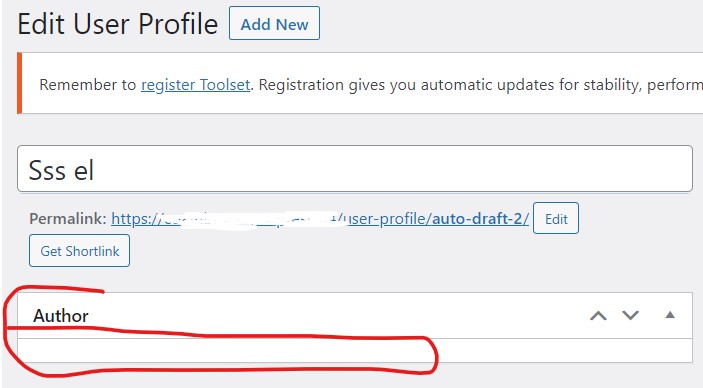
To link the CPT "member profile" with the "user profile", we understand that it is done through the "author" field, is that right? But we cannot select the user as the author of the CPT, only the administrators role. Is it necessary to give some kind of permission to the "subscriber" role to be able to be the "author" of the CPT "Member Profile"?
Hello and thank you for contacting Toolset support.
By default, WordPress will offer only the users with a role higher than Author, those are the Author, Editor, and Administrator role.
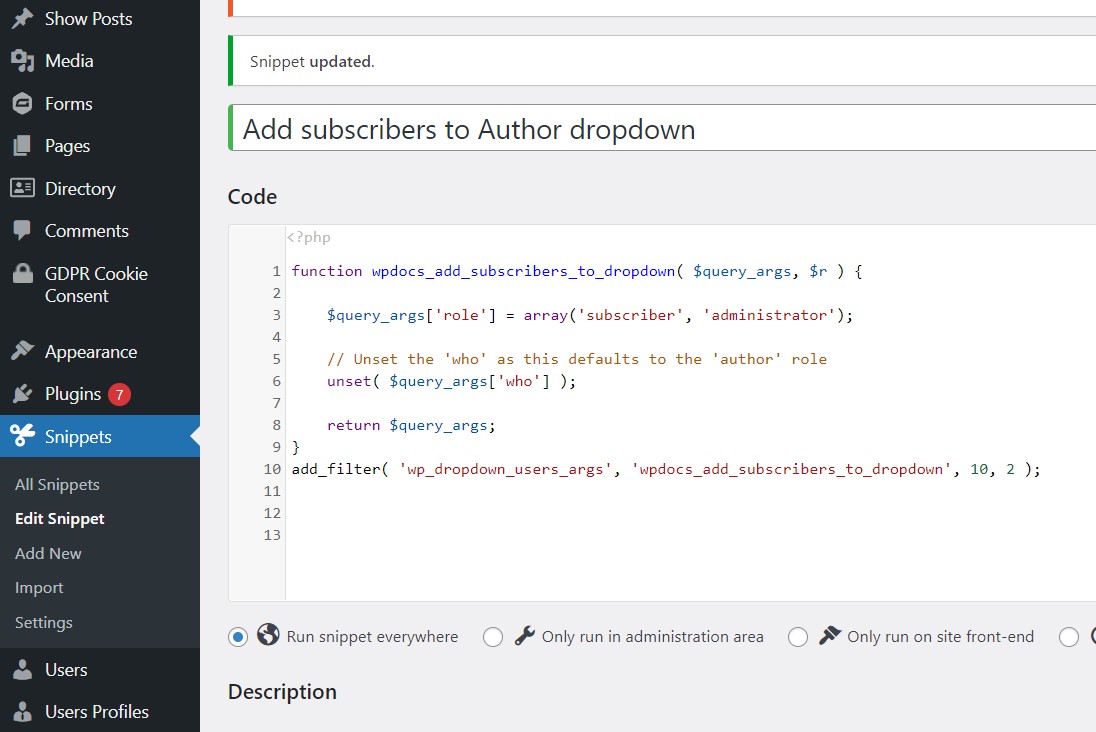
But, maybe, you do not want these users to become authors(and be able to create posts, custom posts, etc.). For that, you need a workaround to be able to choose the subscribers within the author dropdown. That can be done through custom code as the one on this ticket https://toolset.com/forums/topic/cant-add-new-user-with-new-custom-role-as-author/
For example, to have subscribers and administrators on the dropdown we can do:
function wpdocs_add_subscribers_to_dropdown( $query_args, $r ) {
$query_args['role'] = array('subscriber', 'administrator');
// Unset the 'who' as this defaults to the 'author' role
unset( $query_args['who'] );
return $query_args;
}
add_filter( 'wp_dropdown_users_args', 'wpdocs_add_subscribers_to_dropdown', 10, 2 );
I hope this helps. Let me know if you have any questions.
I can't tell when the snippets that are added to the plugin "Snippets" are run. Maybe it is run too late. What if you add the snippet in Toolset Settings? Does it fix the issue?
https://toolset.com/documentation/programmer-reference/adding-custom-code/using-toolset-to-add-custom-code/
If the issue persists, please allow me temporary access to your website and I'll check what's happening. If it is possible, please add FTP access too, so we can check the logs file.
Thank you for the credentials. The code is not correct. If we want to use multiple roles, we should use role__in instead of role in line 4. I tested the following code and it works as I would expect:
function wpdocs_add_subscribers_to_dropdown( $query_args, $r ) {
$query_args['role__in'] = array('subscriber', 'administrator');
// Unset the 'who' as this defaults to the 'author' role
unset( $query_args['who'] );
return $query_args;
}
add_filter( 'wp_dropdown_users_args', 'wpdocs_add_subscribers_to_dropdown', 10, 2 );
I'll remain at your disposal.
Thanks, working. (I dont know why "multiple roles" is activated. Is it activated by default when installing "Toolset Access"?)
Following the line of this ticket, about linking wordpres "users" with a CPT "members profile", as indicated in the tutorial https://toolset.com/course-lesson/how-to-create-custom-searches-and-relationships-for-users/ , now another question arises:
What to do with the title field of the CPT "members profile"?
I have noticed that in the tutorial, and in the demo sites that you have, that you usually put "Name and Last Name" as the title.
But this generates duplicity, as these fields have already been requested and filled in previously when creating the "users profile". Why ask for them again?
Moreover, this duplicity means that if you want to edit this information, you have to change it both in the "users profile" and in the CPT "members profile".
Is it possible to autocomplete the "title" field of the CPT "members profile" automatically with the name or username of the "author"?
any other idea for the title field?
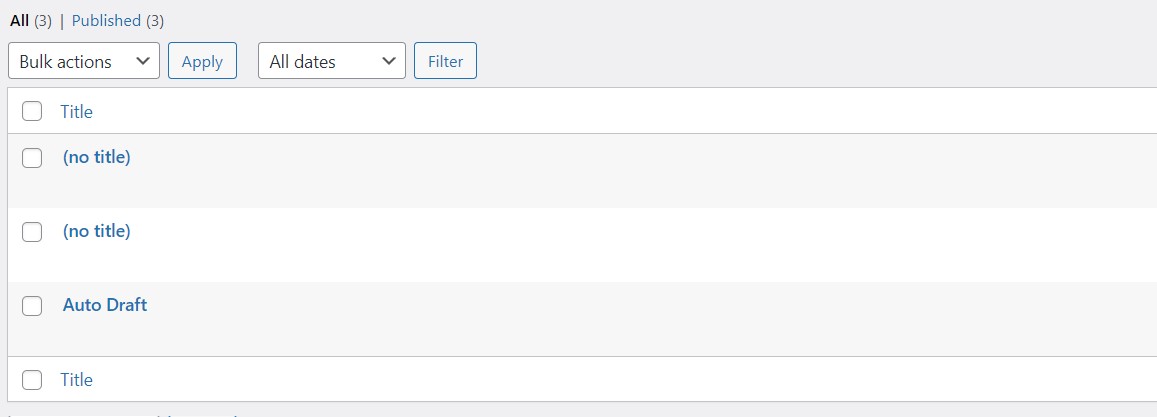
(We have already try to leave it blank , but we use the backend to fill this inforamation, and it is displayed with (no title) and (auto draft) (see image)
thanks
Jamal is on Vacation. This is Minesh here and I'll take care of this ticket. Hope this is OK.
As shared with the Doc, the user is used only for username and password, for creating user in WordPress.
=> https://toolset.com/course-lesson/how-to-create-custom-searches-and-relationships-for-users/#the-flow
What to do with the title field of the CPT "members profile"?
I have noticed that in the tutorial, and in the demo sites that you have, that you usually put "Name and Last Name" as the title.
But this generates duplicity, as these fields have already been requested and filled in previously when creating the "users profile". Why ask for them again?
Moreover, this duplicity means that if you want to edit this information, you have to change it both in the "users profile" and in the CPT "members profile".
Is it possible to autocomplete the "title" field of the CPT "members profile" automatically with the name or username of the "author"?
===>
The mechanism should be automatic but requires to use the Toolset form hook "cred_save_data" that when you create a new user, it will also add a new entry to member profile post and should copy the member first name and last name. - You want that - correct?
thanks for your answer
In the course images you can see how the "user profile" has "Name" and "Lastname", and also you have "contractors name".
Not using the default fields "Name" and "Lastname" of WordPress Users can generate "complications" with other plugins (like Woocommerce for example) and also prevents you from using the option "Display name publicly as" the WordPress. Therefore we prefer not to leave them blank and use the original User Profile fields that already exist.
>The mechanism should be automatic but requires to use the Toolset form hook "cred_save_data" that when you create a new user, it will also add a new entry to member profile post and should copy the member first name and last name. - You want that - correct?
Yes, this would be great. can you give me more information about this? would this also apply if the new user is created from the wordpress backend?
==>
No, when you create new user from backend its not applicable as Toolset form hooks only run on the frontend when you use Toolset form.
So, as I understand, you want to add a new post when you create a new user from frontend using Toolset User form - right?
- If Yes:
Can you please share details where you added the user form to create a new user and for what post type you want to create a new post automatically?
hello, thanks for responding, but that is not what we need.
As detailed in the initial post of this thread, we need something VERY SIMPLE (no users modifying their profile or anything like that, no frontend forms, etc.), just this:
--> "Create a public directory of members, searchable and filterable, showing custom user fields"
It is something that can be done with simple free plugin called.
"Dynamic User Directory" - https://wordpress.org/plugins/dynamic-user-directory/
But we wanted to do it with Toolset, not to depend on other plugins.
For them we thought this would be the solution:
https://toolset.com/course-lesson/how-to-create-custom-searches-and-relationships-for-users/
But after analyzing this solution, we have concluded that it is not a good solution. Generating a new CPT for the extra user data, instead of using the wordpress "user profile", is a solution that in the end generates more problems and inconveniences, than advantages.
We only want to show a filterable and searchable list of users, and as far as we have been able to observe, currently only the FacetWP plugin, with its "User Post Type" addon, achieves this in an efficient and clean way.
hidden link
In this case, FacetWP beats Toolset.
Is there a way that Toolset could do the same as FacetWP, with its "User Post Type" addon, or the "Dynamic User Directory" plugin?
Thanks
For them we thought this would be the solution:
https://toolset.com/course-lesson/how-to-create-custom-searches-and-relationships-for-users/
But after analyzing this solution, we have concluded that it is not a good solution. Generating a new CPT for the extra user data, instead of using the wordpress "user profile", is a solution that in the end generates more problems and inconveniences, than advantages.
==>
The thing is that with the user kind view, you can only list the user related content, you can not build custom search view using the user kind view. Filterable search list for users is not possible with Toolset, you can say its limitation and as users used to ask for is that is why the Doc you are following comes in the picture where we demonstrated what is the alternate workaround in such cases.
We only want to show a filterable and searchable list of users, and as far as we have been able to observe, currently only the FacetWP plugin, with its "User Post Type" addon, achieves this in an efficient and clean way.
hidden link
In this case, FacetWP beats Toolset.
Is there a way that Toolset could do the same as FacetWP, with its "User Post Type" addon, or the "Dynamic User Directory" plugin?
==>
I understand that but there is no other workaround available with Toolset otherthan how its demonstrated with the official Doc:
- https://toolset.com/course-lesson/how-to-create-custom-searches-and-relationships-for-users/
Ok thanks.
Is there any place where to expose this "lack" and request that the Toolset team evaluate its development in the future?
Basically the requirement would be:
"Display in the frontend a list of users with Custom User Fields that can be filtered and searched (without the need to create and link a new CPT)."
Examples:
WPFacet with its addon "User post type".
or "Dynamic User Directory" plugin
You can always file a new feature request using the following link and our product manager will review it:
=> https://toolset.com/home/contact-us/suggest-a-new-feature-for-toolset/