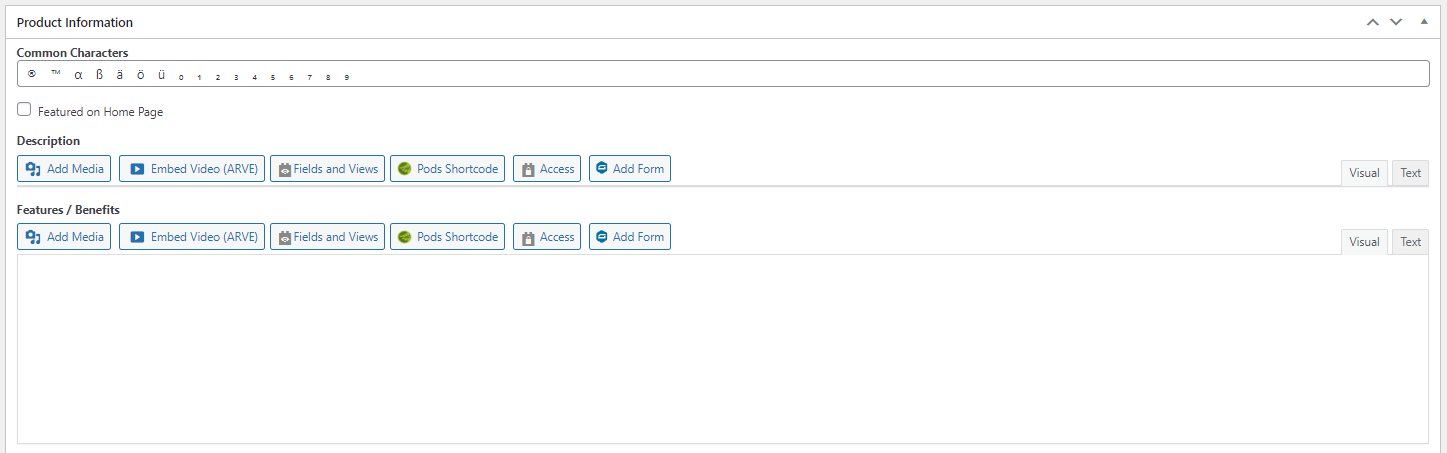
I am trying to: edit our product pages, which rely on Toolset custom fields. While previews and pages look the same, we have lost the ability to edit the custom fields. In fact, there is nothing displayed there at all. With multiple clicks, the whole field glitches out.
Link to a page where the issue can be seen: Nothing front-end available to show. This is a back-end issue.
I expected to see: The text editing field.
Instead, I got: blank white box.
Hi,
Thank you for contacting us and I'd be happy to assist.
I tried to log in to your website's admin area, but, it seems it is using some secret/private admin area login page.
Can you please share the link to the admin area login page?
I've set your next reply as private.
regards,
Waqar
Thank you for sharing the admin access.
In your website's admin area, I noticed that if the visual tab is selected for the "WYSIWYG" type custom fields, any content added in the field becomes hidden.
I couldn't reproduce this issue on my test website, even with similar settings and fields, which suggests that something specific to your website is involved here.
To troubleshoot this, I'll suggest the following steps:
1. Please make sure that WordPress, active theme, and plugins are all updated to the latest versions.
2. It would be interesting to test this with all non-Toolset plugins disabled and a default theme like Twenty Twenty-One.
If it's fixed, you can start adding the disabled items, one by one, to narrow down to a possible conflicting one.
3. In case the issue still persists, I'll need your permission to download a clone/snapshot from your website, to investigate this on a different server.
I hope this helps and please let me know how it goes.