Hello. Thank you for contacting the Toolset support.
As you are trying to delete the unwanted custom fields or database cleanup - I strongly suggest that before performaing any action:
*** Please make a FULL BACKUP of your database and website.***
Once you have full backup of your databse - then try to cleanup the unwanted fields and make sure first that you are not using those fields with your content tepmlates/views/archives or anywhere.
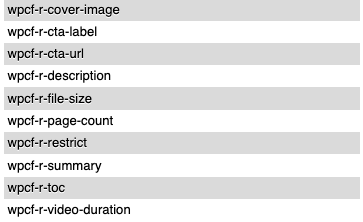
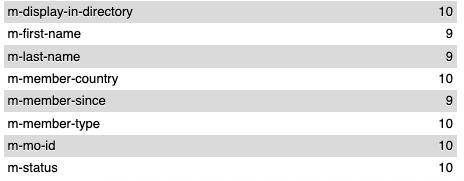
I am actively using all custom post types. My issue is that for some reason one has no wpcf- prefix, while the others do. This is causing issues with custom programming that references the CPTs.
What I want to know is what setting changed Members CPT to drop the wpcf- prefix. I want it to continue going forward for consistency.
If there were no settings, and this is a weird fluke, can I update the database? Keeping in mind that there may be edits or additions to the CPT in the future.
If you have created custom fields using Toolset Types plugin then it will have 'wpcf-" prefix. If you have created those custom fields manually or its added by third party plugins or some other way, it not Toolet Types custom field as Custom fields created using Toolset Types always has "wpcf-" prefix.
You will have to interect with database and delete the unwanted custom fields.
Sorry to contradict you, but the Member CPT was created in Toolset, and its records are being stored without a wpcf- prefix.
What is my best course of action at this point? Can I edit the database to correctly use wpcf- prefixes? Or, do I have a more serious problem in that Toolset has malfunctioned and I need to get to the bottom of that issue?
Sorry to contradict you, but the Member CPT was created in Toolset, and its records are being stored without a wpcf- prefix.
==>
That is really strange. I dont think so, even if you try to create a new test site and install Toolset Types plugin and try to create custom fields, for instance you created custom field with slug "price" (without quotes) in GUI it will show the "price" but when you check the database the custom field actually stored as "wpcf-price".
I don't know how it happened. I noticed that when I was writing plugins to reference the fields, I found some one way and others another, despite the documentation.
Going forward, I want to correct the issue. I want to correct the database records.
What is my best course of action? The current records in the CPT can be deleted (still under development and testing). Do I need to recreate the CPT or is there another course of action?
I am looking to activate WPML, so I don't want to have more issues down the line.