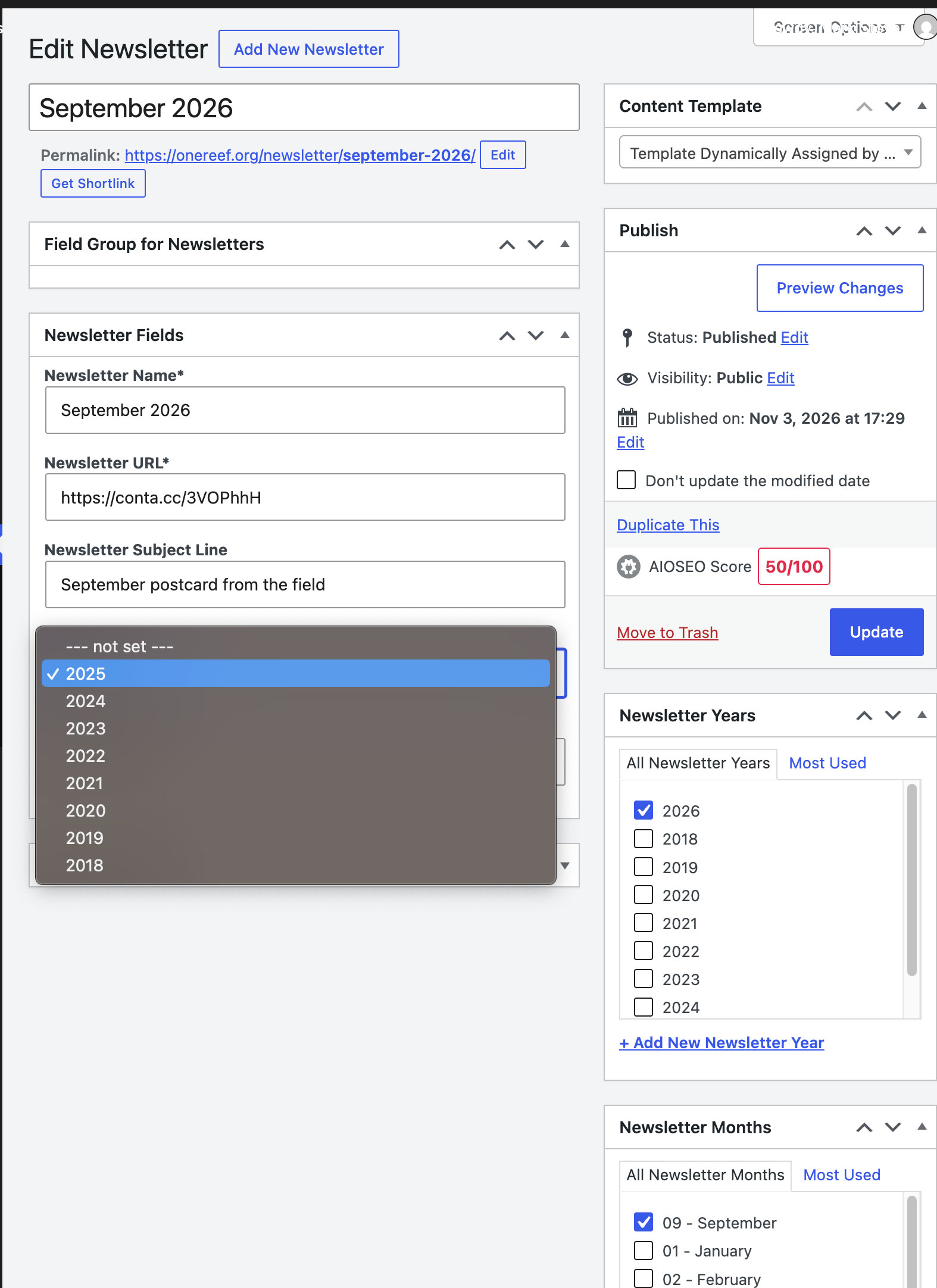
Hi,
Welcome to Toolset support.
Those are two separate things, which is why the new year did not appear.
"Newsletter Years" on the right is a taxonomy. 2026 is there and ticked correctly.
The dropdown on the left is a custom field of type "Select". Its options are a fixed list stored with the field itself. Adding a term to the taxonomy does not add an option to it.
To fix it now:
1. Go to Toolset > Custom Fields and open the "Newsletter Fields" group.
2. Open the year Select field.
3. Add 2026 as a new option, with the same value format as the others. Add 2027 too while you are there.
4. Save the group, then edit the September 2026 newsletter and pick the real year.
Worth considering: you are keeping the same list in two places, so this will happen again every January. If the archive page can filter by the "Newsletter Years" taxonomy instead, you can drop the select field and maintain one list.
If you prefer to keep the field, it can read its options from the taxonomy so it never goes stale:
```php
add_filter( 'wpt_field_options', function( $options, $title, $type ) {
if ( 'Newsletter Year' !== $title ) {
return $options;
}
$terms = get_terms( array(
'taxonomy' => 'newsletter-years',
'hide_empty' => false,
'orderby' => 'name',
'order' => 'DESC',
) );
if ( is_wp_error( $terms ) ) {
return $options;
}
$options = array();
foreach ( $terms as $term ) {
$options[] = array( '#title' => $term->name, '#value' => $term->name );
}
return $options;
}, 10, 3 );
```
Replace `Newsletter Year` with the field's exact title and `newsletter-years` with the taxonomy slug. The filter matches on the title, so renaming the field will break it.
The custom code suggested above is not part of our official support policy. We will not be able to maintain or guarantee that it will work. It is an attempt to help you understand what should be done for scenarios where the built-in Toolset features are not there to handle your request.
Thanks.