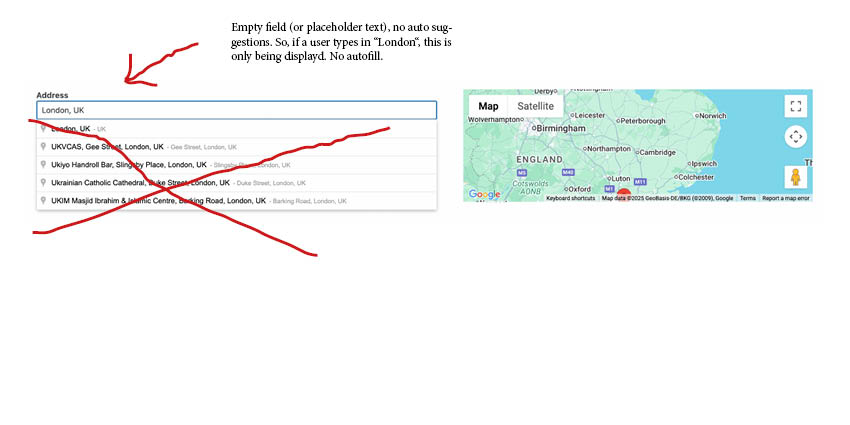
I have a view with a filter "map" search. I am using OSM and it seems to work to display results in a list with radius search. (Google maps key 00000000000000000000) to activate seach by distance in the view function. But if this shows issues than i may need to switch to Google maps. But for now it works!!!
So far, so good.
But i have one big issue. The site is an local site. And in the searchbar i do not need the autosearch suggestions Google and OSM are filling in. It's just looks messy. The fist "results" are from all over the world!? I just need a blank "label"/ no autofill where user can fill in the placename as text without the autofill sugestions.
On a view. I'm using the "Show both the legacy and Blocks interface and let me choose which to use for each item I build" option as i'm building in Elementor.
Again, the autosearch suggestionis is confusing as it is a local site. My user does not need a suggestion in USA or Japan after typing letters in the search box. Instead they just can fill in a place in an empty searchfield/textbox.
Are you using AJAX search or search form with search button.
To do a trick maybe you will have to use non-ajax view (if you are using ajax-filter). If you can share admin access details and problem URL where you added your view and once I can see your current setup then I will be able to guide you in the right direction and what could be the possible workaround if any.
*** Please make a FULL BACKUP of your database and website.***
I would also eventually need to request temporary access (WP-Admin and FTP) to your site. Preferably to a test site where the problem has been replicated if possible in order to be of better help and check if some configurations might need to be changed.
I have set the next reply to private which means only you and I have access to it.