Skip Navigation

[Resolved] Map pop-up breaks types value in link

This thread is resolved. Here is a description of the problem and solution.

Problem:

Map pop-ups accept HTML markup for their content, and shortcodes can be used to output field values.

But it is not possible to use a shortcode to provide the value for an HTML attribute

Solution:

It is a known issue, see the erratum here:

https://toolset.com/errata/cannot-use-types-shortcode-as-html-attribute-value-in-maps-pop-up/

You can try the workaround mentioned in above erratum: create a custom shortcode, output the link HTML, and put this custom shortcode as map marker popup content.

Relevant Documentation:

This support ticket is created 4 years, 3 months ago. There's a good chance that you are reading advice that it now obsolete.

This is the technical support forum for Toolset - a suite of plugins for developing WordPress sites without writing PHP.

Everyone can read this forum, but only Toolset clients can post in it. Toolset support works 6 days per week, 19 hours per day.

Sun Mon Tue Wed Thu Fri Sat
- 9:00 – 13:00 9:00 – 13:00 9:00 – 13:00 9:00 – 13:00 9:00 – 13:00 -
- 14:00 – 18:00 14:00 – 18:00 14:00 – 18:00 14:00 – 18:00 14:00 – 18:00 -

Supporter timezone: Asia/Hong_Kong (GMT+08:00)

This topic contains 2 replies, has 2 voices.

Last updated by martinS-26 4 years, 3 months ago.

Assisted by: Luo Yang.

Author
Posts
#2182455
2021-09-28 22_11_25-Vendors – Allteck Group.png
2021-09-28 22_09_32-Vendors – Allteck Group.png
2021-09-28 22_09_46-Edit Page ‹ Allteck Group — WordPress.png
2021-09-28 22_09_54-Edit Page ‹ Allteck Group — WordPress.png

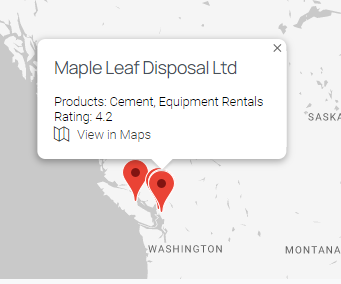
I am trying to: Add a custom field (address) into an href link on a map pop-up. see uploaded images.

Link to a page where the issue can be seen: n/a - requires login

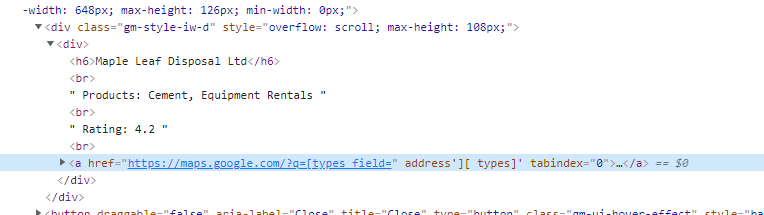
The pop-up content is formatted as id expect and the pop-up content preview shows correctly, however when it outputs on the front end it comes up incorrect, as href="hidden link field="

I suspect its happening due to the hidden quotes in the field that breaks the html but i have no control over this in the pop-up content editor. How can I get around this issue?

Thanks!

#2182543

Hello,

It is a known issue, see the erratum here:
https://toolset.com/errata/cannot-use-types-shortcode-as-html-attribute-value-in-maps-pop-up/

You can try the workaround mentioned in above erratum: create a custom shortcode, output the link HTML, and put this custom shortcode as map marker popup content.

#2182897

Perfect, that solution worked. Appreciate the prompt assistance!