Tell us what you are trying to do?
I am creating a map where the markers are coming from a view.
The view shows all content type »Partner« with filtering on the front-end by a custom taxonomy »Partner status«.
I have added custom marker icons (svg 24 x 32px), but am unable to show a different marker on hover (set up, but not working) or when selected. By clicking in the sidebar on the piece of content, the map zooms to the correct pin but does not open it.
Also, when I load the map, or refresh the page, the map is always zoomed out completely and no pins are shown at all. Once i click in the sidebar or on one of the filters the map updates and works correctly
Is there any documentation that you are following?
No, but i am using the classic editor.
Is there a similar example that we can see?
No
What is the link to your site?
You can see the example page here: hidden link
Hello. Thank you for contacting the Toolset support.
I'm not sure why no map markers are added on the map.
*** Please make a FULL BACKUP of your database and website.***
I would also eventually need to request temporary access (WP-Admin and FTP) to your site. Preferably to a test site where the problem has been replicated if possible in order to be of better help and check if some configurations might need to be changed.
I have set the next reply to private which means only you and I have access to it.
I've deactivated the plugin "Slim SEO" and I can see map marker works. Maybe you can update ALL plugins to latest version and check if that helps otherwise you will need to get in touch with "Slim SEO" plugin support and check with them why map markers is not added on map when the "Slim SEO" plugin is active.
Hi, thanks a lot for finding this out! I will reach out to the developers and flag the issue. I can look for alternatives and uninstall it.
I still need assistance on:
— why the markers are not focusing?
— why are they not larger when they are selected and the chosen hover marker doesn’t appear?
— and why the pop up is not being opened when i click on the focus button from the sidebar?
I checked and I noticed that you are using OpenStreetMaps API and we are at early stage of that.
I checked that when you click on the link the marker does get the focus but it does not open the associated marker popup and hover does not work as well.
I'll report this issue in front of our next level support and aks them if they can add this feature. But if you want to see focus on marker works, then for now you need to use Googe Map API.
I will try with google maps for the moment, and see if the necessary interactions work there.
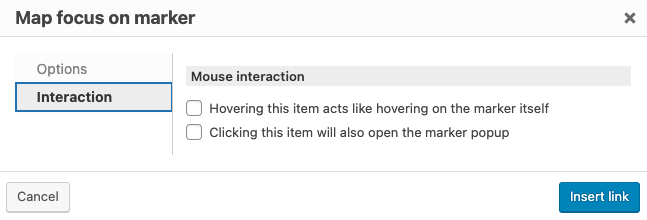
Regarding the "map-focus-on-marker" i understand your feedback, but in the UI when I insert the "marker focus" field i do have these two options available (see screenshot):
1) hovering on this item acts like hovering on the marker itself
2) clicking this item will also open the marker popup
None of which seem to work (at least with openstreetsmaps).
Until these interactions work for openstreetmaps it would be good to know about these limitations and read them somewhere in the documentation.
I can confirm that it works as expected if i use google maps.
What is still not working are the hover functionalities such as:
1) hovering on this item acts like hovering on the marker itself
2) change marker icon on hover
Please keep me updated as they are extremely important to our project. Or is there a way I can subscribe to this issue?
What is still not working are the hover functionalities such as:
1) hovering on this item acts like hovering on the marker itself
2) change marker icon on hover
===>
I've escalated both the issues and I will get in touch with you as soon as I've any update on it.