Skip Navigation

[Resolved] Manually update toolset types instructions

This support ticket is created 3 years, 2 months ago. There's a good chance that you are reading advice that it now obsolete.

This is the technical support forum for Toolset - a suite of plugins for developing WordPress sites without writing PHP.

Everyone can read this forum, but only Toolset clients can post in it. Toolset support works 6 days per week, 19 hours per day.

Sun Mon Tue Wed Thu Fri Sat
- 9:00 – 12:00 9:00 – 12:00 9:00 – 12:00 9:00 – 12:00 9:00 – 12:00 -
- 13:00 – 18:00 13:00 – 18:00 13:00 – 18:00 13:00 – 18:00 13:00 – 18:00 -

Supporter timezone: America/Sao_Paulo (GMT-03:00)

This topic contains 1 reply, has 2 voices.

Last updated by Mateus Getulio 3 years, 2 months ago.

Assisted by: Mateus Getulio.

Author
Posts
#2569465

Hi I can't find any instructions on how to update Tools types manually.

I've done this in the past before, but cant remember the full process.

Is there some documentation on the website that explains the process for a manual update?

Thanks

Tom

#2569593

Mateus Getulio
Supporter

Languages: English (English )

Timezone: America/Sao_Paulo (GMT-03:00)

Hi Tom,

Thanks for your contact.

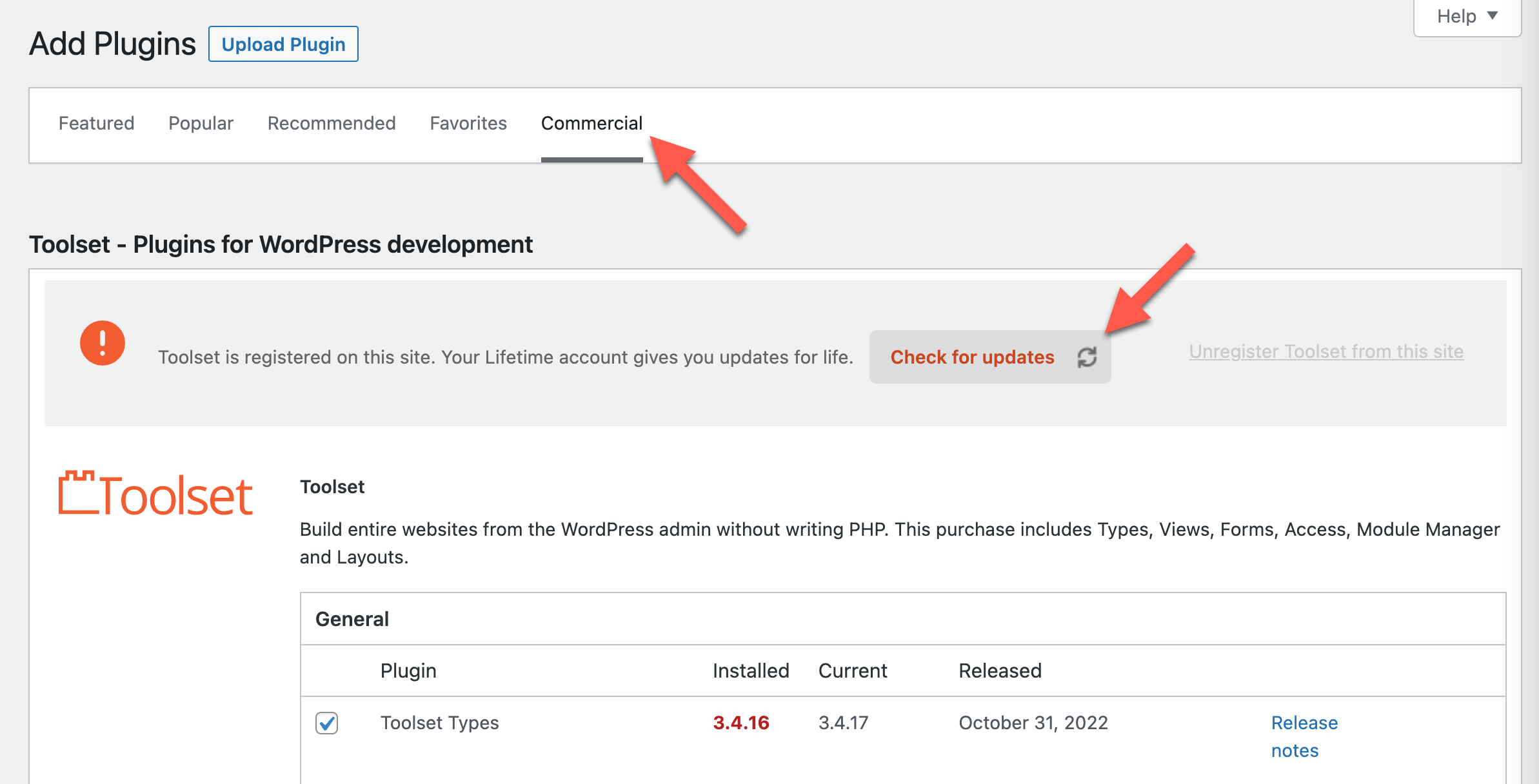
To see the updates available you need to follow these steps:

- Go to Plugins -> Add New -> Commercial tab
- Then, click on the 'Check for updates' button, to see the updates available
- Here's a screenshot showing this step-by-step: https://toolset.com/wp-content/uploads/2022/11/check-for-updates-toolset.png

You can also get the latest versions from your downloads page: https://toolset.com/account/downloads/, and upload them directly in the Plugins -> Add New section.

Please try out these solutions and let us know if it is solved now. Thank you!

Regards,
Mateus.