Hi team,
I am trying to:
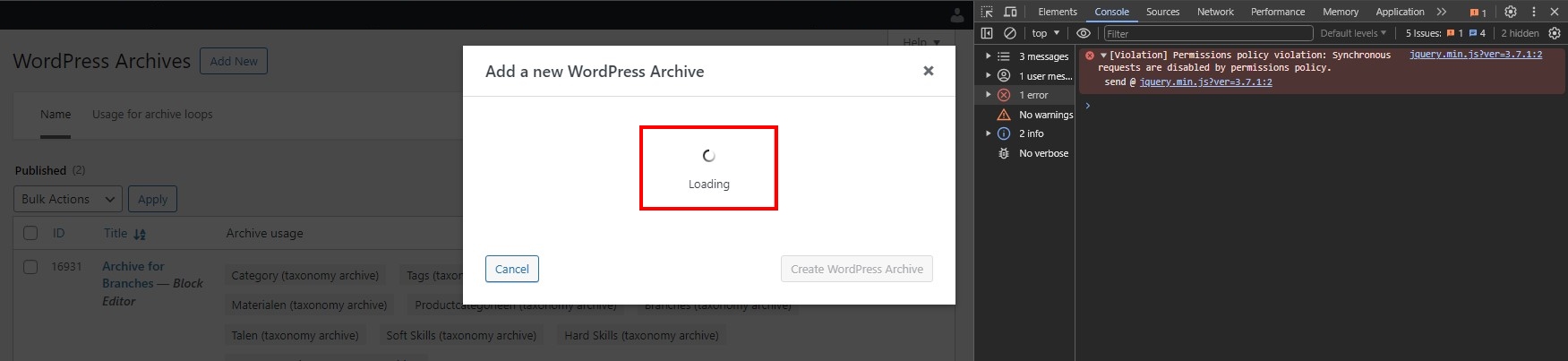
Create an Archive. The "Add a new WordPress Archive" appears, but then it's stuck with the rotating loading icon.
I expected to see:
A field where I can give the Archive a name and the blue "Create Archive" button
Instead, I got:
Nothing happens.
What may it be?
Hi there
If it is not possible to add a new archive, it is likely that you will see errors if you open the browser console.
If they report a 500 error, that means there are errors on the server itself when trying to fulfil a request from the browser. I think that is probably the case here.
In which case you would need to check the server debug.log for details of the error.
If you haven't already, turn on the debug log by editing your wp-config.php file and change the line with WP_DEBUG like so:
define('WP_DEBUG', true);
define('WP_DEBUG_LOG', true);
define('WP_DEBUG_DISPLAY', false);
define('WP_DISABLE_FATAL_ERROR_HANDLER',true);
That will create a debug.log file in your /wp-content/ directory which you can examine in any text editor. Try creating the archive again and then inspect the log.
Please share details with us.
Note, I see you are using PHP version 8.3.6.
I would not recommend using such a cutting-edge PHP version, as you are likely to experience compatibility problems.
Even WordPress itself only declares beta compatibility with PHP versions 8.2 and 8.3 (https://make.wordpress.org/core/handbook/references/php-compatibility-and-wordpress-versions/).
Toolset is fully tested with PHP 8.1 and should work well with PHP 8.2, but it is not tested yet with PHP 8.3.
I suspect if you downgrade to a more mature PHP version you will not experience the errors on your site.