Skip Navigation

[Closed] It is displayed as a warning in WordPress.

This support ticket is created 2 years, 12 months ago. There's a good chance that you are reading advice that it now obsolete.

This is the technical support forum for Toolset - a suite of plugins for developing WordPress sites without writing PHP.

Everyone can read this forum, but only Toolset clients can post in it. Toolset support works 6 days per week, 19 hours per day.

Sun Mon Tue Wed Thu Fri Sat
- 9:00 – 13:00 9:00 – 13:00 9:00 – 13:00 9:00 – 13:00 9:00 – 13:00 -
- 14:00 – 18:00 14:00 – 18:00 14:00 – 18:00 14:00 – 18:00 14:00 – 18:00 -

Supporter timezone: Asia/Hong_Kong (GMT+08:00)

This topic contains 5 replies, has 2 voices.

Last updated by Luo Yang 2 years, 11 months ago.

Assisted by: Luo Yang.

Author
Posts
#2569853
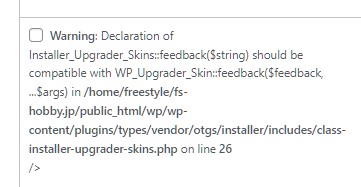
Screenshot_1.jpg

Tell us what you are trying to do?
I want to update on WordPress, but I can't. Is the warning in the attached image the cause?

What is the link to your site?
hidden link

#2569915

Hello,

It should be a known issue of old version of Toolset plugins, please try to upgrade the Toolset Types plugin manually:
1) Backup your website database
2) Deactivate/delete old version of Toolset Types plugin
3) Download the latest version of Types plugin here:
https://toolset.com/account/downloads/
click link "Download Toolset manually"
4) Upload/activate Types plugin in your website manually

And test again

#2569953

Import backed up database after reinstalling Types plugin?

I'm not very familiar with databases.

#2571733

No, you don't need to import the database again in most cases.
Just in case anything goes wrong, so I suggest you backup your website database, you can follow WP document to backup the database:
https://wordpress.org/documentation/article/backing-up-your-database/

#2574689

Sorry for the late reply. i will try. thank you.

#2574837

I have marked this ticket as "Waiting for feedback status", please update here if you still need assistance for it.

The topic ‘[Closed] It is displayed as a warning in WordPress.’ is closed to new replies.