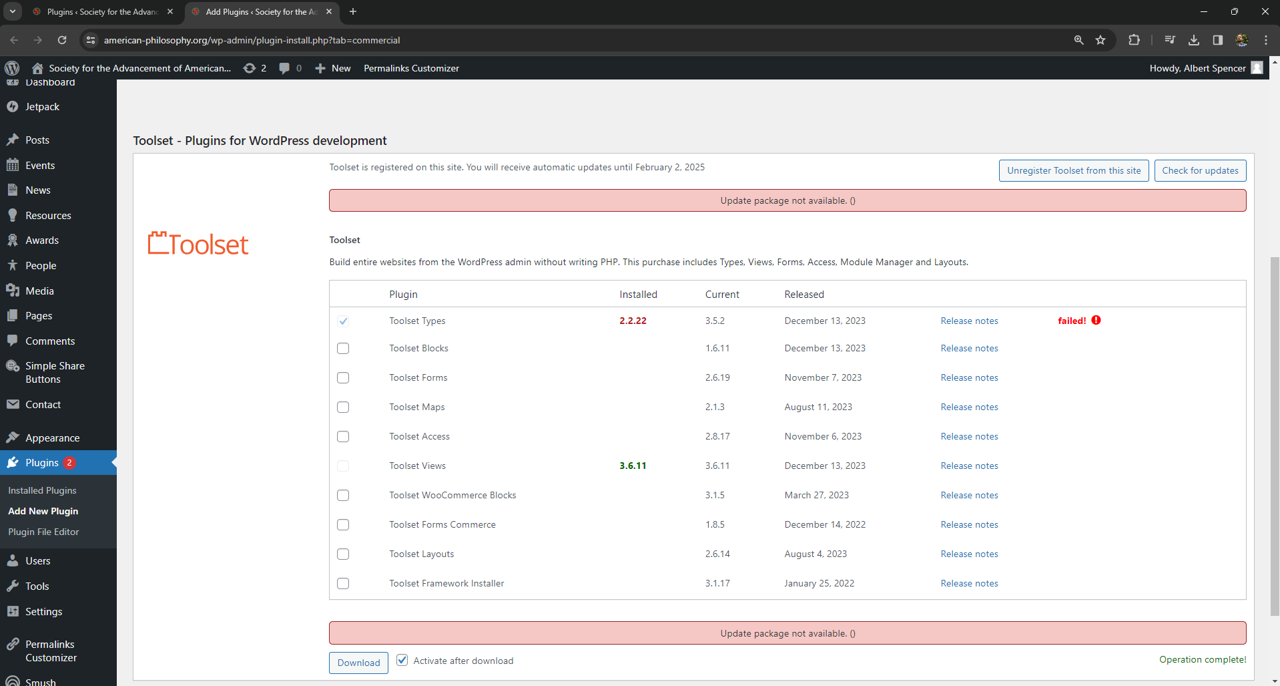
Tell us what you are trying to do?
Download and install Toolset Plug-In
Is there any documentation that you are following?
Is there a similar example that we can see?
See Screenshot below
What is the link to your site?
hidden link
Minesh Supporter
Languages:
English (English )
Timezone:
Asia/Kolkata (GMT+05:30)
Hello. Thank you for contacting the Toolset support.
Based on the screenshot you shared - I saw that you are using really outdated Toolset Types plugin version.
We publish the Types 3.0 with the new many to many relationships and we have added the number of new features to this major release and that is before almost five/six years a go.
Please check the following blog:https://toolset.com/2018/05/toolset-post-relationships-release/ https://toolset.com/2018/05/when-if-to-migrate-relationships-in-old-toolset-sites/
*** Please make a FULL BACKUP of your database and website.***
For now, please try to update the Toolset plugin using "OTGS Installer":
1) Deactivate and Delete all Toolset plugins from plugins page: hidden link https://toolset.com/account/downloads/ https://toolset.com/faq/how-to-install-and-register-toolset/#installing-the-otgs-installer-plugin https://toolset.com/faq/how-to-install-and-register-toolset/#automatic-installation-once-you-have-otgs-installer-plugin-installed