Hi there from Germany,
I am building a Website with a CPT "Teams" for a local football club. I am also using Toolset and Elementor on "Hello Theme", latest WordPress.
Next to the Teams fields I want to show the related standard posts (listed) as Team NEWS on a teams single template.
How can I manage to show additionally the Posts on the Teams single by same Category? Meaning Team A should have the News of the Category for Team A.
Can´t realise it with Elementor, because the CPT Teams does not have any widget in Elementor Templates.
Is there a chance to build this with a View or template of toolset?
Al the best from Germany
Jörg
Hi Jorg,
Thank you for getting in touch.
If I understand correctly you essentially want to display Posts of the same category as the one that is currently being viewed. If so then you can do this with a view.
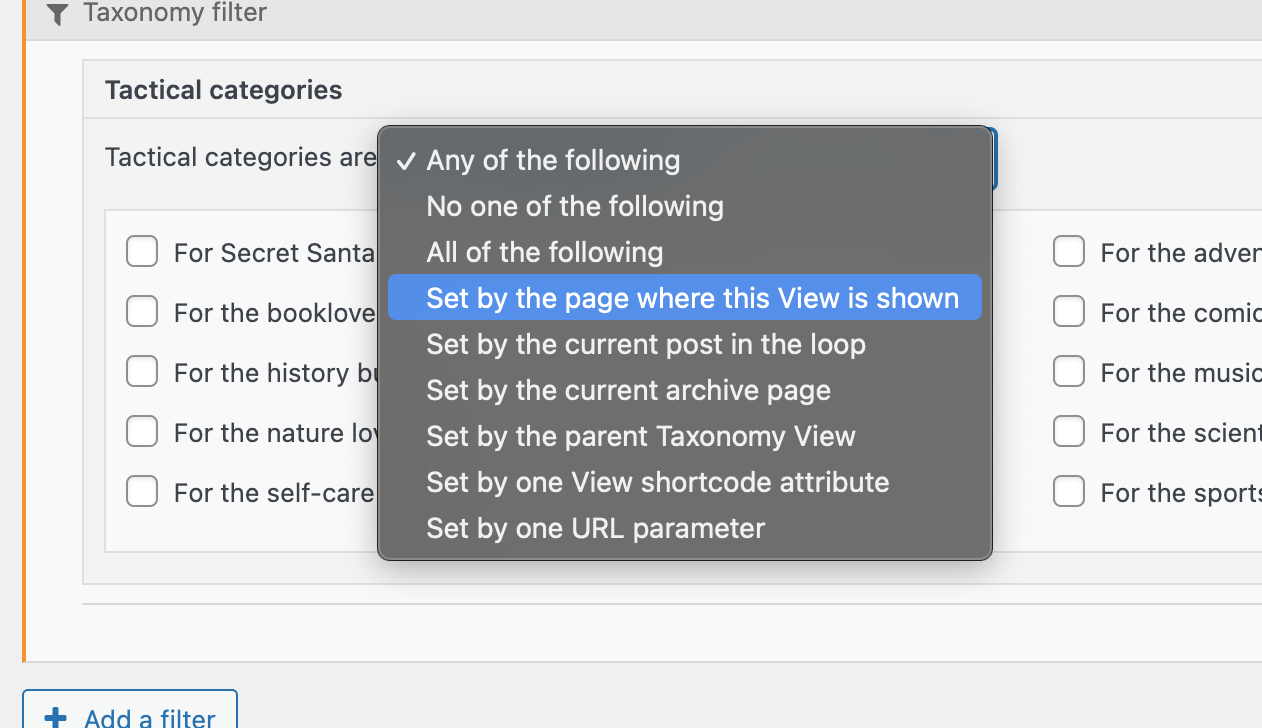
Go to Toolset -> Views and create a new view for that same post type and then add a query filter to that view for the specific taxonomy and then set the filter to get the value from the current page that the view is on.
Then just populate the view with the loop wizard with the additional info that you want that view to display. From there you can simply add your view to your elementor template.
Please let me know if this helps.
Thanks,
Shnae
Hey Shane,
Thx for your soon reply.
Your Idea will work, no daubt. But the Page I want to integrate the Posts in is a template (single custom post)of my CPT Teams, which has a Category
So, if the category of the team ist "Junior Team A" It should publish the WP standard posts of the Category "Junior Team A".
I have 62 Teams, don´t want to create 62 Views and put it in manually
Is my description clear enough? Not easy to describe.
Jörg
Hi Jorg,
Then this is exactly what i'm describing that you should do with our Views plugin.
Adding the query filter to the view for the Category taxonomy and set it to filter for the same category of the page.
When the view is added to the page it will automatically display posts from that same category. See Screenshot
If you're having any issues setting up this please let me know.
Thanks,
Shane
HI Shane,
before moving on pls let me understand the category function,... I only created categories for the standard posts,... not for the category of the cpt. Is it right to do so?
because i created a filter as you described, but the result ist that it seeems to be no filter, all posts were shown.
Jörg
Hi Jorge,
Perhaps it'll be easier if I had a look at your setup to see exactly what is wrong.
Would you mind allowing me to have admin access to the website so that I can have a more detailed look at this for you ?
Please where applicable please provide me with a link to an example page where I can see the issue.
I've enabled the private fields for your next response.
Thanks
,Shane
Page is under developement, nothing is published yet.... no worries with testing
Jörg
Hi Jorg,
Based on what i'm seeing the correct information is being displayed.
If you take a look at the page you will see that i've output the taxonomy values for each post and they seem to be matching the page that its on.
hidden link
Thanks,
Shane
Hi Shane,
thx for your reply.
Yes you are right, the view ist there, ...but to many posts. This Category has got only one post(!)
Where do the others come from and follow?
Jörg
Hi Shane again,
additionally, why is the category shown before the h2 tag?
Jörg
Hi Jorg,
Only one post is now displaying in the view and it is the "Neue Trainingszeiten für unsere Jugendmannschaften in der neuen Saison
" post.
SO the correct data is indeed now showing.
additionally, why is the category shown before the h2 tag?
This was added by me for testing purposes to debug the view to see what data is being displayed.
Thanks,
Shane
A small missunderstanding at the end, but no matter, I now know how to move one, thx Shane (!!!)