Skip Navigation

[Resolved] How do I show specific fields in post snippets

This support ticket is created 3 years, 6 months ago. There's a good chance that you are reading advice that it now obsolete.

This is the technical support forum for Toolset - a suite of plugins for developing WordPress sites without writing PHP.

Everyone can read this forum, but only Toolset clients can post in it. Toolset support works 6 days per week, 19 hours per day.

Sun Mon Tue Wed Thu Fri Sat
- 9:00 – 12:00 9:00 – 12:00 9:00 – 12:00 9:00 – 12:00 9:00 – 12:00 -
- 13:00 – 18:00 13:00 – 18:00 13:00 – 18:00 14:00 – 18:00 13:00 – 18:00 -

Supporter timezone: America/Jamaica (GMT-05:00)

This topic contains 7 replies, has 3 voices.

Last updated by dmitrya 3 years, 5 months ago.

Assisted by: Shane.

Author
Posts
#2442229
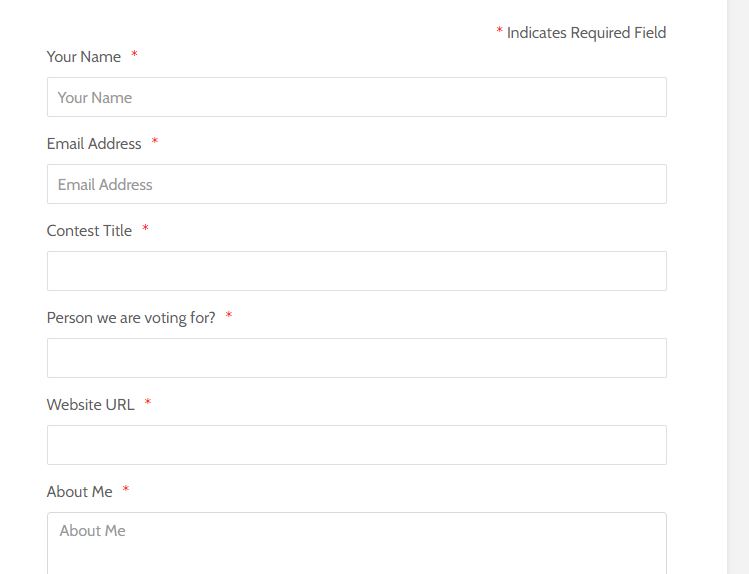
Post form.JPG
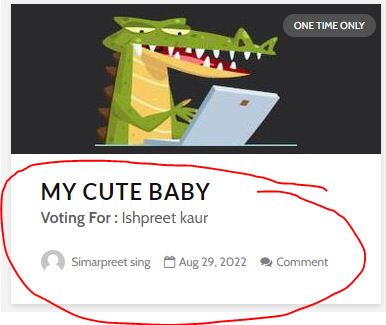
post snippet.JPG

How do I get specific fields to show in my post snippets? For example, a user fills out the form on the front page of my website when it gets posted the preview of the post currently shows the author's name, if there are comments, the date, and who my users are voting for.

1, I'd like to be able to edit the preview fields as I choose but I can't seem to find where I can edit the previews. I attached an example of the preview I'm trying to edit.

2. I know how to create a form but how do I get the info filled out in the form posted to another page like it currently does? Most of the work on my site was done by my dev and he never explained to me the inner workings of Toolset I know basic stuff and yes I've gone through the tutorials I'm still lost any help would be appreciated.

I know you need shortcodes to show the form but once the form is filled out i'd like the custom posts to go to a specific page like current setup on my get online votes site.

I'm trying to learn as i wanna start my other site so basically once a user fills out a form here on the front page. How did the data transfer here hidden link front page to hidden link?

Thanks you

Dmitry

#2442339

Hello,

What is the "post snippets" you mentioned above?
Please provide your website credentials in below private message box, also point out:
- the "post snippets" URL
- Which custom field do you want to display
Thanks

#2442429

Hello, can you please transfer this support ticket to Shane?

Thank you

Dmitry

#2442431

As your request, transfer it to Shane

#2443529

Shane
Supporter

Languages: English (English )

Timezone: America/Jamaica (GMT-05:00)

Hi Dmitrya,

Are you using a content template to create the previews or are they being generate by your plugin/theme?

Is it the information on the form that you want to display in your preview?

Please provide some clarity on these questions and we can go from there.

Thanks,
Shane

#2443611

Hi Shane,

I was informed by my dev these are custom Templates and cannot be edited using Tooslet. I thought since some of the info on the template is pulled from Toolset I could edit it but guess not.

Do you know if Toolset lets you edit custom templates?

Thanks

Dmitry

#2443643

Shane
Supporter

Languages: English (English )

Timezone: America/Jamaica (GMT-05:00)

Hi Dmitry,

Thats correct the custom templates can't be edited by Toolset.

Depending on the scenario you will need to create a custom template to display your items.

Thanks,
Shane

#2445331

My issue is resolved now. Thank you!