Skip Navigation

[Waiting for user confirmation] hide the blog title only for that page

This is the technical support forum for Toolset - a suite of plugins for developing WordPress sites without writing PHP.

Everyone can read this forum, but only Toolset clients can post in it. Toolset support works 6 days per week, 19 hours per day.

This topic contains 1 reply, has 1 voice.

Last updated by Christopher Amirian 4 hours, 29 minutes ago.

Assisted by: Christopher Amirian.

Author
Posts
#2868567
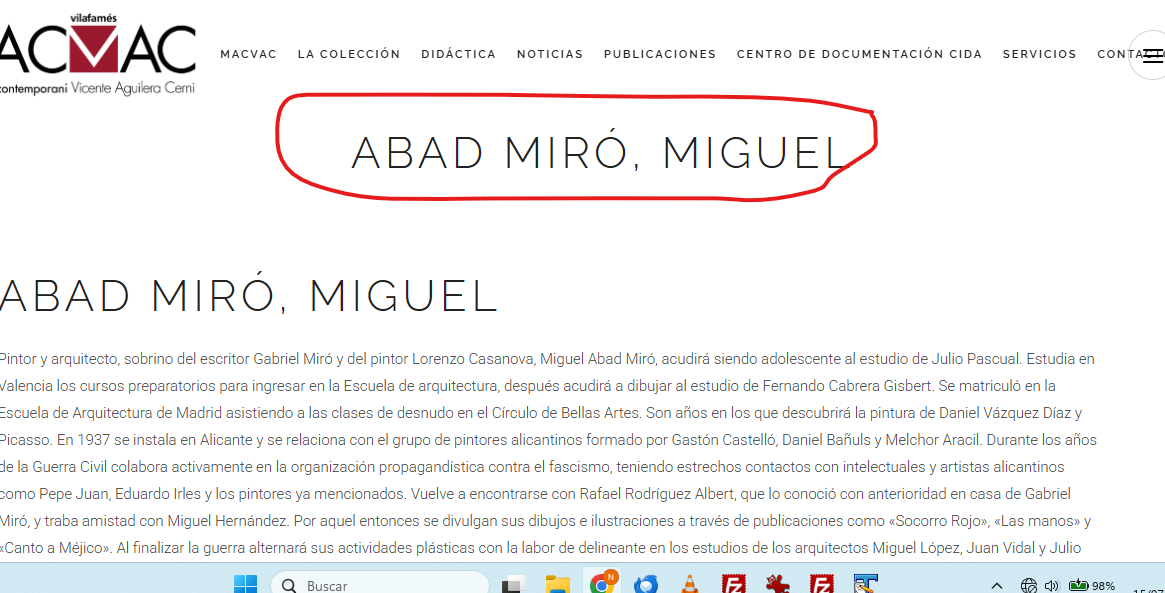
Captura de pantalla 2026-07-15 105925.png

Hello,
I want to hide the blog title only for the page that I am using Toolset. If I hide all the post title with this:
.title_subtitle_holder {
display: none;
I cannot see the title for my post blog.
Please, how can I hide the title only for these pages creates with Toolset?
The page are hidden link
I attached you and screenshot.
Best regards,
Nuria Benaches

#2868572

Christopher Amirian
Supporter

Languages: English (English )

Hi,

Welcome to Toolset support. If you want to hide the title only for that specific page, please add this CSS code to your theme:

body.postid-3093 .title_subtitle_holder {
    display: none;
}

But if you want to hide the title for all Artista post type single post entries, use this CSS code:

body.single-artista .title_subtitle_holder {
    display: none;
}

Thanks.