Link to a page where the issue can be seen: hidden link
I expected to see: The Permalink Settings page.
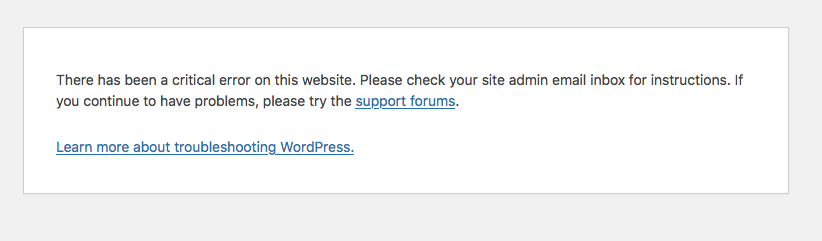
Instead, I got: See screenshot.
In troubleshooting this issue, disabling the Types plugin resolves the issue.
This seems to be a problem with custom post types and WordPress class-wp-rewrite.php
Here is the debug info:
Deprecated: WPV_Content_Template_Embedded::__construct(): Implicitly marking parameter $constants as nullable is deprecated, the explicit nullable type must be used instead in /home/duboisking/public_html/new/wp/wp-content/plugins/toolset-blocks/embedded/inc/classes/wpv-content-template-embedded.class.php on line 57

Deprecated: WPV_Content_Template_Embedded::__construct(): Implicitly marking parameter $wpv_wordpress_archive_frontend as nullable is deprecated, the explicit nullable type must be used instead in /home/duboisking/public_html/new/wp/wp-content/plugins/toolset-blocks/embedded/inc/classes/wpv-content-template-embedded.class.php on line 57

Deprecated: OTGS_UI_Loader::__construct(): Implicitly marking parameter $locator as nullable is deprecated, the explicit nullable type must be used instead in /home/duboisking/public_html/new/wp/wp-content/plugins/toolset-blocks/vendor/otgs/ui/src/php/OTGS_UI_Loader.php on line 22

Deprecated: OTGS_UI_Loader::__construct(): Implicitly marking parameter $assets as nullable is deprecated, the explicit nullable type must be used instead in /home/duboisking/public_html/new/wp/wp-content/plugins/toolset-blocks/vendor/otgs/ui/src/php/OTGS_UI_Loader.php on line 22

Deprecated: Toolset_Compatibility_Theme_Handler::__construct(): Implicitly marking parameter $populate_manager as nullable is deprecated, the explicit nullable type must be used instead in /home/duboisking/public_html/new/wp/wp-content/plugins/toolset-blocks/vendor/toolset/toolset-theme-settings/compatibility-modules/toolset.layouts-theme.class.php on line 48

Deprecated: Toolset_Compatibility_Theme_Handler::__construct(): Implicitly marking parameter $helper as nullable is deprecated, the explicit nullable type must be used instead in /home/duboisking/public_html/new/wp/wp-content/plugins/toolset-blocks/vendor/toolset/toolset-theme-settings/compatibility-modules/toolset.layouts-theme.class.php on line 48

Deprecated: OTGS\Toolset\Common\Relationships\MainController::__construct(): Implicitly marking parameter $database_layer_factory_di as nullable is deprecated, the explicit nullable type must be used instead in /home/duboisking/public_html/new/wp/wp-content/plugins/toolset-blocks/vendor/toolset/toolset-common/inc/m2m/MainController.php on line 85

Deprecated: OTGS\Toolset\Common\Relationships\MainController::__construct(): Implicitly marking parameter $cleanup_factory_di as nullable is deprecated, the explicit nullable type must be used instead in /home/duboisking/public_html/new/wp/wp-content/plugins/toolset-blocks/vendor/toolset/toolset-common/inc/m2m/MainController.php on line 85

Deprecated: ToolsetCommonEs\Library\MobileDetect\MobileDetect::__construct(): Implicitly marking parameter $headers as nullable is deprecated, the explicit nullable type must be used instead in /home/duboisking/public_html/new/wp/wp-content/plugins/toolset-blocks/vendor/toolset/common-es/server/Library/MobileDetect/MobileDetect.php on line 686

Deprecated: ToolsetCommonEs\Rest\Route\PostSearch::__construct(): Implicitly marking parameter $wp_query_factory as nullable is deprecated, the explicit nullable type must be used instead in /home/duboisking/public_html/new/wp/wp-content/plugins/toolset-blocks/vendor/toolset/common-es/server/Rest/Route/PostSearch.php on line 15

Deprecated: OTGS_Installer_Repository::set_subscription(): Implicitly marking parameter $subscription as nullable is deprecated, the explicit nullable type must be used instead in /home/duboisking/public_html/new/wp/wp-content/plugins/types/vendor/otgs/installer/includes/repository/class-otgs-installer-repository.php on line 85

Deprecated: OTGS_Installer_Package_Product_Finder::get_product_in_repository_by_subscription(): Implicitly marking parameter $subscription as nullable is deprecated, the explicit nullable type must be used instead in /home/duboisking/public_html/new/wp/wp-content/plugins/types/vendor/otgs/installer/includes/class-otgs-installer-package-product-finder.php on line 11

Warning: Cannot modify header information - headers already sent by (output started at /home/duboisking/public_html/new/wp/wp-content/plugins/types/vendor/otgs/installer/includes/class-otgs-installer-package-product-finder.php:11) in /home/duboisking/public_html/new/wp/wp-includes/functions.php on line 7182

Fatal error: Uncaught TypeError: Unsupported operand types: string & int in /home/duboisking/public_html/new/wp/wp-includes/class-wp-rewrite.php:1036 Stack trace: #0 /home/duboisking/public_html/new/wp/wp-includes/class-wp-rewrite.php(1413): WP_Rewrite->generate_rewrite_rules() #1 /home/duboisking/public_html/new/wp/wp-includes/class-wp-rewrite.php(1513): WP_Rewrite->rewrite_rules() #2 /home/duboisking/public_html/new/wp/wp-includes/class-wp-rewrite.php(1888): WP_Rewrite->refresh_rewrite_rules() #3 /home/duboisking/public_html/new/wp/wp-includes/rewrite.php(282): WP_Rewrite->flush_rules() #4 /home/duboisking/public_html/new/wp/wp-admin/options-permalink.php(212): flush_rewrite_rules() #5 {main} thrown in /home/duboisking/public_html/new/wp/wp-includes/class-wp-rewrite.php on line 1036
I tested 8.3, 8.2, 8.1, and 8.0 - ALL return the fatal error.
Deactivating Types the error goes away... but when I re-activate Types, I'm getting 404 errors for my CPTs - which is why I was trying to update my Permalinks.
Fatal error: Uncaught TypeError: Unsupported operand types: string & int in /home/duboisking/public_html/new/wp/wp-includes/class-wp-rewrite.php:1036 Stack trace: #0 /home/duboisking/public_html/new/wp/wp-includes/class-wp-rewrite.php(1413): WP_Rewrite->generate_rewrite_rules() #1 /home/duboisking/public_html/new/wp/wp-includes/class-wp-rewrite.php(1513): WP_Rewrite->rewrite_rules() #2 /home/duboisking/public_html/new/wp/wp-includes/class-wp-rewrite.php(1888): WP_Rewrite->refresh_rewrite_rules() #3 /home/duboisking/public_html/new/wp/wp-includes/rewrite.php(282): WP_Rewrite->flush_rules() #4 /home/duboisking/public_html/new/wp/wp-admin/options-permalink.php(212): flush_rewrite_rules() #5 {main} thrown in /home/duboisking/public_html/new/wp/wp-includes/class-wp-rewrite.php on line 1036
What if you try to deactivate all third-party plugins excluding Toolset plugins and then check if you able to see it working when ONLY Toolset plugins active.
- Do you see any difference?
NOTE: I downgraded to 7.4, and was able to access the Permalinks settings page with Types active.
However, a warning is still thrown:
Warning: A non-numeric value encountered in /home/duboisking/public_html/new/wp/wp-includes/class-wp-rewrite.php on line 1038
Disabling Types makes the warning go away. There is obviously a problem with strings/characters in my CPTs or taxonomies.
The warning does not display with debugging turned off in WP config.
NOTE: When I tried to switch to Twenty-Twenty Five theme with Types enabled.. Fatal Error.
It DID switch themes. Disabled Types, and no errors switching themes.
Can you please send me duplicator copy of your site and also shere details where I can see the fatal error accessing what post/page in backend or frontend?
Minesh, the site is too big for a Duplicator backup (2.93GB).
I am currently trying to migrate the site to a new server, so I am looking at rebuilding it on a clean install of WordPress and PHP 8.2.
It seems as though something in my CPTs is causing the error - so hopefully recreating them might fix it.
I will keep the old site/code on my dev server and give you Administrator access once I have got everything backed up.
Me again, as Minesh is off today. It is very hard to determine what might be the cause of the issue unless there is a version of the website that it is possible to do troubleshooting without the fear of breaking the website.
Since the fatal error happens while WordPress is generating rewrite rules, and since disabling Types removes the issue, the next thing to check is the slug / rewrite configuration of the Types custom post types and custom taxonomies.
- Go to Toolset → Post Types, edit each custom post type, and check the Options → Rewrite settings. Toolset uses these rewrite settings for the post type URLs and archive URLs.
- Review the custom taxonomies as well and check their slugs. Toolset creates taxonomies with slugs, and those slugs must not conflict with other rewrite structures.
- Please make sure there is no duplicate slug and that a taxonomy slug is not the same as a CPT slug. Toolset confirms duplicate slugs are not allowed, and using a taxonomy slug as the CPT slug can lead to permalink failures.
- Also, adding a page or post with the same slug of the custom post type might cause such a conflict.
But it can not be determined unless the custom post types are deactivated/deleted to their slug changed in a staging/copy environment one by one and checked.
Thanks for the reply.
I am currently working on editing some duplicate slugs (I haven't resolved the fatal error yet), deactivating the various CPTs/taxonomies has NOT solved the problem yet.
... the code was comparing the current page slug to the taxonomy slug to display children. The reason it worked was because the slug of the page matched the taxonomy slug.
Since I'm changing the page slugs, this code no longer works.