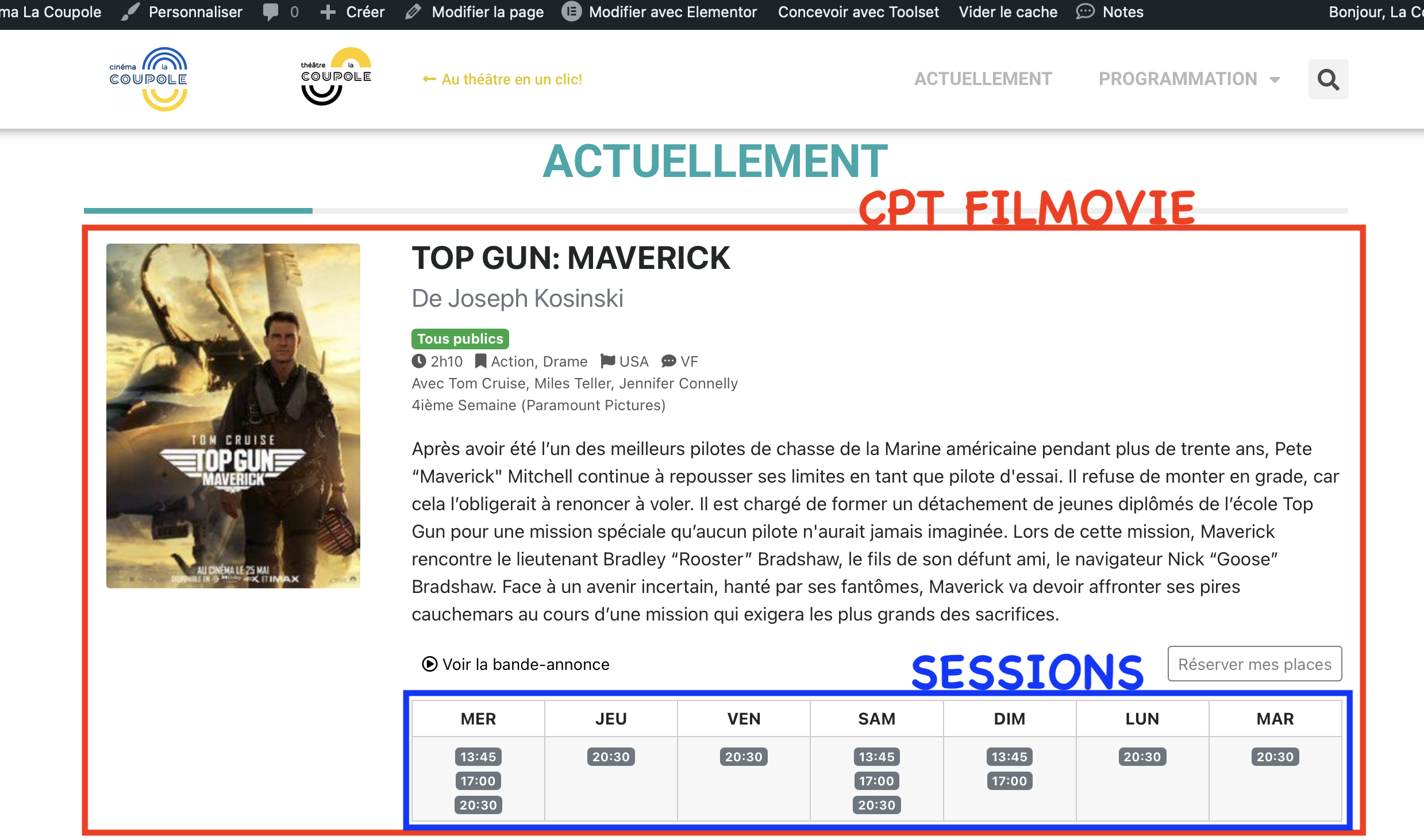
I want to be able to display the programming of a cinema.
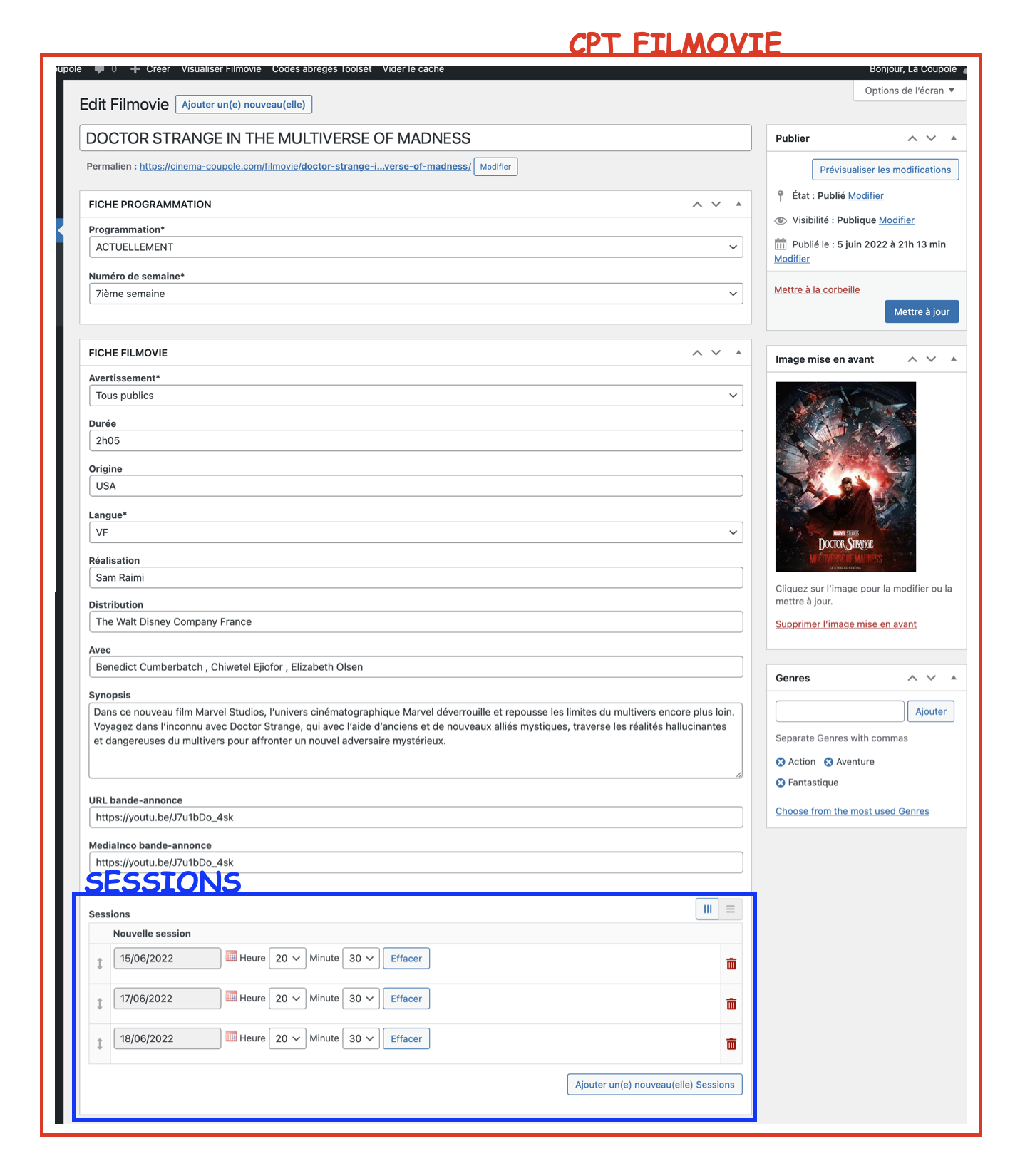
I have created a "Filmovie" CPT where movies are saved using different custom fields.
Session dates and times are created and saved using a group of repeatable fields.
I then created a View that should display the current schedule (according to a "Programmation" CPF and the "Actuellement" criteria).
So far, everything is ok.
I would like the view to be able to be filtered according to the date of the session : if I select one date, the view must only display the films and times of this date.
But I also want to be able to view all sessions (all dates and times) using a "view all week" button.
You can see an example on the website of another cinema: hidden link
If you need access to my site, I will create an ID for you.
- - - - -
Is there any documentation that you are following?
Toolset knowledge base.
Is there a similar example that we can see?
hidden link
What is the link to your site?
hidden link
Hello,
I assume we are talking about a Toolset repeatable field groups.
If it is, the repeatable field groups are based on one-to-many relationship, so "Session" is also a custom post type, you can follow our document to setup a post view:
- Query Session posts
https://toolset.com/course-lesson/creating-and-displaying-repeatable-field-groups/#displaying-repeatable-field-groups
- Setup the custom search form, filter by your custom date field:
https://toolset.com/documentation/user-guides/views/date-filters/
https://toolset.com/course-lesson/creating-a-custom-search/
- In view's loop, display parent "Filmovie" post information
https://toolset.com/documentation/programmer-reference/views/views-shortcodes/item-attribute/
If you need more assistance for it, you can provide your website credentials in below private message box, I can setup a demo for you
Hello,
Thank you for your helping!
Currently the configuration is as :
"Filmovie" is a CPT,
"Sessions" is a group of repeatable fields.
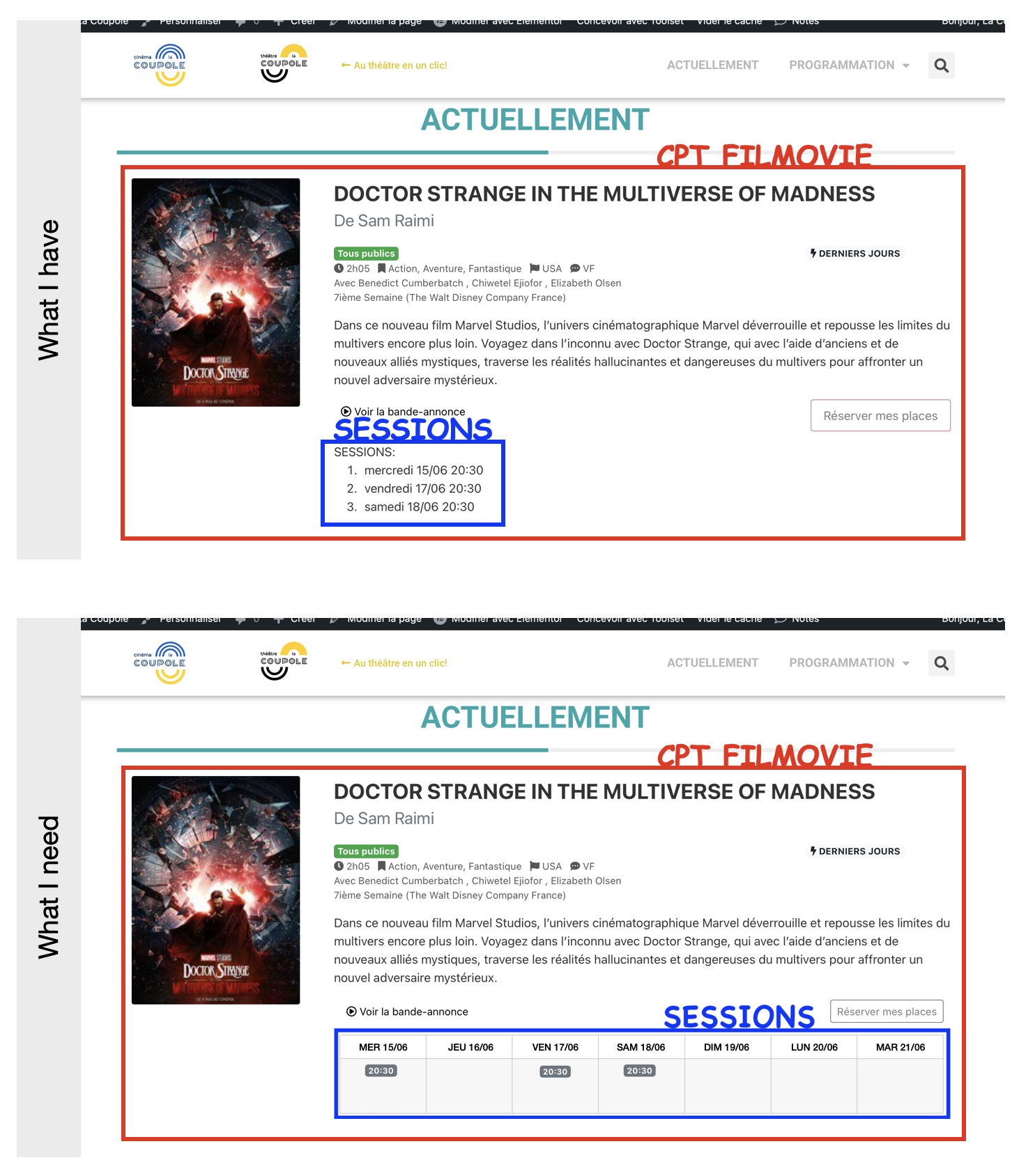
I created a View to display the "Filmovie" and a View to display the "Sessions".
The "Sessions" view query filter includes the criteria "Filter by post relationship or owner of repeatable field groups" > Select "sessions" items as related items from : Current post in loop.
I need on the page the user can select a date and the result of this search shows the sessions of the selected date.
I can't create this "link" 🙁
@Toolset Support : If you need access to the administration of the site, I will create an ID for you (in private message).
Please share your website credentials in below private message box, also point out the problem page URLs
Your website isn't in English and website settings is complicated, there are lots of post view in the URL you mentioned above.
Please provide more details for these questions:
Which one is the custom field group "Sessions"?
Which one is the custom date field?
Also point out the post view URLs.
Where do you want to display the related "Sessions" posts?
Your website isn't in English and website settings is complicated, there are lots of post view in the URL you mentioned above.
I'm sorry for the language... i'm in France.
Please provide more details for these questions:
Which one is the custom field group "Sessions"?
The group of repeatable fields SESSIONS can be found in the CPT FILMOVIE.
Which one is the custom date field?
I don't understand this question.
Also point out the post view URLs.
hidden link (section ACTUELLEMENT)
Where do you want to display the related "Sessions" posts?
The SESSIONS publication must be displayed under the associated "FILMOVIE"; like a classic cinema program.
Maybe with screen capture attached is it more simple to understand for you?
Here are 2 images that might help you understand what I need...
Thanks for the details, I am checking it in your website, will update here if find anything
I assume we are talking about the post view "myView1-avp":
hidden link
It is querying "Filmovies" posts, and you are going to filter the result by custom date field "Nouvelle session" of another post type "Sessions".
If it is, it is not possible within WordPress or Toolset plugins, as I mentioned above:
Toolset repeatable field groups are based on one-to-many relationship, so "Session" is also a custom post type.
Since you are querying post type "Filmovies", so you can not filter result by custom fields "Nouvelle session" of another post type "Sessions", it is a limitation of WordPress core.
In your case, you can consider the workaround I mentioned above:
1) Create a post view:
- Query Session posts
- Setup the custom search form, filter by your custom date field:
https://toolset.com/documentation/user-guides/views/date-filters/
https://toolset.com/course-lesson/creating-a-custom-search/
- In view's loop, display parent "Filmovie" post information
https://toolset.com/documentation/programmer-reference/views/views-shortcodes/item-attribute/
2) Create another page, and display above post view directly.
Please let me know if you need assistance to setup above post view.
I'm sorry... but I need help for "myView3-Actuellement" (not "myView1-avp").
Now, I can display in the loop the schedules of all the sessions ("session-date-ts" fields in the cpt "Filmovie").
But I need to be able to filter the output with a calendar ; when the visitor chooses a date, only the sessions of this date should be displayed.
It is possible?
Thanks for the details, in order to filter the date-time field by a date value, it needs custom codes, I have done below modifications in:
1) Dashboard-> Toolset-> Settings-> Custom codes, add an item "mydayfilter", with below codes:
add_filter('wpv_filter_query', function($args, $settings, $view_id){
  if($view_id == 4978){
    if(isset($_GET['wpv-wpcf-session-date-ts'])){
      $start = $_GET['wpv-wpcf-session-date-ts'];
      $end = $start + 24 * 3600;
      foreach($args['meta_query'] as $k => $v){
      	if($v['key'] == 'wpcf-session-date-ts'){
          $args['meta_query'][$k] = array(
            'key'     => 'wpcf-session-date-ts',
            'value'   => array( $start, $end ),
            'type'    => 'numeric',
            'compare' => 'BETWEEN',
          );
          break;
        }
      }
    }
  }
  return $args;
}, 10, 3);
2) Edit one of "Filmovies" post:
hidden link
in field "Session-date-ts" add one value: 21/06/2022 18:00
Test it in frontend, for example:
hidden link
It works fine, it is only a demo for your reference, you need to customize the search form manually.
Excellent! That's so cool, thank you!
But... I don't like the result of the display.
I would like each 'session' to be able to display individually.
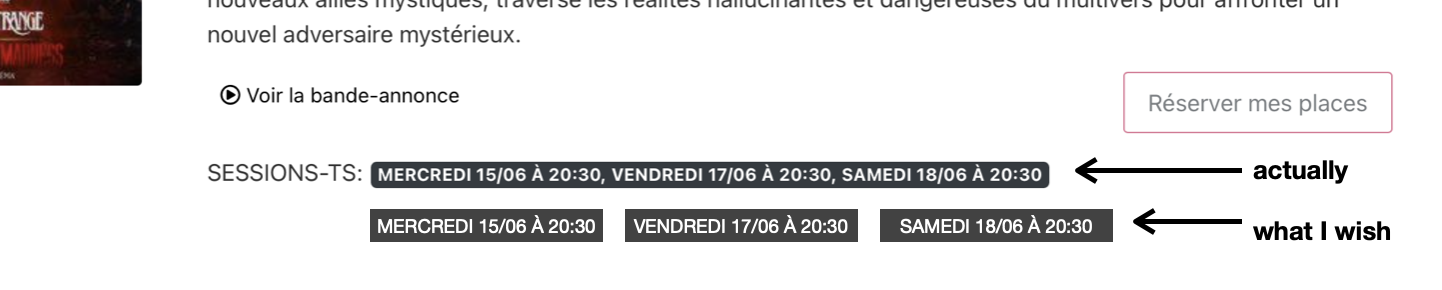
When I display the 'sessions' in a Bootstrap badge, it displays the whole row in the badge.
Can each 'session' be displayed in a badge? (see screenshot)
And optionally group 'sessions' by 'day'. Ex:
TUESDAY 21/06 13:45, 17:00, 20:30
and not
TUESDAY 21/06 13:45, TUESDAY 21/06 17:00, TUESDAY 21/06 20:30
And is it possible that when loading the page it is displayed the sessions of the current date (and not other dates)?
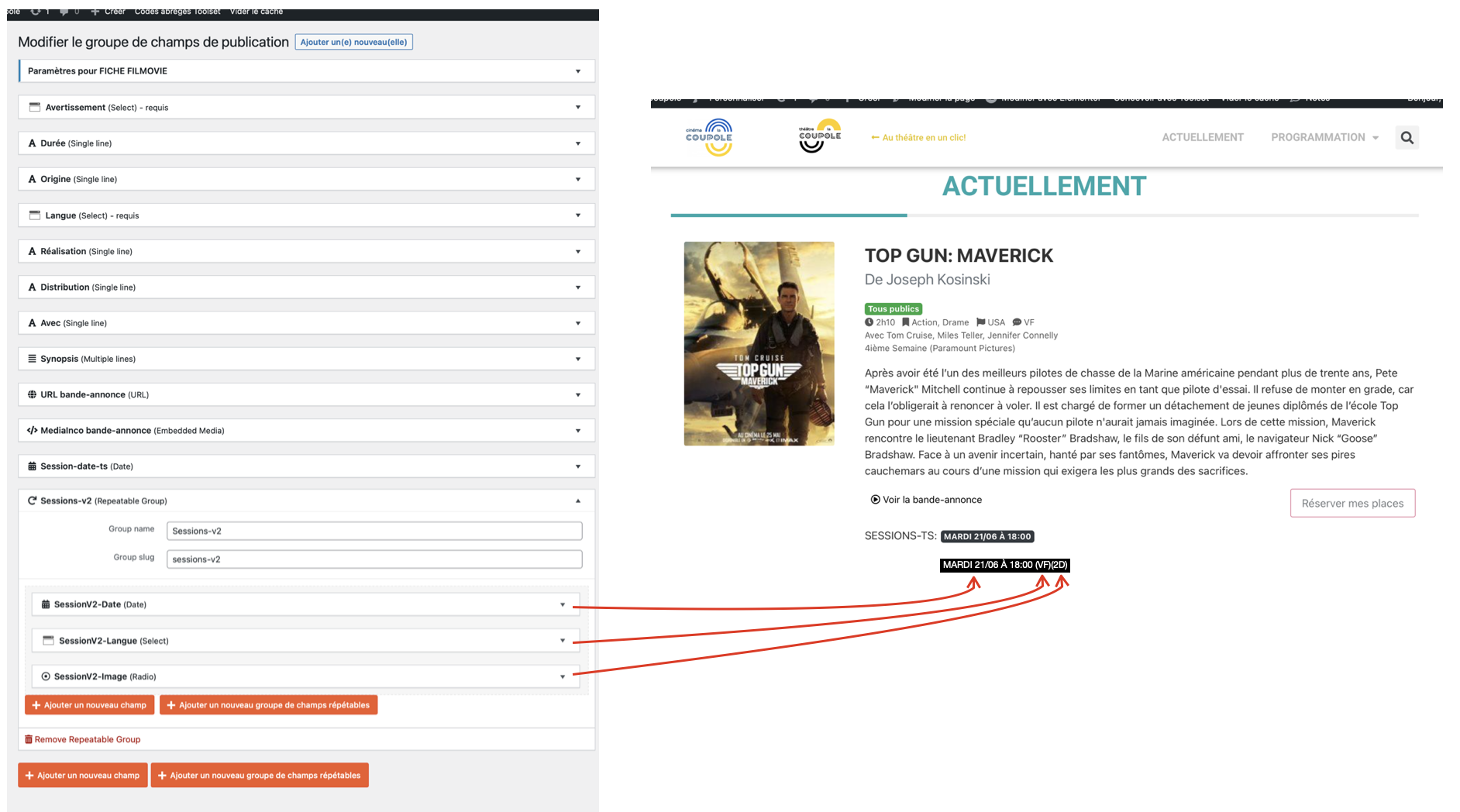
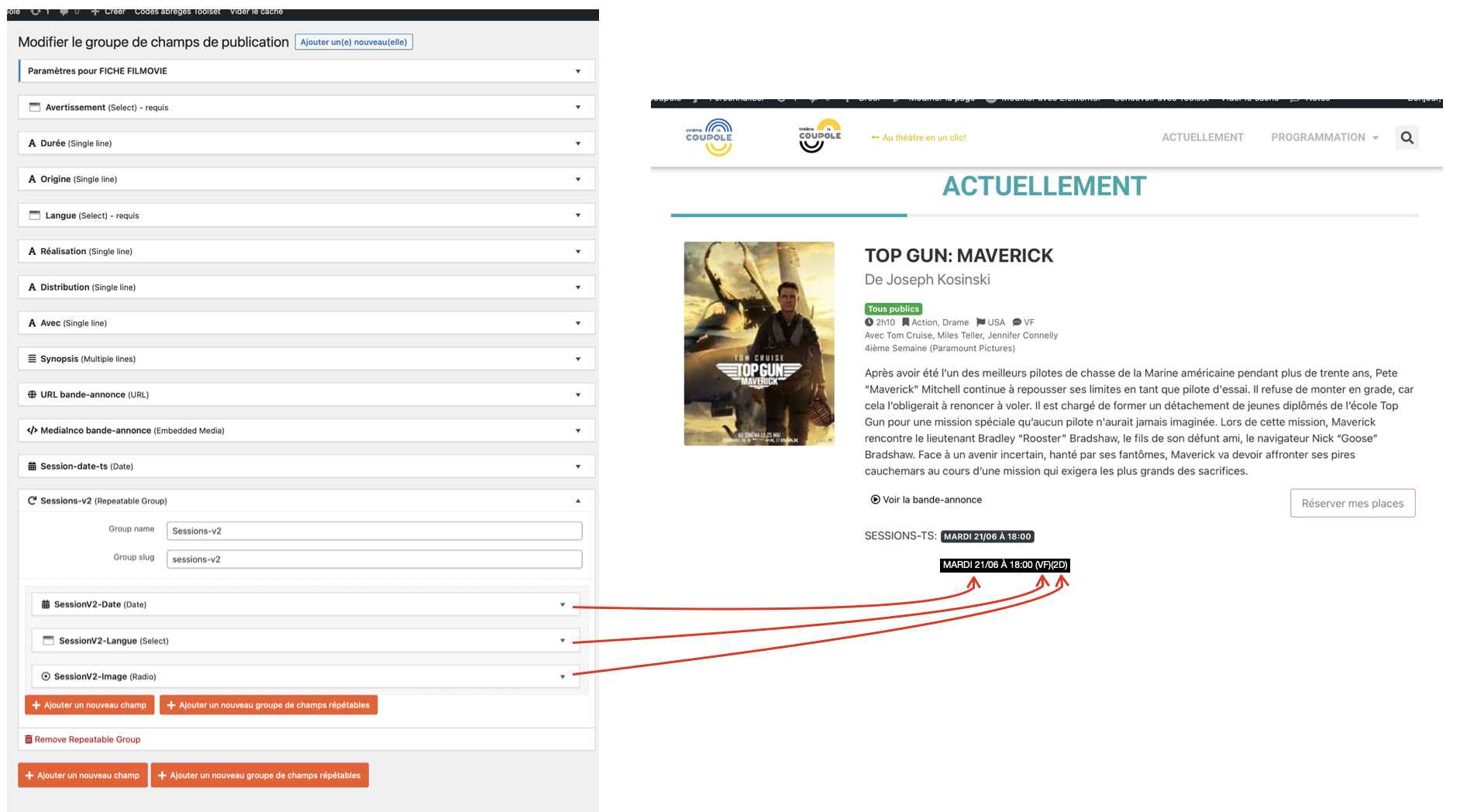
To go further in the use of Toolset and the personalization of the site, I added a 'group of repeatable fields' in the CPT 'Filmovie': 'SessionV2'.
Is it possible to display the information of each session on the font-end?
Ex: WEDNESDAY 22/06 13:45 (VF)(2D) | 17:00 (VOSTFR)(2D) | 18:00 (VF)(2D)
You can try [wpv-for-each] shortcode, for example, edit the post view "myView3-Actuellement":
hidden link
in section "Loop item in myView3", line 48, replace to:
[wpv-for-each field="wpcf-session-date-ts"]<span class="badge badge-dark lessessions">[types field='session-date-ts' style='text' format='l d/m à H:i'][/types]</span> [/wpv-for-each]
More help:
https://toolset.com/documentation/programmer-reference/views/views-shortcodes/#wpv-for-each
Iterate through multiple items in a post meta field and output the enclosed text for each item. Including Types repeating fields.
Great job, thank you!
But how to display only the sessions of the selected day in the calendar?
And is it possible, that when loading the page, it is displayed only the sessions of the current date (and not other dates)?
To go further in the use of Toolset and the personalization of the site, I added a 'group of repeatable fields' in the CPT 'Filmovie': 'SessionV2'.
Is it possible to display the information of each session on the font-end?
Ex: WEDNESDAY 22/06 13:45 (VF)(2D) | 17:00 (VOSTFR)(2D) | 18:00 (VF)(2D)