I have a form created with Toolset Forms various fields. One of them is a multiple single line custom field. When testing the form leaving this field empty, I get the error message upon submission:
Fatal error: Uncaught TypeError: array_filter(): Argument #1 ($array) must be of type array, string given in .../plugins/cred-frontend-editor/application/controllers/validators/toolset_forms.php:101
I temporarily resolved the issue by replacing L. 98 of that file:
if ( is_null( $_values ) ) {
By:
if ( is_null( $_values ) or empty($_values) ) {
The reason I did this is that when the field is not filled by the user, $_values is empty, but it's not null and it's not fulfilling the condition empty($config['repetitive']) either (see L. 95). So it stays '' and is not changed into an array. Due to that, L. 101 fails.
This is a new issue that was not there before I updated from my old version of CRED to version 2.6.22.
Welcome to Toolset support. Would you please create the same scenario in a clean installation below?
hidden link
If it is possible to replicate the empty single-line problem there, I will immediately report this to the second-tier support to follow up with the development team.
Hi,
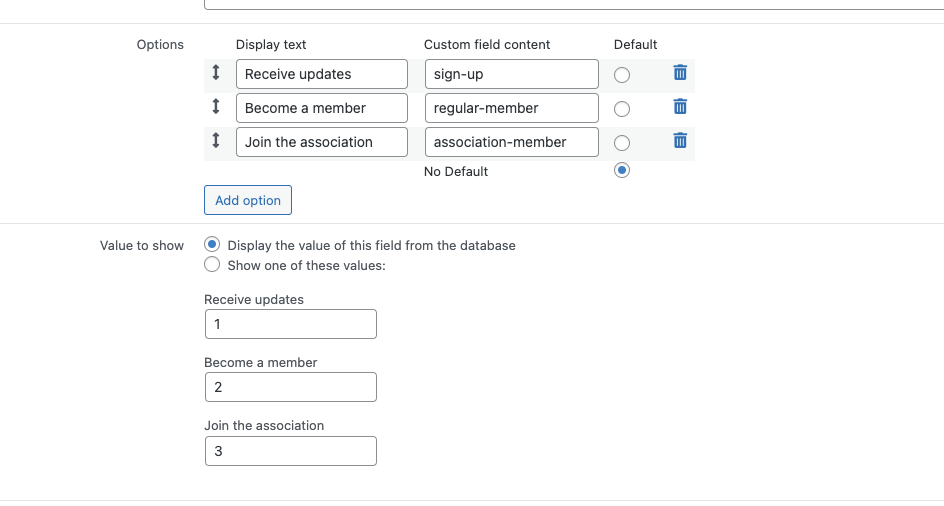
Thanks, I was able to recreate the issue on the sandbox. To see the issue, go to hidden link, select "Receive updates", and click "Send". There is a critical error. The critical error does not happen when the radio is set to another position. The issue seems to arise only when there is a conditional cred_show_group inside another one.
Thanks for your help!
I think you used the following in the sandbox:
[cred_show_group if="($(registration-type) ne '0' )" mode="fade-slide"]
which will lead to no reaction when you switch the radio button, and this whether the numerical or the slug is accepted. So, it's not testing anything (unless I missed something).
So to follow your suggestion, I changed it to the following in the sandbox:
[cred_show_group if="($(registration-type) eq '1' )" mode="fade-slide"]
I expect the inner part to display when the radio is in the first position only.
But there is no reaction when I switch the radio button from 1 to 2 to 3. In my understanding, this is because the custom field is set to take fields from the database, and this is what I need to do here.
So, I think we're back to square zero, with the problem still there. You can test this on the sandbox page /test-page.
Hi Christopher,
Thanks, yes that is absolutely correct. The issue arises with 2 nested conditional groups and with empty multi-single line fields.
Thanks for your help and let me know when it's resolved.
Christopher is on vacation. This is Minesh here and I will try to help you further.
I checked the internal ticket but there is no update available but I raise your concern and added your voice to our internal ticket. I/Christopher will get in touch with you once we have any update on this.