I am trying to:
Display a Custom URL field on a custom post
Link to a page where the issue can be seen:
hidden link
I expected to see:
"Lakeland PBS" with URL to related website
Instead, I got:
"Lakeland PBS" with empty href field
I am using this to successfully display the Name + URL on a View of custom post types: hidden link
hidden link
However when I use that HTML on the individual custom post type it only displays the 'source-name' and href is blank.
If I remove the a tag wrapper, [types field='source-link' output='raw'][/types] displays the correct URL.
Hi Eric,
Thank you for getting in touch.
Are you using a content template to display your custom post?
If not then this is why it isn't working. Using shortcodes as attributes in HTML tags are not allowed anymore by wordpress and as such for this to work the code must be added to our content template.
We have added a special workaround in our code to allow the shortcodes to still work as attributes for html tags.
Thanks,
Shane
Hi Shane,
Thanks for the explanation. I'm using Divi's Theme Builder to display the custom post, not the Toolset content template.
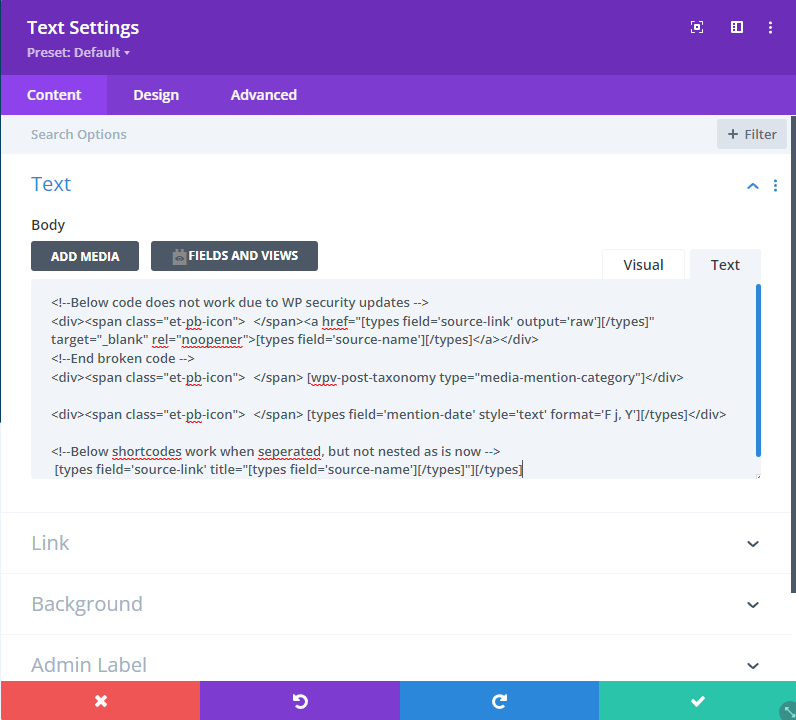
As a work around, I'm trying to do this: [types field='source-link' title="[types field='source-name'][/types]"][/types]
but on the frontend it is displaying as: Lakeland PBS“][/types]
Do you have any recommendations to get the above method to work, or other work-arounds?
Thanks
Hi Eric,
Given that you're using divi are you using their WYSIWYG editor to add the original anchor tag with the shortcode ? Or are you using their shortcode block.
If you're using the shortcode block can you try using the WYSIWYG editor ?
Failing this the only other solution I can think of is to create a custom shortcode that will basically create the custom link for you.
Thanks,
Shane
Hey Shane,
I'm not sure I fully understand your question. I'll try to explain the setup -
Divi's theme builder only allows editing page templates "on the front end" - the visual editor.
Within this editor, I am using a Text module where I am manually adding my anchor tag and Toolset shortcode (Not using the "Field and Views" button Toolset adds to the Text module. That button has never worked for me.)
The above issue almost appears to be an escape character issue - both shortcodes [types field='source-link' output='raw'][/types] and [types field='source-name'][/types] display the correct data - but when trying to nest the 'source-name' shortcode into the 'source-link' shortcode, its breaks. Is there an escape character I can be using to get this nested shortcode to work?
Hopefully that makes sense.
Thanks
Hi Eric,
Thank you for the screenshot, however given the case you will definitely need to use a custom shortcode to generate the url.
Try using this one below.
// Add Shortcode
function my_cust_url( $atts ) {

	// Attributes
	$atts = shortcode_atts(
		array(
			'id' => '',
		),
		$atts
	);

	$url = get_post_meta($atts['id'],'wpcf-source-link');
	$urlname = get_post_meta($atts['id'],'wpcf-source-name');

	return "<a href='".$url."' target='_blank' rel='noopener'>".$urlname."</a>";

}
add_shortcode( 'my_cust_url', 'my_cust_url' );
Add it to the Toolset custom code section at Toolset -> Settings -> Custom Code and ensure that you've activated it. You can use the shortcode like this.
[my_cust_url id="[wpv-post-id]"]
Thanks,
Shane
Thanks for the custom function Shane.
I added it to Toolset and activated it. However, the custom shortcode renders only as: "] - which makes me believe the issue is with calling a shortcode within the quotes - whether that is Divi or Toolset im not sure.
When I explicitly add the post id, i.e [my_cust_url id="1141"], it renders as:
hidden link
Any other ideas or suggestions? It seems this issue may lie with Divi's rendering of its own shortcodes and getting tripped up by the nested shortcode in quotes.
Hi Eric,
My apologies here is a modification for the shortcode so that it will work now.
// Add Shortcode
function my_cust_url( $atts ) {

    // Attributes
    $atts = shortcode_atts(
        array(
            'id' => '',
        ),
        $atts
    );

    $url = get_post_meta($atts['id'],'wpcf-source-link');
    $urlname = get_post_meta($atts['id'],'wpcf-source-name');
     if(!empty($url) && !empty($urlname)){
    return "<a href='".$url[0]."' target='_blank' rel='noopener'>".$urlname[0]."</a>";
}

}
add_shortcode( 'my_cust_url', 'my_cust_url' );
Please change the code to this one and let me know if you get the desired results now.
Thanks,
Shane
Thanks for fixing that function. When I explicitly pass in a post id, ie [my_cust_url id="1141"] , the function works.
When I try to pass in the nested shortcode, it still renders just as: "].
Hi Eric,
It seems we are still having issues with the nested shortcodes, so we perhaps need to just get the post ID in the code itself.
Please change the code to this below.
// Add Shortcode
function my_cust_url( ) {

  $id = get_the_ID();

    $url = get_post_meta($id,'wpcf-source-link');
    $urlname = get_post_meta($id,'wpcf-source-name');
     if(!empty($url) && !empty($urlname)){
    return "<a href='".$url[0]."' target='_blank' rel='noopener'>".$urlname[0]."</a>";
}

}
add_shortcode( 'my_cust_url', 'my_cust_url' );
Please let me know if this alternative works.
Thanks,
Shane
My issue is resolved now. Thank you!