THello,
Is it possible to assign a template to a CPT created with Toolset via the URL?
I teach cooking classes at a school. Some classes are for aspiring professionals, while others are for amateurs.
I created a “Technology” CPT, which I use to create instructional sheets on various techniques.
A taxonomy assigns this sheet to different levels.
I have created different templates that are displayed depending on the level.
However, some sheets should be usable by both amateurs and professionals (for example, the technique for filleting fish).
Is it possible that:
- If the sheet is accessed from the “amateur” menu, it displays using the “amateur” template
- If the sheet is accessed from the “professional” menu, it displays using the “professional” template
bearing in mind that each of these templates has a different navigation menu, created manually, and different headers.
I hope that’s clear....
In short, what I’d like is to be able to “force” the display of a specific template via the URL or another method, if you have one.
There are multiple ways to show the content template, if you can share problem URL and admin access details and tell me with what URL/menu you want to display what content template and once I review that I will be able to guide you in the right direction.
*** Please make a FULL BACKUP of your database and website.***
I would also eventually need to request temporary access (WP-Admin and FTP) to your site. Preferably to a test site where the problem has been replicated if possible in order to be of better help and check if some configurations might need to be changed.
I have set the next reply to private which means only you and I have access to it.
Hello,
I'm not sure if I phrased my request correctly. I'll try to be more specific.
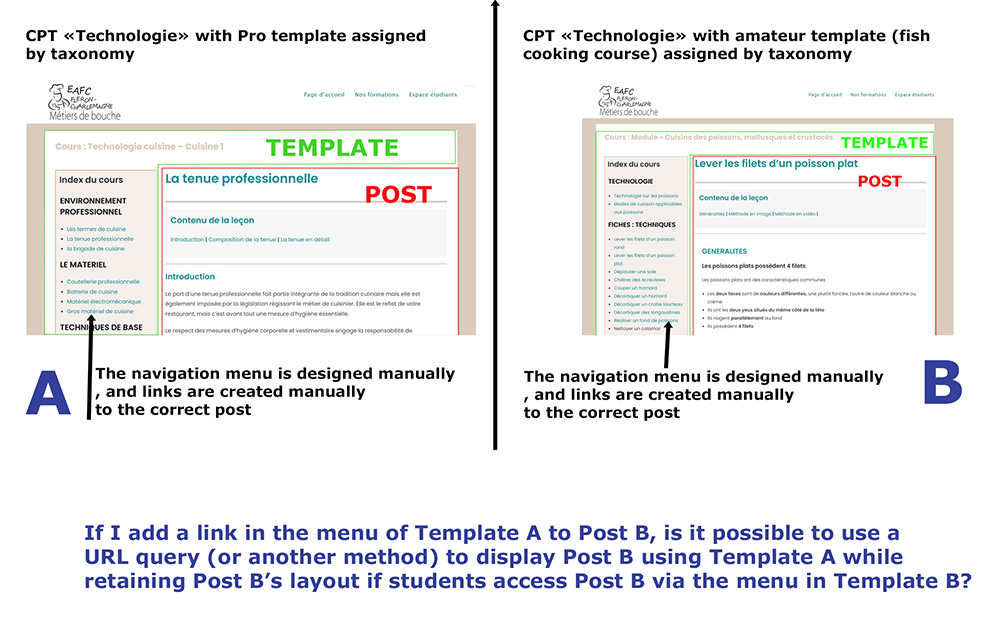
In the image below, you'll find two screenshots of my WordPress site using the “Technology” custom post type. The template varies depending on the level (professional courses or amateur courses, plus a few specific subcategories) assigned by a taxonomy. https://toolset.com/wp-content/uploads/tmp/Courscuisine_exempple.jpg
If I add a link in the menu of Template A to Post B, is it possible to use a URL query (or another method) to display Post B using Template A while retaining Post B’s layout if students access Post B via the menu in Template B?
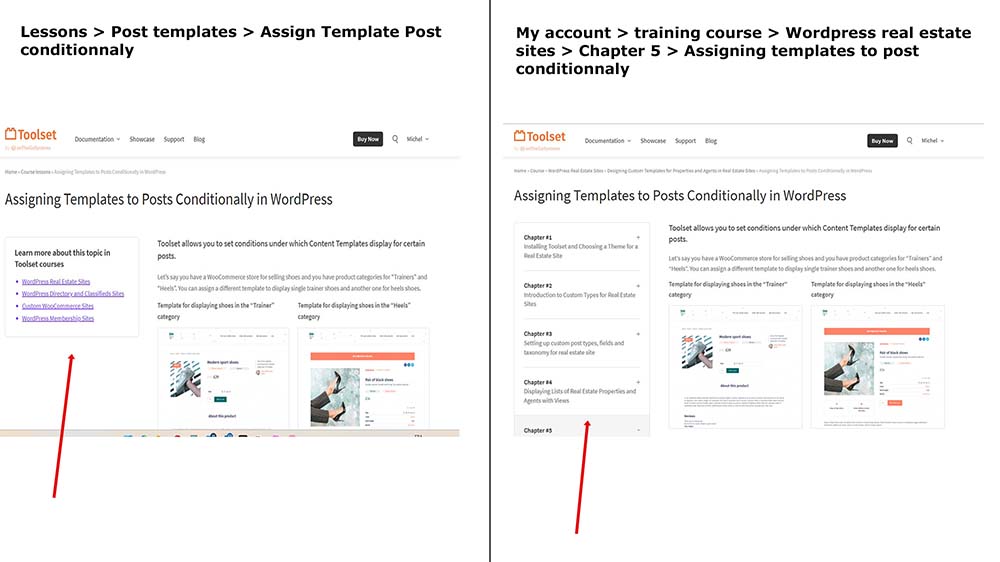
On the toolset website, there’s something that looks a lot like what I want to do. Depending on the path you take to access a post, the layout is different...
In the image below, I’m using the example from the post you recommended I read about how to dynamically assign a template.
As shown in the image below, the front-end design is different depending on whether I access this post via the lessons or via the training courses
That’s actually what I’m looking for: assigning a different template to a post based on the path taken to reach it, rather than just based on a taxonomy.
Sure, I could create as many copies of the post as needed and assign the desired taxonomy to each one, but I’m thinking there might be a smarter way that doesn’t involve unnecessarily duplicating content.
If you think you need access to the site’s backend to provide a solution, please let me know, and I’ll grant you the necessary access.
And later you can use the conditional shortcode to display the content template as per your requirement.
For example:
[wpv-conditional if="( '[wpv-search-term param='your-url-param']' eq 'url-param-value' )"]
//// show the content template if url-param euqal to url-param-value
[wpv-post-body view_template="content-template-slug"]
[/wpv-conditional]
Where:
- Replace 'your-url-param' and 'url-param-value' and "content-template-slug" with your original values.
Ok - then can you please share details clicking on what link what template you want to display when that clicked linked has what URL param value?
*** Please make a FULL BACKUP of your database and website.***
I would also eventually need to request temporary access (WP-Admin and FTP) to your site. Preferably to a test site where the problem has been replicated if possible in order to be of better help and check if some configurations might need to be changed.
I have set the next reply to private which means only you and I have access to it.
Please share direct link of the menu and to what menu you want to display what content template. Maybe few screenshots will be helpful. I need informatio like
- Link 1 with required URL param => what template you want to apply.
- Link 2 with required URL param => what template you want to apply.