Skip Navigation

[Waiting for user confirmation] Critical error on Toolset Archive pages after Elementor Pro update to 4.2.1

This is the technical support forum for Toolset - a suite of plugins for developing WordPress sites without writing PHP.

Everyone can read this forum, but only Toolset clients can post in it. Toolset support works 6 days per week, 19 hours per day.

Sun Mon Tue Wed Thu Fri Sat
- 10:00 – 13:00 10:00 – 13:00 10:00 – 13:00 10:00 – 13:00 10:00 – 13:00 -
- 14:00 – 18:00 14:00 – 18:00 14:00 – 18:00 14:00 – 18:00 14:00 – 18:00 -

Supporter timezone: Asia/Kolkata (GMT+05:30)

This topic contains 1 reply, has 1 voice.

Last updated by Minesh 6 days, 3 hours ago.

Assisted by: Minesh.

Author
Posts
#2872767
Screenshot 2026-08-11 at 11.29.14 AM.png

Hi Toolset team,

After updating our plugins, our Toolset Archive templates are throwing "There has been a critical error on this website" on the front-end. Single post templates load fine — it's specifically the Archive pages that are affected.

I isolated the cause by deactivating plugins one at a time: deactivating Elementor Pro resolves the issue and the archive loads normally. Reactivating it brings the error back immediately, so it appears to be a conflict between Toolset Blocks and Elementor Pro 4.2.1.

Setup details:
- Toolset Blocks (Views): 1.6.26
- Toolset Types: 3.6.2
- Elementor: 4.2.1
- Elementor Pro: 4.2.1
- WordPress: 7.0.2
- PHP: 8.1.34
- Theme: Astra 4.13.8
- Hosting: Pantheon

The affected archive templates use a Toolset View that outputs an Elementor template via shortcode (e.g. [elementor-template id="480405"]) in the Loop Output. The archive preview loads fine in the WP admin editor, but errors on the live front-end.

Site URL:
hidden link
hidden link
hidden link
hidden link
hidden link

Could you take a look and let me know if this is a known compatibility issue with Elementor Pro 4.2.1, and whether there's a fix or workaround while we wait on an update?

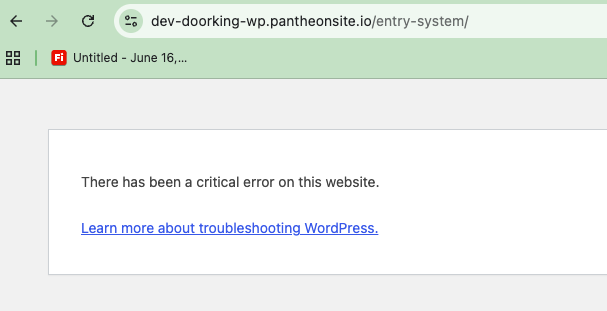
Thanks so much,

#2872799

Minesh
Supporter

Languages: English (English )

Timezone: Asia/Kolkata (GMT+05:30)

Hello. Thank you for contacting the Toolset support.

When I activated the Debug log by adding the debug log plugin:
- hidden link

And checked the one of problem URL you shared:
- hidden link

I found the following fatal error and the fatal error belongs to the plugin "the-plus-addons-for-elementor-page-builder":

 
Uncaught TypeError: Illegal offset type in isset or empty in /code/wp-content/plugins/the-plus-addons-for-elementor-page-builder/modules/enqueue/plus-generator.php:1092 Stack trace: #0 /code/wp-content/plugins/the-plus-addons-for-elementor-page-builder/modules/enqueue/plus-generator.php(986): L_Plus_Generator->header_init_load_data() #1 /code/wp-includes/class-wp-hook.php(341): L_Plus_Generator->tp_before_enqueue_styles() #2 /code/wp-includes/class-wp-hook.php(365): WP_Hook->apply_filters() #3 /code/wp-includes/plugin.php(522): WP_Hook->do_action() #4 /code/wp-content/plugins/elementor/includes/frontend.php(664): do_action() #5 /code/wp-content/plugins/elementor-pro/modules/theme-builder/classes/locations-manager.php(204): Elementor\Frontend->enqueue_styles() #6 /code/wp-includes/class-wp-hook.php(341): ElementorPro\Modules\ThemeBuilder\Classes\Locations_Manager->enqueue_styles() #7 /code/wp-includes/class-wp-hook.php(365): WP_Hook->apply_filters() #8 /code/wp-includes/plugin.php(522): WP_Hook->do_action() #9 /code/wp-includes/script-loader.php(2329): do_action() #10 /code/wp-includes/class-wp-hook.php(341): wp_enqueue_scripts() #11 /code/wp-includes/class-wp-hook.php(365): WP_Hook->apply_filters() #12 /code/wp-includes/plugin.php(522): WP_Hook->do_action() #13 /code/wp-includes/general-template.php(3208): do_action() #14 /code/wp-content/themes/astra/header.php(31): wp_head() #15 /code/wp-includes/template.php(814): require_once('...') #16 /code/wp-includes/template.php(749): load_template() #17 /code/wp-includes/general-template.php(48): locate_template() #18 /code/wp-content/themes/astra/archive.php(15): get_header() #19 /code/wp-includes/template-loader.php(132): include('...') #20 /code/wp-blog-header.php(19): require_once('...') #21 /code/index.php(17): require('...') #22 {main} thrown

/code/wp-content/plugins/the-plus-addons-for-elementor-page-builder/modules/enqueue/plus-generator.php:1092 · 2026-08-11 21:40:47

Can you please get in touch with the "the-plus-addons-for-elementor-page-builder" plugin author and raise the issue in front of them.








