Hello
I have a site that has the Toolset Types Ver. 2.2.2 plugin installed, I know that it is no longer supported, so I proceed to buy the version of the Toolset Types Ver. 3.4.15 plugin from https://toolset.com, without However, when installing, it shows me a critical error in the debug.log.
Attachment.
Thanks
Hi,
Thank you for contacting us and I'd be happy to assist.
Since your website has a very old version of Toolset Types, I'll recommend the following steps to update it:
1. Please make a complete backup copy of the website and deactivate and then delete the Toolset Types plugin.
2. Download the latest Types version from the downloads page ( https://toolset.com/account/downloads/ ) and install and activate it from the admin area.
After that, automatic updates will work, for future releases, once Toolset registration is completed.
( ref: https://toolset.com/faq/how-to-install-and-register-toolset/ )
I hope this helps and please let me know if you need any further assistance around this.
regards,
Waqar
Hi Waqar:
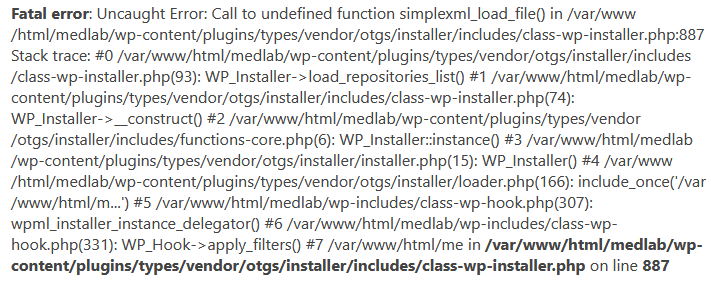
Hello, we did everything indicated. At first it went well, the site was stable but then we couldn't get into the admin due to a critical error (attached image).
This happened after we upgraded the php to version 7.4.
Can you tell us why the error that indicates a critical error in line 887 and why is it?
Fatal error: Uncaught Error: Call to undefined function simplexml_load_file() in /var/www/html/medlab/wp-content/plugins/types/vendor/otgs/installer/includes/class-wp-installer.php:887 Stack trace: #0 /var/www/html/medlab/wp-content/plugins/types/vendor/otgs/installer/includes/class-wp-installer.php(93): WP_Installer->load_repositories_list() #1 /var/www/html/medlab/wp-content/plugins/types/vendor/otgs/installer/includes/class-wp-installer.php(74): WP_Installer->__construct() #2 /var/www/html/medlab/wp-content/plugins/types/vendor/otgs/installer/includes/functions-core.php(6): WP_Installer::instance() #3 /var/www/html/medlab/wp-content/plugins/types/vendor/otgs/installer/installer.php(15): WP_Installer() #4 /var/www/html/medlab/wp-content/plugins/types/vendor/otgs/installer/loader.php(166): include_once('/var/www/html/m...') #5 /var/www/html/medlab/wp-includes/class-wp-hook.php(307): wpml_installer_instance_delegator() #6 /var/www/html/medlab/wp-includes/class-wp-hook.php(331): WP_Hook->apply_filters() #7 /var/www/html/me in /var/www/html/medlab/wp-content/plugins/types/vendor/otgs/installer/includes/class-wp-installer.php on line 887
Thank you.
regards,
José
Hello
We already solved the problem.
Thank you anyway.
My issue is resolved now. Thank you!