Minesh
Supporter
Languages:
English (English )
Timezone:
Asia/Kolkata (GMT+05:30)
Shane is on vacation. I checked the internal ticket and it seems that the fix for this issue will be shipped with the next release of Toolset Form version 2.6.13.
Please hold on until the release, we are planning to release it by this month end or maybe sooner.

Shane
Supporter
Languages:
English (English )
Timezone:
America/Jamaica (GMT-05:00)
Hi Martin,
This issue has now been fixed and the latest versions of our Toolset plugins are now available for download.
You can download them from the link below.
https://toolset.com/account/downloads/
Thanks,
Shane
Hi Shane,
thanks for updating me on this issue.
I downloaded the latest version of CRED in order to test the fix that should resolve the notification issue.
Unfortunately I cannot see any difference. Notifications are not triggered if custom fields are edited in the backend.
Please could you retest on your local as well and give me feedback?
Many thanks and best regards
Martin
Hi Martin,
I tested this on the sandbox site once more with the latest version of our plugins and saw that the notifications are indeed working.
Can you setup a copy of your site for us to investigate again to see what is happening on your end as I can no longer see the issue on a fresh install.
Thanks,
Shane
Hi Martin,
There is quite a bit to navigate through on this site.
Can you point me to the Post type as well as the Form that I should be looking at so that I can quickly test this ?
Thanks,
Shane
Hi Shane,
sure let me guide you to what you need:
the Create Form is on the frontend. click the yellow button and it opens in a modal. But you must not be logged in to make it work. So open it in incognito mode: hidden link
It will create a post of post type "bookings": hidden link
You will receive a notification to an email Address that is stored to another post type. you can enter it here:
hidden link
This part is working. (wp email catcher does not display this email for some reason, so you need to enter your email address if you want to see this part working).
This part now is not working any more:
Now when you look at the post notifications you will see a notification setup for the condition "reply state = 0" and "reply processed =2" . Now you need to enter reply state = 2 on the backend for the new created booking post:
hidden link
An email should be sent to the email address you have entered in the modal window (opened through "yellow button click"). this is the part that does not work any more after 2.9.6.
Let me know if there is anything else you need. I hope I did not miss anything here 🙂
Best
Martin
Hi Martin,
This is actually working.
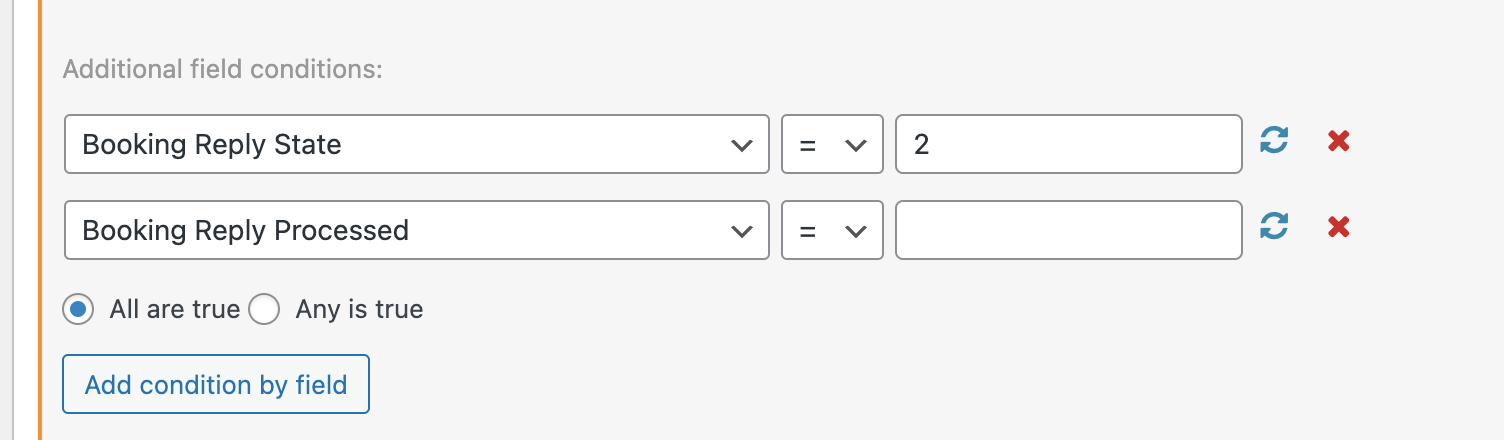
The problem that was preventing it from working was the conditional on your form. See Screenshot
You had 0 for the Booking reply processed, however when this checkbox is not filled ticked on the post, it returns an empty value. So the appropriate condition can be seen in my screenshot.
I've tested this and it works on my end. You can try testing it with this post that I created.
hidden link
Thanks,
Shane
Hi Shane,
thanks for your explanation.
I'm afraid I don't think it works as expected - I see 2 issues here. Let me explain:
Issue 1:
You are right the notification is triggered when the booking reply condition is setup to be equal empty. But the checkbox is setup to write 0 to the database when it is not ticked.
I have tested this further: no matter if I setup to write 0 or empty to the database when I setup the condition of booking reply processed to be equal empty it works. Is that intended?
Issue 2:
Let's pretend issue 1 is expected behaviour. The notification is not sent when I change the custom field value of booking reply state programmatically in php, or using Admin Columns Pro - using the inline edit functionality.
I also extended my testing and removed booking reply processed from the condition, to reduce the conditions to booking reply state = 2 only. Also this is not working using the inline edit functionality.
Shouldn't that work also programmatically, and not only using the backend edit forms? At least it was so, and is in my current version.
Hope you can figure out what it is - as said we did not change anything here in the last 2 years, and it stopped working. I hope we can figure out what it is. Please let me know.
Note: We had to setup a site protection, it got listed on google. Access Details are: "user", "12345678"
Many thanks for you help 🙂
Best
Martin
Hi Martin,
You are right the notification is triggered when the booking reply condition is setup to be equal empty. But the checkbox is setup to write 0 to the database when it is not ticked.
I have tested this further: no matter if I setup to write 0 or empty to the database when I setup the condition of booking reply processed to be equal empty it works. Is that intended?
Have you confirmed that 0 is indeed stored to the database when saving ? However I do believe that the 0 is stored after the empty value is sent. Which means the notification may simply be picking up the value as empty before the 0 is stored.
Given that checking it for an empty value works then I highly suspect that the above statement is accurate.
Issue 2:
Let's pretend issue 1 is expected behaviour. The notification is not sent when I change the custom field value of booking reply state programmatically in php, or using Admin Columns Pro - using the inline edit functionality.
When you say through PHP you're referring to using the wordpress update function instead of clicking update on the backend ? Can you send me an example of the code you're using ?
Shouldn't that work also programmatically, and not only using the backend edit forms? At least it was so, and is in my current version.
Hope you can figure out what it is - as said we did not change anything here in the last 2 years, and it stopped working. I hope we can figure out what it is. Please let me know.
Given that it works through the backend form then the initial issue is essentially fixed. This item would essentially need to be handled in a separate ticket. Also some consultation will need to be done with our 2nd tier team to proceed on this one. However they won't be available until wednesday.
Please let me know if this is ok.
Thanks,
Shane
Hi Shane,
I did some more intensive testing:
Issue 1: zero/empty for custom field condition:
- I ensured that 0 is already saved to the database before I set the value of reply state to 2. And even then a comparison with 0 is not triggering the notification. So it is not because the value for the condition is still just not set. It seems there is a bug with 0 and empty value comparison. But you were right: it seems the value of the other field needs already to be saved in the database before. The setup default value (non checked) on the form for reply processed is written afterwards.
- I tested with the older Cred version as well: there the comparison with zero is working correctly and empty comparison is not triggering the notification. Other way, when I change the configuration: When I save empty to the database the notification is sent when the comparison is setup to be equal empty. This is how I would expect it. (Also here, the value of the other condition needs to be in the database already)
Issue 2: in the older cred version we have in place now, I can edit the custom fields via Admin columns, and also using the post meta update function in php. (Admin columns is using that in the background as well I guess).
Setting the right conditions on the meta fields, even when I reduce my conditions (without the condition that is comparing against 0) this is not working any more.
I'm afraid I do not see the initial reported issue as fixed. My reported initial issue was that no notification s were sent when I update a custom field value programmatically. Probably your team was testing it only using the edit form. Please see reply #2278771 and below: https://toolset.com/forums/topic/cred-notifications-for-custom-field-change-stopped-working-after-upgrade/#post-2278771
I don't want to be picky here - but I need a solution and I have reported the issue already on 27th of January. I really hope you can speed up things here for me.
Please let me know if I can assist you any further. I'm really happy to help.
Best
Martin
Hi Shane,
any news from your side on this topic?
Are your devs looking at this issue?
Thanks
Martin
Hi Martin,
My apologies for the delays. I was able to get an update on this one for you.
It would appear that this won't be added due to various reasons, one being performance.
How it is intended to work is by using the Frontend Form or updating the field through the backend. Based on the comments there won't be a fix for fields that are updating via PHP.
Thanks,
Shane
Hi Shane,
that is quite disappointing, since I'm waiting for a solution since 6 month.
Also that functionality was supported for at least 3,5 years now. This was when we implemented it (looking at my github), after talking to support if this functionality is supported.
So it's not a question of, adding something new. To me it looks like functionality (triggering notifications from custom field updates programmatically (php) not using Toolset form or WP Backend form) was shortened or got lost, which is really a pain when you rely on plugins for your business.
We have a massive Site - we've used Toolset quite excessive - performance was never a problem. With the right exit condition, field updates should not cause an issue on performance.
Martin

Nigel
Supporter
Languages:
English (English )
Spanish (Español )
Timezone:
Europe/London (GMT+01:00)
Hi Martin
I discussed this with the developers, who confirmed that they would not be including programmatic updates to custom field values as a trigger for form notifications.
There were several issues with notifications stretching back some time, and last year a complete review of the scope was conducted (what should work when), which was then implemented and tested.
The updated_postmeta hook would used for this, but it is too generic and very inefficient for this purpose, which can lead to performance problems, and so will not be used.
A workaround occurs to me, though. Instead of updating the post meta directly (using update_post_meta), you can update the post using wp_update_post—supplying the custom field details—and that will trigger the hooks used to fire the notifications when the conditions match.
Because this may be useful to other Toolset users I have added the details to an erratum here: https://toolset.com/errata/notifications-when-custom-field-value-changes-not-sent-if-updated-programmatically/
Can you please check that and try the suggested workaround? If that does then I suggest we close here.
Lastly, let me just apologise that it has taken too long to communicate this to you.
Hi Nigel,
thanks for taking your time to look at this issue again.
We have just tested through and I'm happy to say that your provided solution is working great and solving the issues we had.
Martin