Skip Navigation

[Closed] Can't enter date. Year dropdown selector no longer there.

This support ticket is created 3 years, 1 month ago. There's a good chance that you are reading advice that it now obsolete.

This is the technical support forum for Toolset - a suite of plugins for developing WordPress sites without writing PHP.

Everyone can read this forum, but only Toolset clients can post in it. Toolset support works 6 days per week, 19 hours per day.

Sun Mon Tue Wed Thu Fri Sat
- 9:00 – 13:00 9:00 – 13:00 9:00 – 13:00 9:00 – 13:00 9:00 – 13:00 -
- 14:00 – 18:00 14:00 – 18:00 14:00 – 18:00 14:00 – 18:00 14:00 – 18:00 -

Supporter timezone: Asia/Karachi (GMT+05:00)

This topic contains 3 replies, has 3 voices.

Last updated by Waqar 3 years, 1 month ago.

Assisted by: Waqar.

Author
Posts
#2539643
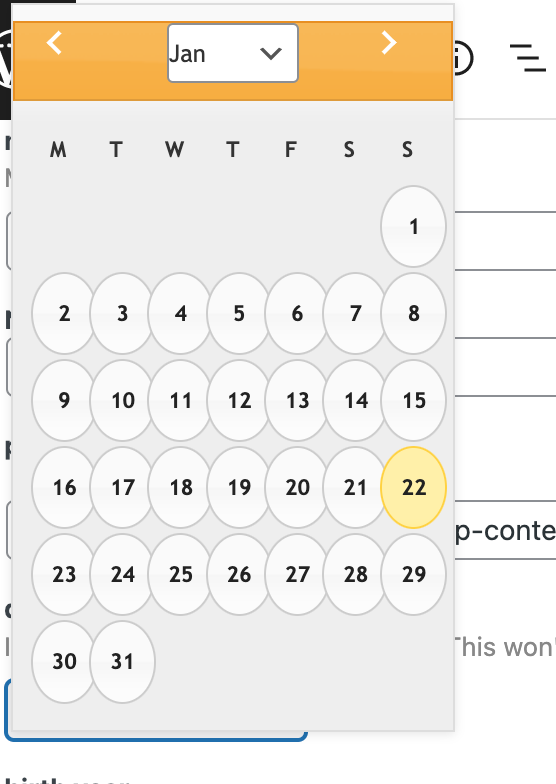
Screen Shot 2023-01-22 at 9.10.08 PM.png

I am trying to choose a date within Toolset custom post types.

Link to a page where the issue can be seen: hidden link

I expected to be able to enter a dd/mm/yyyy date by. manual entry. Or on the date picker, to be able to select a year.

Instead, the date picker only allows selection of the day, and to cycle one month forward or one month back at a time. There is no way to select a date like 1/1/1900 without cycling back 450 months!

#2539739

Nigel
Supporter

Languages: English (English ) Spanish (Español )

Timezone: Europe/London (GMT+00:00)

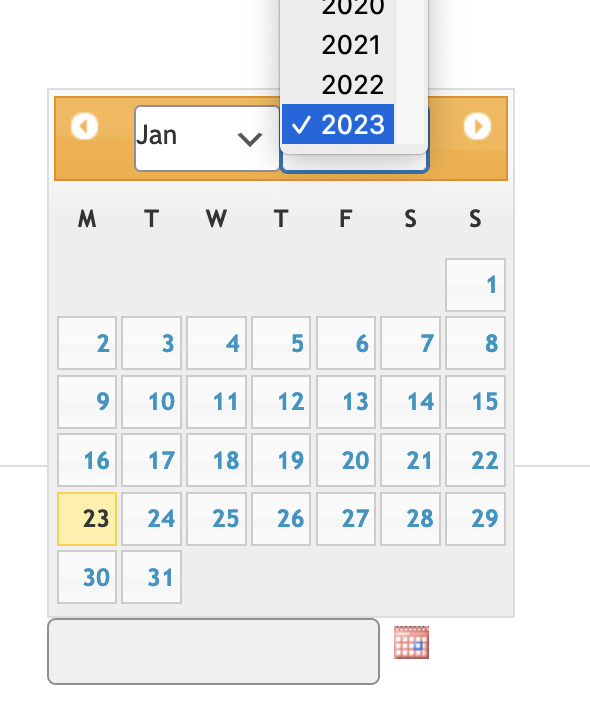
Screenshot 2023-01-23 at 08.45.06.png

Hi there

The year is ordinarily available in the datepicker, it looks like something else may be interfering in the datepicker UI on your site.

Could you try disabling your other plugins (and if necessary switching theme) to see if you can isolate anything that breaks the datepicker UI?

#2542087

I'm going to try that. Stay tuned. Thanks!

#2544095

Sure please take your time and let us know how it goes.

The topic ‘[Closed] Can't enter date. Year dropdown selector no longer there.’ is closed to new replies.