Minesh
Supporter
Languages:
English (English )
Timezone:
Asia/Kolkata (GMT+05:30)
I do not have any other ideas now I still wonder why the post relationshp is shows corrupted on the post-edit screen and it does not display the related post under the post-relationship box on your post edit screen. Have you migrated the posts or run any cleanup before?
I can't think of anything else to test or check either... Aside from updating the plugins and clearing cache I haven't migrated anything on the site, developed anything or done any sort of cleanup. I tried clearing the OPCACHE just now. That didn't make a difference. I also tried creating a new post type and a many-to-many relationship with profiles and it works fine. So the problem is something to do with the resource post itself. Did you see the error message on the wp-admin/admin.php?page=cred_relationship_forms page?
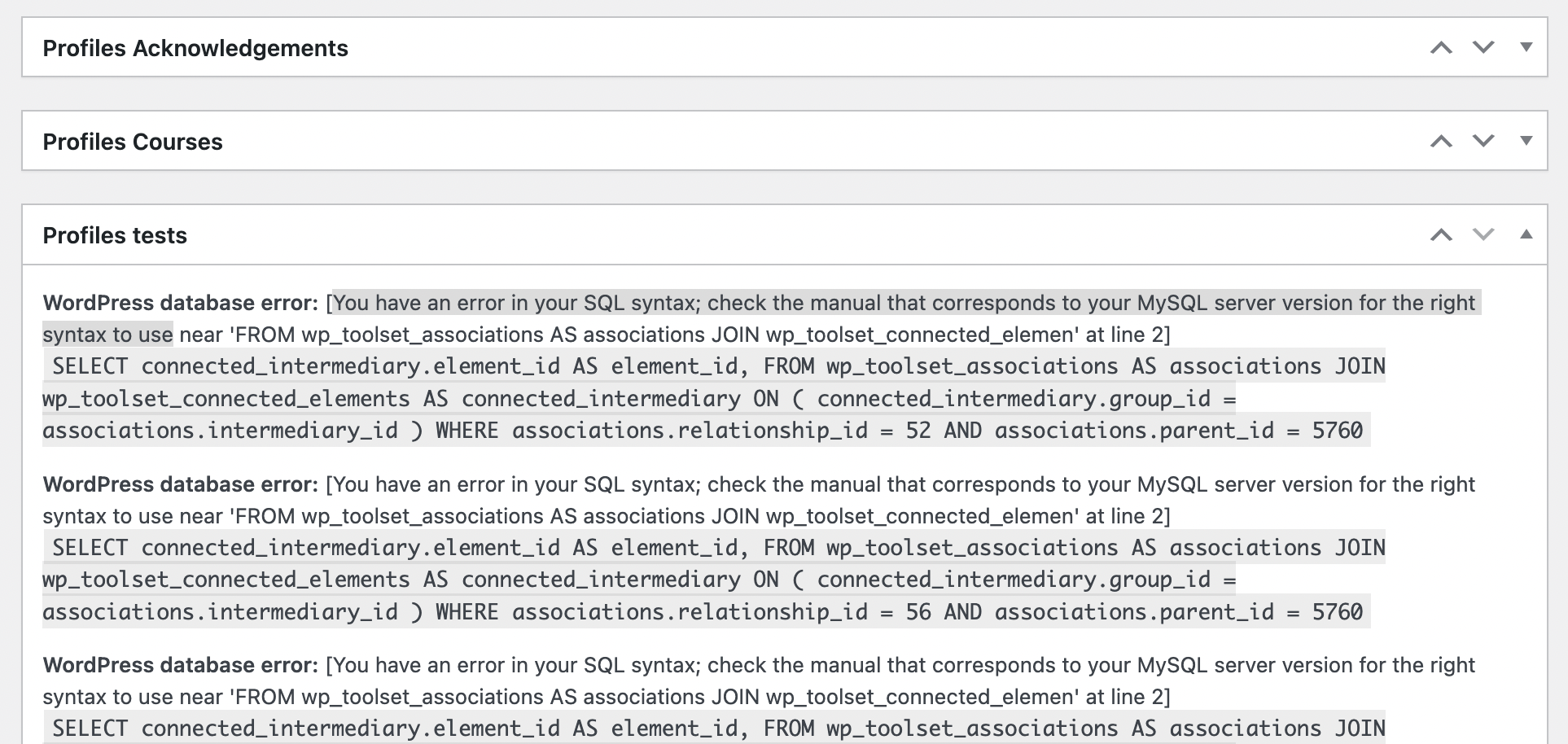
Also, have you seen this WordPress Database error displayed on the related parent PROFILE post in the post edit screen? This error appears when the intermediary post is deleted: WordPress database error: [You have an error in your SQL syntax; check the manual that corresponds to your MySQL server version for the right syntax to use near 'FROM wp_toolset_associations AS associations JOIN wp_toolset_connected_elemen' at line 2]
SELECT connected_intermediary.element_id AS element_id, FROM wp_toolset_associations AS associations JOIN wp_toolset_connected_elements AS connected_intermediary ON ( connected_intermediary.group_id = associations.intermediary_id ) WHERE associations.relationship_id = 52 AND associations.parent_id = 5760
This is a screen shot of the PROFILE called "Toolset Support". If you navigate to any RESOURCE post that has been related to this post via an itermediary in the past and that intermediary post has been deleted you cannot create a new intermediary with that same profile and resource post. It does not appear as an option in the relationship form. Toolset thinks it still exists in the database even though it has been deleted?
The same screen I'm talking about with my previous reply as I mentioned that with the post-relationship section "Profiles Resources" and I do not see any connected posts within this section.
I mentioned that with the following link:
- https://toolset.com/forums/topic/cannot-delete-relationship-critical-error-toolset_element_exception_element_do/#post-2854750
Can you please clarify are you using the same post type with what post-relationshp. Maybe its due to you have same post-type involved with many post relationship it it tried to look for the profile post. Have you try to delete any profile post before?
are you using the same post type with what post-relationshp
I am not sure what this means? The relationship is a many-to-many relationship between PROFILES (parent) and RESOURCES (child). Is that what you mean?
you have same post-type involved with many post relationship it it tried to look for the profile post
I am not sure how this would effect it. The error occurs when the intermediary post is deleted. "Uncaught Toolset_Element_Exception_Element_Doesnt_Exist: Unable to load posts 42627 (42627)." So its looking for post 42627 which is the ID of the intermediary post that was deleted. Its trying to get a post that doesn't exist anymore...
have you try to delete any profile post before
On this website a user can only create one profile post and it cannot be deleted. Ahhh but on this test website I deleted all the accounts (and their profiles) that belonged to other members on the production site. Is that what you mean?
I have found another clue:
Remember that the view to get the related post sits on the content template for the child post (RESOURCE).
We currently have a view that gets the related intermediary post. Inside this loop is a link to the other related parent post (PROFILE) and a link to delete that intermediary post. Error thrown.
I just tested a different view that gets the other related parent post (PROFILE) and not the intermediary post itself. Inside that loop I added a link to DELETE THE RELATIONSHIP (not the profile post in the loop). No error thrown.
So we now know:
Deleting the intermediary post from the parent post in the relationship does NOT throw the error.
Deleting the intermediary post from the intermediary post throws the error on its related child post that still thinks it exists and can't find it.
what if we try to delete the intermediary post from the parent/child - will that help?
Also - I'm not sure why you are using nested view. is it required?
Sorry Minesh I think you might misunderstand me. There isn't a nested view...
The setup that throws the error:
1. A content template for the child post (RESOURCE).
2. In that content template a view that gets the related intermediary post (PROFILE-RESOURCE).
3. In that view's loop a link to 'delete the post' (PROFILE-RESOURCE).
The setup that doesn't throw the error:
1. A content template for the child post (RESOURCE).
2. In that content template a view that gets the related parent post of the specified relationship (PROFILE).
3. In that view's loop a link to 'delete the relationship' (PROFILE-RESOURCE).
So the critical error happens when a related intermediary post is deleted via the child post template. The child post thinks the intermediary post still exists and can't find it.
Hope this helps clarify!
What if you try to use the following shortcode in order to delete the relationship between the two post:
[cred-delete-relationship type='link' related_item_one='[wpv-post-id item="@profile-resource.parent"]' related_item_two='[wpv-post-id item="@profile-resource.child"]' relationship='profile-resource' redirect='self']Delete this relationship[/cred-delete-relationship]
I already added that to the following view:
- hidden link
Wow. Yep. That works! Why does that work?
[cred-delete-relationship] shortcode is used to delete the relationship between the two posts.
You can find more information about it with the follwoing Doc:
- https://toolset.com/documentation/programmer-reference/forms/cred-shortcodes/#cred-delete-relationship
No no I mean why does specifying all three posts in the shortcode make the difference. Not to worry. Thank you Minesh!