Tell us what you are trying to do?
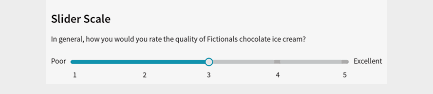
1. Range Slider: I would like to build a range slider in the Custom Search builder. It is based on a custom field (radio) with 5 points. Like the Likert Scale, it goes: Very Poor, Poor, Average, Good, Very Good. I want to build this instead of using a dropdown or other options. Is it possible to build?
2. Taxonomy: Is it possible to choose only some items from Tags to display, instead of everything displaying when I select Tags in "Add Search Field"? So for example, I have 5 tags: A, B, C, D, E. I want only A and B displaying in a field in the Custom Search builder.
Some goes to Categories, it is possible to just select some Categories to display in a field?
Is there any documentation that you are following?
I can't find any info
Is there a similar example that we can see?
See image attached
Hello. Thank you for contacting the Toolset support.
As you already aware that range filter is possible with using minimum value and maximum value input boxes as you can see with one of our reference site here for price field: hidden link
There is no such native feature available to implement the range slider with Toolset and there is no simple way to implement it. It will require lots of custom code, including knowledge of advanced jQuery and HTML and CSS customizations.
To implement such feature really needs significant customization with HTML, CSS, jQuery, PHP and Toolset hooks and to support such custom edits is beyond the scope of our support policy: https://toolset.com/toolset-support-policy/
As a supporter, we need to work within the defined support boundaries, as a result, I do not have any solution to offer you here.
2. Taxonomy: Is it possible to choose only some items from Tags to display, instead of everything displaying when I select Tags in "Add Search Field"? So for example, I have 5 tags: A, B, C, D, E. I want only A and B displaying in a field in the Custom Search builder.
2. Taxonomy: Is it possible to choose only some items from Tags to display, instead of everything displaying when I select Tags in "Add Search Field"? So for example, I have 5 tags: A, B, C, D, E. I want only A and B displaying in a field in the Custom Search builder.
==>
Toolset offers the filer "wpv_filter_taxonomy_frontend_search_get_terms_args" which you can use to control what terms should be included or excluded.