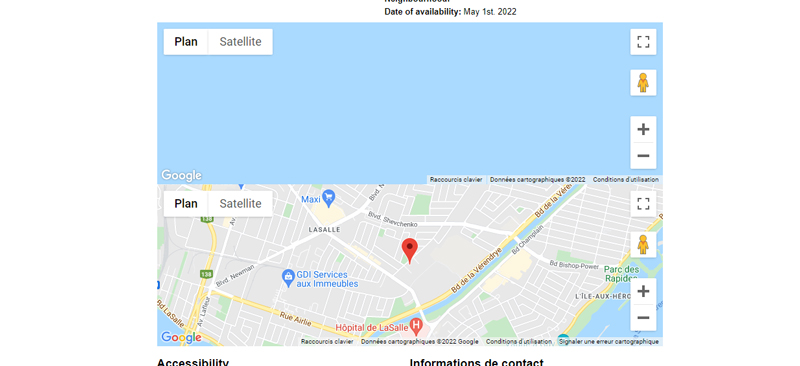
I'm trying to add a map showing the address of the post using this code following these instructions https://toolset.com/forums/topic/how-to-add-a-map/.
I added this code
[wpv-map-render map_id="carte-ili-fiche"][/wpv-map-render]
[wpv-map-marker map_id='carte-ili-fiche' marker_id='marker-carte-ili-fiche' marker_field='wpcf-adresse-gps'][/wpv-map-marker]
The problem is that the code makes two maps: first one is empty, second one shows the address.
I can't have just one: if I try to remove the first code line, then the working maps stops to work.
What is the link to your site?
hidden link
Hi Catherine,
Thank you for getting in touch.
Would you mind allowing me to have admin access to the website so that I can have a more detailed look at this for you ?
Please where applicable please provide me with a link to an example page where I can see the issue.
I've enabled the private fields for your next response.
Thanks,
Shane
Hi Catherine,
The problem is being caused by this code below on your content template.
<div id="js-map-element" class="lieu-geo"  data-marker-title="" data-marker-lat="" data-marker-lon="">
    <div id="js-main-map-canvas" class="google-maps team-map-reduced-height"></div>
</div>
You're using this code to initialize another map on the page that is not related to our Toolset Maps plugin.
Once you remove this the duplicate map should no longer be displayed.
Thanks,
Shane
Oups! Thanks! 🙂
It works perfectly