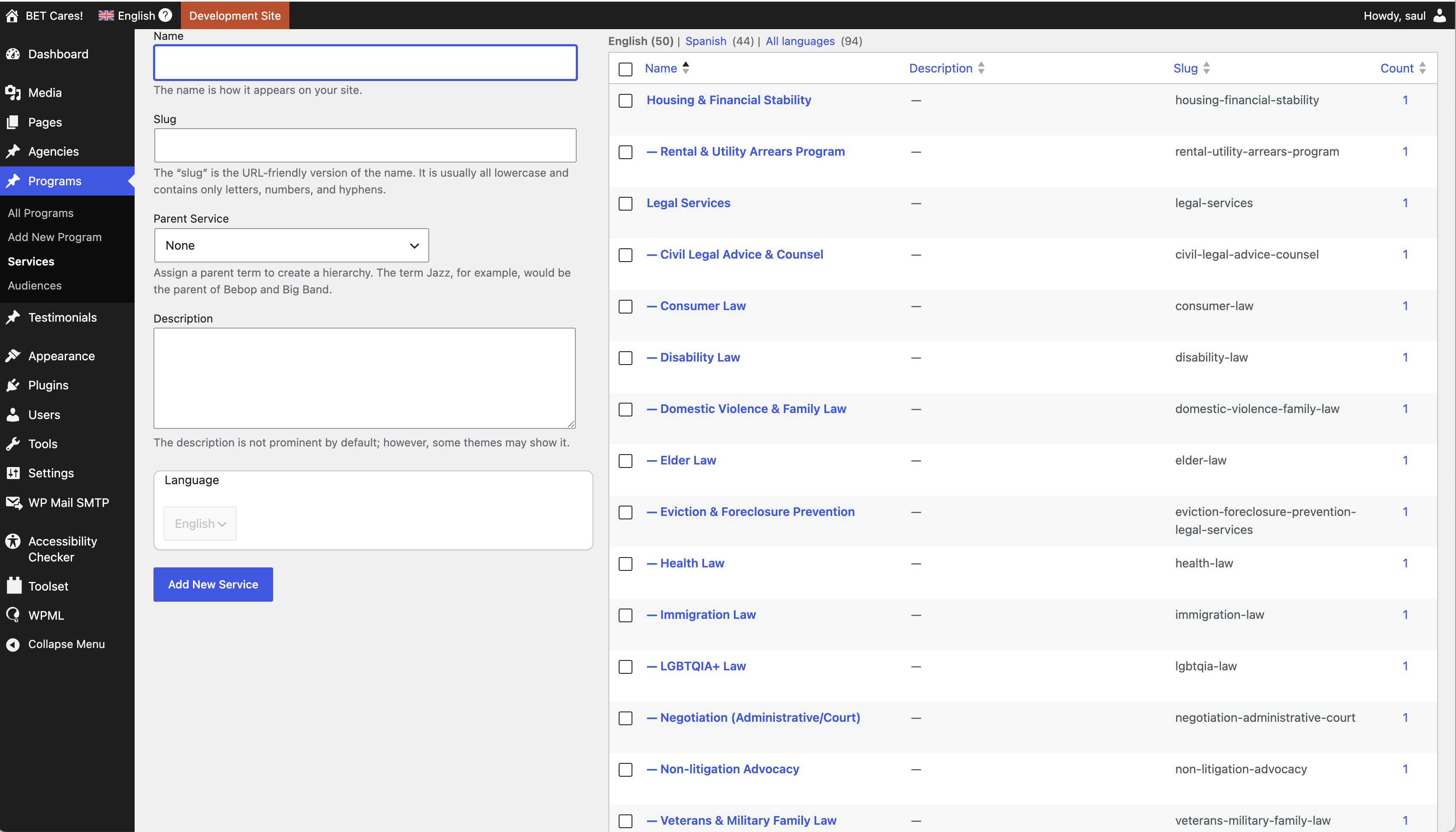
Our website has a custom post type, Program, and a custom (hierarchical) taxonomy, Services, connected to it.
WPML is installed on the site. After translating the taxonomy terms, we noticed that the term count on the taxonomy term page was "1" (or higher, if connected to Program posts) for every term. See service-taxonomy-term-and-counts.png. (When I click the "1" number to view the associated posts, none appear.) This misleads a view which is supposed to list Program posts for only non-empty terms. See view-query-options.png.
How do we list the posts associated with the term which are truly not empty (or not "1" / higher than 1)?
What is your problem URL where you added the view and where you wanted to display the terms?
*** Please make a FULL BACKUP of your database and website.***
I would also eventually need to request temporary access (WP-Admin and FTP) to your site. Preferably to a test site where the problem has been replicated if possible in order to be of better help and check if some configurations might need to be changed.
I have set the next reply to private which means only you and I have access to it.
+ The problem URL where I added the view is here: hidden link
===>
So, basically what you want with above page is list parent and its associated child term that is it. Correct? If yes:
- Do you mean, it does not work and do not display correct child terms for the related parent term with the above "services" page or you have just issue in admin/backend where the post count displayed?
WEll - the admin issue you show me in video that many taxonomy term shows 1 as count but when you click on that 1 count it do not display any post.
I do not able to see that issue, I've just created the following sandbox site and you can auto-login to it using the following link:
- hidden link
Can you just login and check if you can able to reproduce the issue. if yes, please give me exaxt steps I will have to follow that should help me to see the issue.
If you do not able to reproduce the issue, then you need to check on your install by deactivating thrid-party plugins in order to find any possible conflict.
Thanks for your reply. I visited the URL to the sandbox site, but it's for a real estate website. I'm unclear why you're sharing a real estate website and why you're not examining the dev site I provided credentials for earlier in the thread.
Regarding deactivating plugins, I'll try deactivating them one at a time to try to identify a culprit.
I shared sandbox site so you have another install where you can play and see if you able to reproduce.
In order to escalate the issue, I need clear steps that should help me to reprodue the issue and once I know that I will be in position to escalate it in front of our Devs.
I do not play with your site as evenghout its Dev site you maybe using it. Please let me know after deactivating plugins one by one if you able to find culprit plugin or steps that should I follow that help me to reproduce the issue.
I don't know how this issue arose or when, so I don't think I can describe the steps for you to reproduce a similar environment. Not helpful, I know.
You are more than welcome to do anything you like in the WordPress site whose credentials I shared. It really is a dev site, not the production site, and it's OK if it is drastically modified, even deleted.
I need to know the site history, have you imported post/terms before?
I suggest you check by deactivating third-party plugins and check if you able to spot the issue otherwise I will try to jump in and see if I able to spot the culprit.
And to clarify something: I don't care about the taxonomy counts in the WordPress dashboard. I only thought the problem I'm trying to solve might be related to it.
The problem I'm trying to solve is visible on the front-end on this page: hidden link. Second-level taxonomy terms, which have no associated posts, are displaying on the page. My goal is for "empty" second-level terms, terms unassociated with any posts, to not be displayed on /services/.
For example, there is one Program post, name "Music, Art, and Movement Therapy," with the Service taxonomy "Recreation, Arts & Social > Adaptive Creative Arts." The second-level term "Adaptive Creative Arts" should appear on /services/, and it does. But the Service taxonomy "Recreation, Arts & Social > Adaptive Sports" also appears on /services/, yet it has no Program posts associated with it.
Ok - please let me know once you done that and let me know, then I will take it over for your original issue of hiding the child terms if no post assigned.
This entailed creating a temporary page and assigning it all of the taxonomy terms. Then I submitted the page for translation. Afterwards, I deleted the temporary page, but I suspect the taxonomy term counts did not get recalculated upon deletion.
I think we'll be able to mark this as resolved shortly.
The culprit was the process I described above translating terms with WPML. The original description in my initial comment—"After translating the taxonomy terms, we noticed that the term count on the taxonomy term page was "1" (or higher, if connected to Program posts) for every term."—was spot on.
Here's a GitHub gist of a WP CLI method I wrote to correct this issue (if it's useful to you or someone else in the future):
hidden link
Thanks for all of your help, Minesh! I may not have figured this out without it. 🙂