Hi,
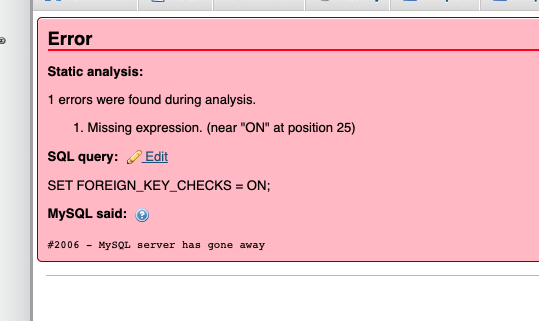
I have built a site on Mamp on a Mac. I uploaded the db file into phpMyAdmin as normal and got an error on upload saying:
Error. Static analysis
1. Missing expression. (Near “ON” at position 25)
SQL Query
SET FOREIGN_KEY_CHECK = ON;
The file does then appear to load fine and I can set wp-options etc…
I’m using the Kadence theme (I’ve cleared cache etc…). The site looks fine and seems to work. When I go to the Customiser and try to make a change it says “Looks like something has gone wrong. Wait a couple of seconds and try again”.
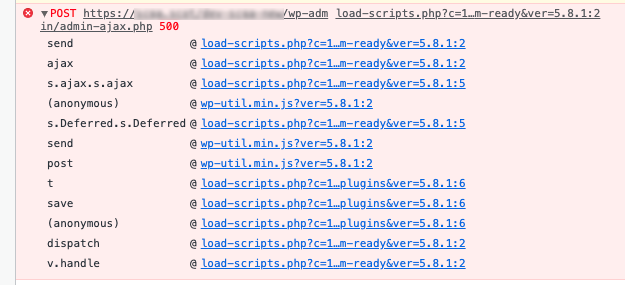
It keeps happening. No changes are accepted. In Console I see an error (attached) which ends in /admin-ajax.php 500 - when I click it, it shows a critical error.
I’ve upped the memory to 512M - no change.
I’ve completely re-installed the site and it keeps happening. The local version of the site works perfectly.
I’m using PHP v7.4 on Mamp and on the server.
When I deactivate all plugins apart from Kadence it works. When I activate Toolset Blocks and Toolset Types it happens again and I get errors.
This does therefore appear to be an issue with Toolset. I can give you a private login if it helps.
Thanks for your help.
Hi,
Thank you for contacting us and I'd be happy to assist.
An error message like this can appear during the database import if server values ( like max_execution_time, max_input_time, memory_limit, post_max_size, max_allowed_packet, etc ) are not adequate enough to handle the import in one go.
To get to the bottom of this manual import issue, it would be best to consult your hosting server's support.
Have you tried to migrate the website using any backup & restore plugins? These are the plugins that we use and recommend:
https://wordpress.org/plugins/duplicator/
https://wordpress.org/plugins/all-in-one-wp-migration/
Using backup & restore plugins is more efficient and safe compared to manual migration because they take care of all involved elements in the background, with minimal manual effort.
I hope this helps and let me know how it goes.
regards,
Waqar
My issue is resolved now. Thank you!