This is the technical support forum for Toolset - a suite of plugins for developing WordPress sites without writing PHP.
Everyone can read this forum, but only Toolset clients can post in it. Toolset support works 6 days per week, 19 hours per day.
| Sun | Mon | Tue | Wed | Thu | Fri | Sat |
|---|---|---|---|---|---|---|
| - | 10:00 – 13:00 | 10:00 – 13:00 | 10:00 – 13:00 | 10:00 – 13:00 | 10:00 – 13:00 | - |
| - | 14:00 – 18:00 | 14:00 – 18:00 | 14:00 – 18:00 | 14:00 – 18:00 | 14:00 – 18:00 | - |
Supporter timezone: Asia/Kolkata (GMT+05:30)
This topic contains 14 replies, has 3 voices.
Last updated by - 4 years, 5 months ago.
Assisted by: Minesh.

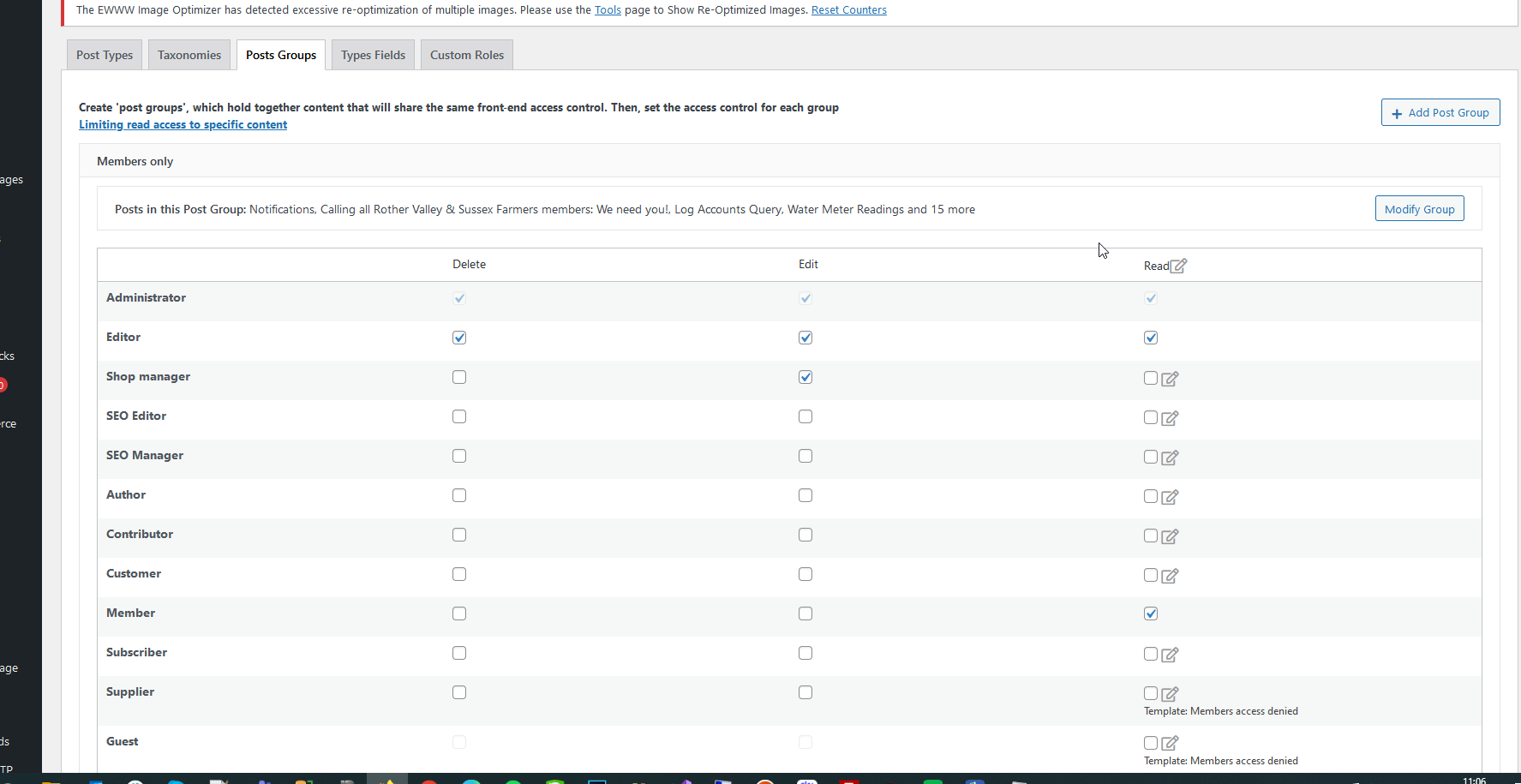
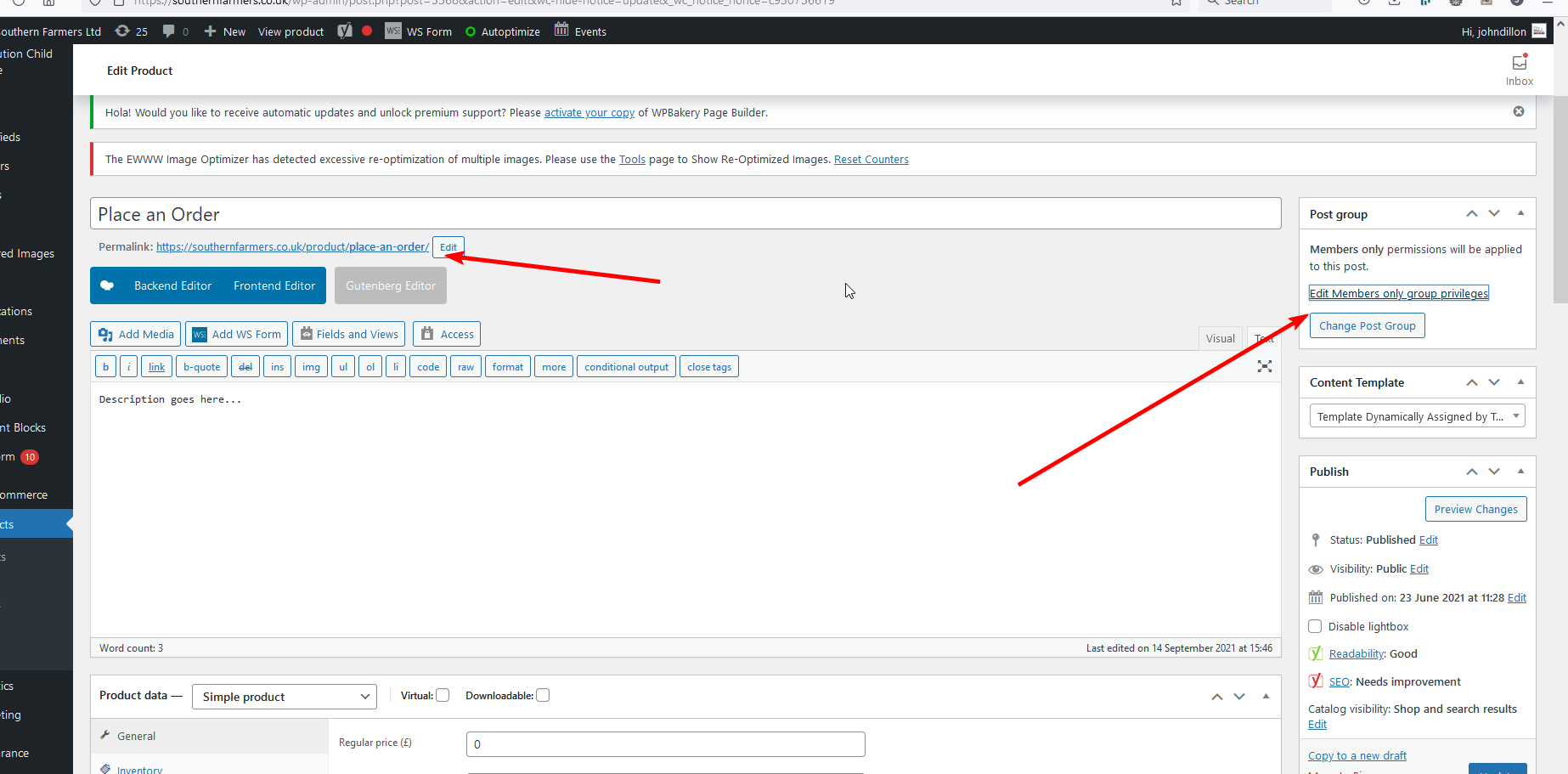
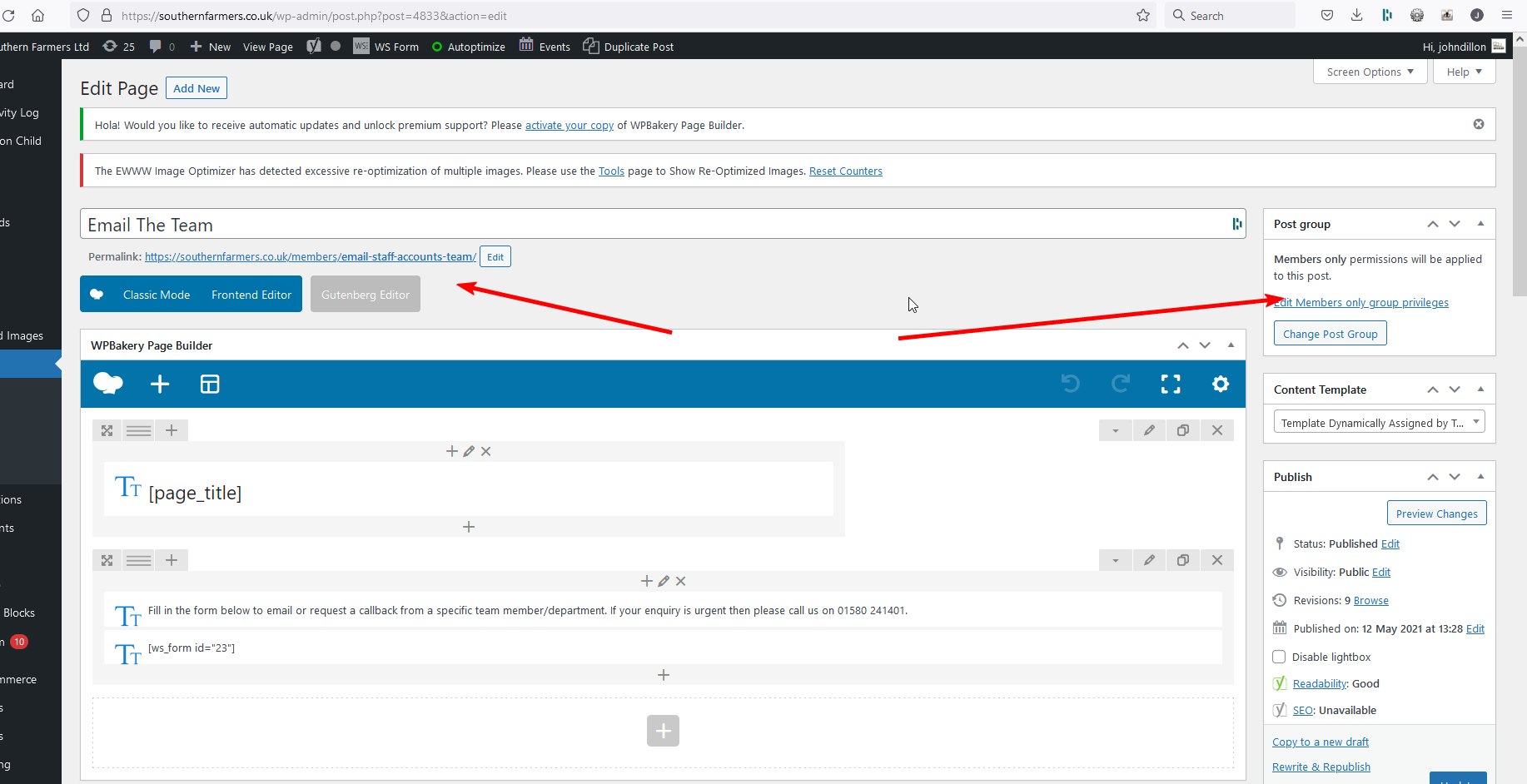
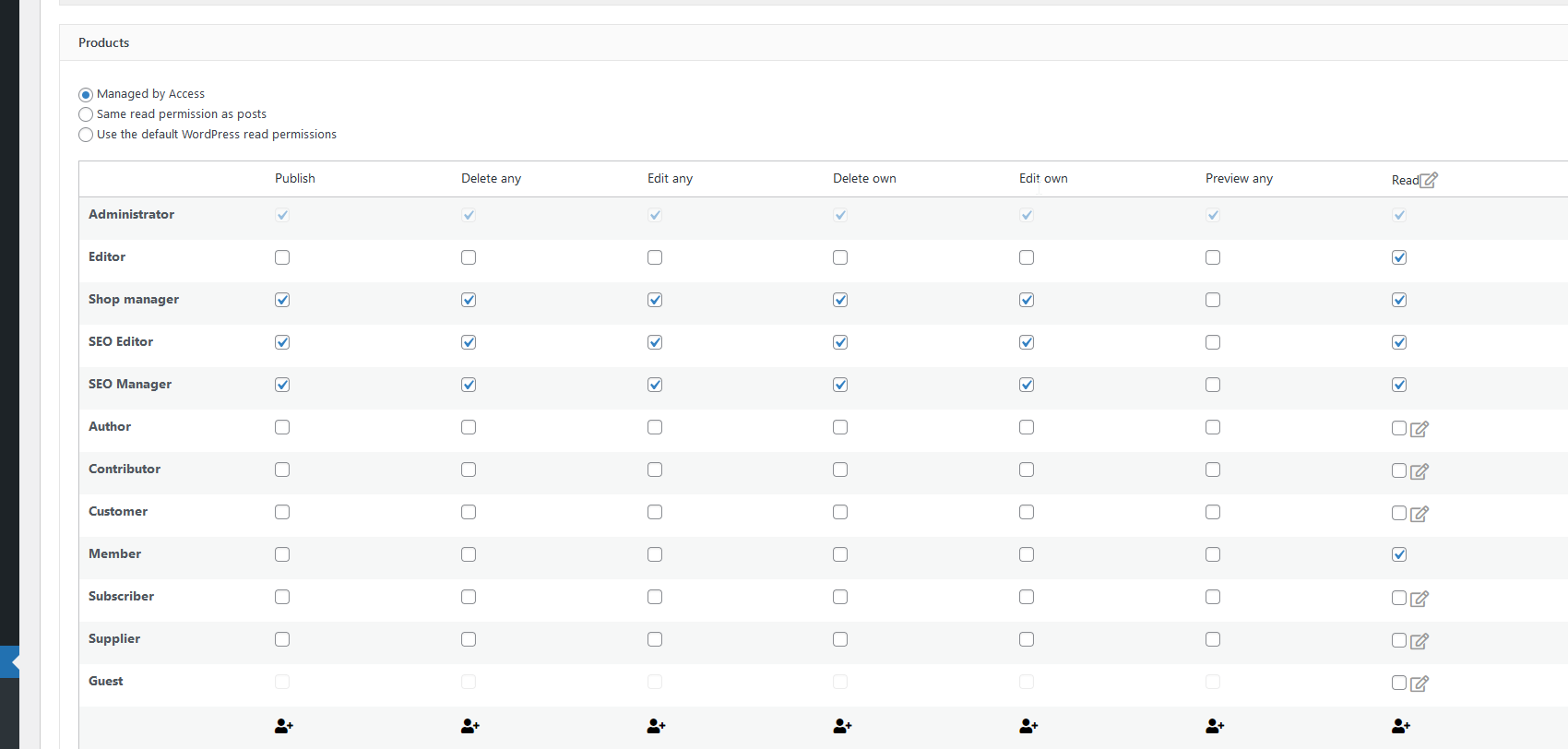
Your support form sometimes doent work I just saw the loading screen for ages has to refresh and redo this ticket.
See attached images showing settings.
See hidden link
This is a page and assigned to the user access group members to you will be shown a "please login response"
See hidden link
This is a woocommerce product and has then same user group settings but its showing full content not then please login response.
Products are set to be controlled by User Access.
Thanks






Hello. Thank you for contacting the Toolset support.
Regarding support forum, its running smoothly at the moment. If you notice anything not working as expected again and again, please feel free to take screenshot and create a ticket (please make sure to clear cache).
As I understand, you want to control the product using the post group you created using Toolset Access plugin and you want that only logged in users should be able to access the following product - right?
=> hidden link
If yes, I checked the above product and I'm able to access the above product as a guest user. Can you please share admin access details so that I can check whats goring wrong with your setup or share a workaround if any.
*** Please make a FULL BACKUP of your database and website.***
I would also eventually need to request temporary access (WP-Admin and FTP) to your site. Preferably to a test site where the problem has been replicated if possible in order to be of better help and check if some configurations might need to be changed.
I have set the next reply to private which means only you and I have access to it.

Minesh
Thank you for sharing admin access details but could you please e confirm that the understanding I shared with my previous reply is correct?
YEs thats correct if you edit then product you'll see its supposed to be restricted by member group.
Thanks
Minesh
I checked and I found that you are using the plugin WS Forms pro to display the form on your post:
=> hidden link
That plugin is overriding all the access permissions. I checked if WS Forms offers any hook, they are offering but the hook trigger is when you submit the form or when you save the form in backend:
=> hidden link
You will have to check with them what hook we should use to override their form content. I tried to use the standard WordPress hook the_content:
add_filter( 'the_content', 'func_custom_filter_for_product_post', 999999 );
function func_custom_filter_for_product_post( $content ) {

	 $userid = get_current_user_id();
    global $post;


    $allowed = apply_filters( 'toolset_access_api_get_post_permissions', true, $post, 'read', $userid, ICL_LANGUAGE_CODE );
	$return = ( $allowed ) ? 1:0;
	if(!$return){

		return $post->post_content;

	}
    return $content;
}
What it does is it checks the read permission for the post and if read post permission is not granted it should return the post content (post body) instead of WS form content.
Could you please check with WS forms authors (support) and check with them how you can return the post content instead of WS form if user is not logged in.
Please see my correspondance with the dev for WS forms. He basically doesnt understand what their plugin is doing and says he knows the toolset dev from other integrations so can you perhaps deal direct with him so we can get to the bottom of this?
Thanks
##- Please type your reply above this line -##
Your request (3653) has been updated. To add additional comments, reply to this email.
Mark Westguard (WS Form)
Apr 27, 2022, 10:36 ADT
I’m confused too. We don’t do anything with that particular product so I don’t understand how we would be overriding their permissions.
We certainly don’t touch the filter hook they are referencing.
If they can provide me with further information about how our product is affecting theirs I’ll be happy to take a look. They haven’t reached out to me directly about this issue and I know the developer 🙂
Thanks
Mark
John Dillon
Apr 27, 2022, 5:42 ADT
Sorry Mark Im a bit confused here….
I want our system to work using Toolset (so its consistent for then user). They are saying your plugin stops Toolset from working, but youre saying this isn’t true nothing you are doing should stop their from working? In which case I need to go back to them.
Correct?
Mark Westguard (WS Form)
Apr 26, 2022, 12:20 ADT
Hi John
Our integration with Toolset is used to pull data from that CPT configuration to build forms, to populate forms and also populate posts with Toolset meta data.
We are not integrated with Toolset User Access Controls, that is a completely different product to what we integrate with. We do not override anything they do.
The Add to Cart button is not rendered, then the form will not be rendered either.
The links I referenced could be used to do a similar thing that user access controls do, i.e. hide the form for certain users if you need to.
Many thanks
Mark
John Dillon
Apr 26, 2022, 12:08 ADT
OK thanks Mark but that’s not the behavior we need, we need to show then same response we do for other pages are you saying this isn’t possible?
Mark Westguard (WS Form)
Apr 26, 2022, 11:49 ADT
Hi John
Thank you for your inquiry.
Toolset rules are not inherited in WS Form when a form is created. We pull the CPT data from Toolset, create a form but it is not dynamically attached to Toolset. It is possible to limit visibility of a form, section or field based on user role of if they are logged in or not.
At a form level:
hidden link (See the 'Limit' tab)
At a section of field level you'll find the setting in the 'Advanced' tab under Restrictions --> User Status
Thanks
Mark
John Dillon
Apr 26, 2022, 9:24 ADT
We have an issue where Toolset User Access controls arent working on a WooCommerce product linked to one of your forms. Basically this plugin should block access to anyone not in a specific user group.
Toolset support have investigated this and say its because your plugin is overriding these permissions and they have a quesiotns for you below. Here is their full answer
thanks
-----------------------
I checked and I found that you are using the plugin WS Forms pro to display the form on your post:
=> hidden link
That plugin is overriding all the access permissions. I checked if WS Forms offers any hook, they are offering but the hook trigger is when you submit the form or when you save the form in backend:
=> hidden link
You will have to check with them what hook we should use to override their form content. I tried to use the standard WordPress hook the_content:
add_filter( 'the_content', 'func_custom_filter_for_product_post', 999999 );
function func_custom_filter_for_product_post( $content ) {
$userid = get_current_user_id();
global $post;
$allowed = apply_filters( 'toolset_access_api_get_post_permissions', true, $post, 'read', $userid, ICL_LANGUAGE_CODE );
$return = ( $allowed ) ? 1:0;
if(!$return){
return $post->post_content;
}
return $content;
}
What it does is it checks the read permission for the post and if read post permission is not granted it should return the post content (post body) instead of WS form content.
Could you please check with WS forms authors (support) and check with them how you can return the post content instead of WS form if user is not logged in.
This email is a service from WS Form. Delivered by Zendesk
[RE53LX-7K2LR]
Minesh
So they shared the information that they do offer a feature to display the form based on the role.
At a form level:
- hidden link (See the 'Limit' tab)
So if you edit your form and navigate to "Limit" tab, please check the following screenshot: hidden link
- hidden link
What if you configure your desired role there and see if that help you to resolve your issue.
No as Ive explained in my emai I dont want this, because it creates different experience for user and I have to set this on all our forms. I just want a single solution I can implement across all content types for authentication using Toolset User Access Id assumed this would be possible?
Minesh
In order to investigate this further and check whats going wrong with your setup I will require duplicator copy of your site.
- https://toolset.com/faq/provide-supporters-copy-site/
Can you please send me duplicator copy of your install and I will try to setup that on my local server and will check for compatibility and will try to check if I can share any workaround.
I have set the next reply to private which means only you and I have access to it.
Sorry but I cant give you a local copy of the site easily, a) its massive due to lots of images, and b) there are data protection issues in terms of the data.
WS forms are easily exportable if I send you an export of one of this is this a better way to start?
Appreciate your help.
Minesh
We will require duplicator copy because we cant predict with what plugin/theme it has conflict possibly or what else is involved.
We do not recommend debugging issues on production sites that is the reason we will require duplicator copy of your site because to reproduce the issue we will require same setup with all require plugins and content.
I've created following code snippet:
- hidden link
add_filter( 'the_content', 'func_custom_filter_for_product_post', 9999 );
function func_custom_filter_for_product_post( $content ) {

	 $userid = get_current_user_id();
    global $post;

	if($post->post_type == 'product' ){

    	$allowed = apply_filters( 'toolset_access_api_get_post_permissions', true, $post, 'read', $userid, ICL_LANGUAGE_CODE );
			$return = ( $allowed ) ? 1:0;
			if(!$return){

			 wp_redirect('/');
			 exit;

			}
   }
    return $content;
}
As you can see it checks the access permissions granted to the current product post and if there is no read access grated it will redirect you on home page. You can setup any other page and adjust that page as redirected page as a workaround.
OK but as Ive explained its not possible to give you a duplictory copy so what do we do?
Im happy for you to mess around on the production site I dont mind the odd bit of downtime, or if you really dont want this we can setup a staging version of the site potentially and give you access to this.
Im not understanding what this snippet is why woudl I want these forms to reditect to the homepage?
Thanks
Minesh
Im not understanding what this snippet is why woudl I want these forms to reditect to the homepage?
==>
With the snippet I shared the example that and this is possible solution that when there is no read access we can redirect user to another post/past which you can setup, so you can create your desired page/post with information about when user do not have read access to that product we can redirect user to that page/post (instead of home page which is currently setup) as somehow we can not override the form. This is the best solution I can think of as of now.
OK but I dont want this solution this is the same as using WS forms, I want toolset to work as it does on all my other content types, how can we enable you to explore this this that doesnt involve creating a duplicator site?
Thanks

Nigel
Languages: English (English ) Spanish (Español )
Timezone: Europe/London (GMT+01:00)
Hi John
Minesh asked me to take a look at this ticket for a second opinion.
It took me a while to understand the set up here, I don't follow why a product would be used to publish a form that is evidently not a product, particularly as WooCommerce includes special handling of products to hijack the template used to display them.
Putting that to one side, you have added settings to Access to restrict guest users so that they cannot see the product.
But at the same time you have set up a WP Form and told its settings to replace the content of the same product with the form instead. Because of this, the Access settings never come into play, WP Forms intervenes and modifies the output before Access gets involved.
I see two possible solutions.
The first is to use the WP Forms settings for the form to specify the users of which role are able to see the form. I think Minesh already suggested this, I'm not sure why this isn't a valid solution.
There may be no other solution, unless the second suggestion works.
It looks like there are two ways to add a WP Form to a page/post. You have assigned the form to a particular product, which leads to the problem described above where it intervenes early to control what is displayed when outputting the product.
But the forms can also be inserted with a shortcode (in this particular case the shortcode would be [ws_form id="14"]).
Try unassigning the form from that product (so the form isn't assigned anywhere) and add the form shortcode to the product content. Then the form becomes part of the content of the post (rather than swapping out the content), in which case I would expect it to fall under the Access rules.
I don't know if it will work, but you can try that. If it doesn't then I'm afraid the first option would indeed be the only option.


