Skip Navigation

[Resolved] Views got suddenly broken

This support ticket is created 2 years, 12 months ago. There's a good chance that you are reading advice that it now obsolete.

This is the technical support forum for Toolset - a suite of plugins for developing WordPress sites without writing PHP.

Everyone can read this forum, but only Toolset clients can post in it. Toolset support works 6 days per week, 19 hours per day.

Sun Mon Tue Wed Thu Fri Sat
- 10:00 – 13:00 10:00 – 13:00 10:00 – 13:00 10:00 – 13:00 10:00 – 13:00 -
- 14:00 – 18:00 14:00 – 18:00 14:00 – 18:00 14:00 – 18:00 14:00 – 18:00 -

Supporter timezone: Asia/Kolkata (GMT+05:30)

This topic contains 11 replies, has 2 voices.

Last updated by AzzurraM25 2 years, 12 months ago.

Assisted by: Minesh.

Author
Posts
#2569139

Hi there,

after some months working fine, suddenly most views on my website got broken (3 column layouts becoming one column, pictures disappearing...). If I deactivate WP Rocket everything goes back to normal. The point is I really need the performance plugin to be running and I don't understand how it's suddenly breaking stuff when it was working fine before.
Could it be that Toolset code is not up-to-date? Do you have a fix for this? I sincerely hope so.

Please access here: hidden link

Thank you for your help,
Azzurra

#2569273

Minesh
Supporter

Languages: English (English )

Timezone: Asia/Kolkata (GMT+05:30)

Hello. Thank you for contacting the Toolset support.

You will have to exclude such files that is responsible for loading the script and you can exclude such files from your WP Rocket settings from the magnification.

With the following Doc you will find the more information about what fields you will have to exclude from minification:
- https://toolset.com/faq/how-to-use-optimization-plugins-with-toolset/

#2569293
Schermata 2023-03-09 alle 15.16.27.png
Schermata 2023-03-09 alle 15.19.11.png

Thank you Minesh,
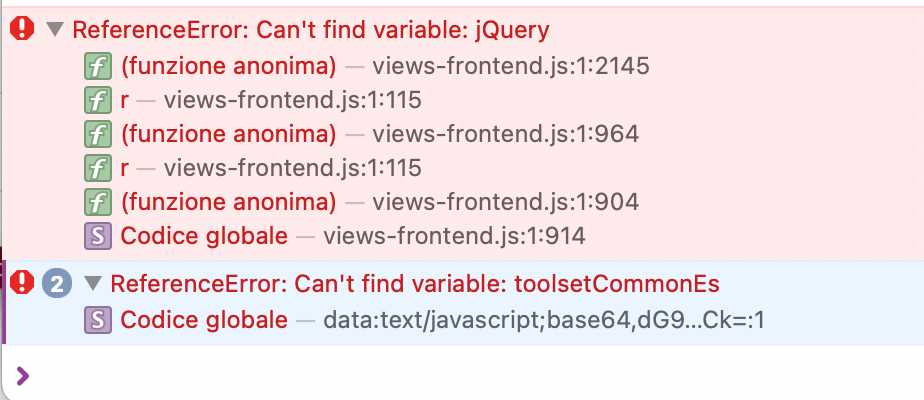
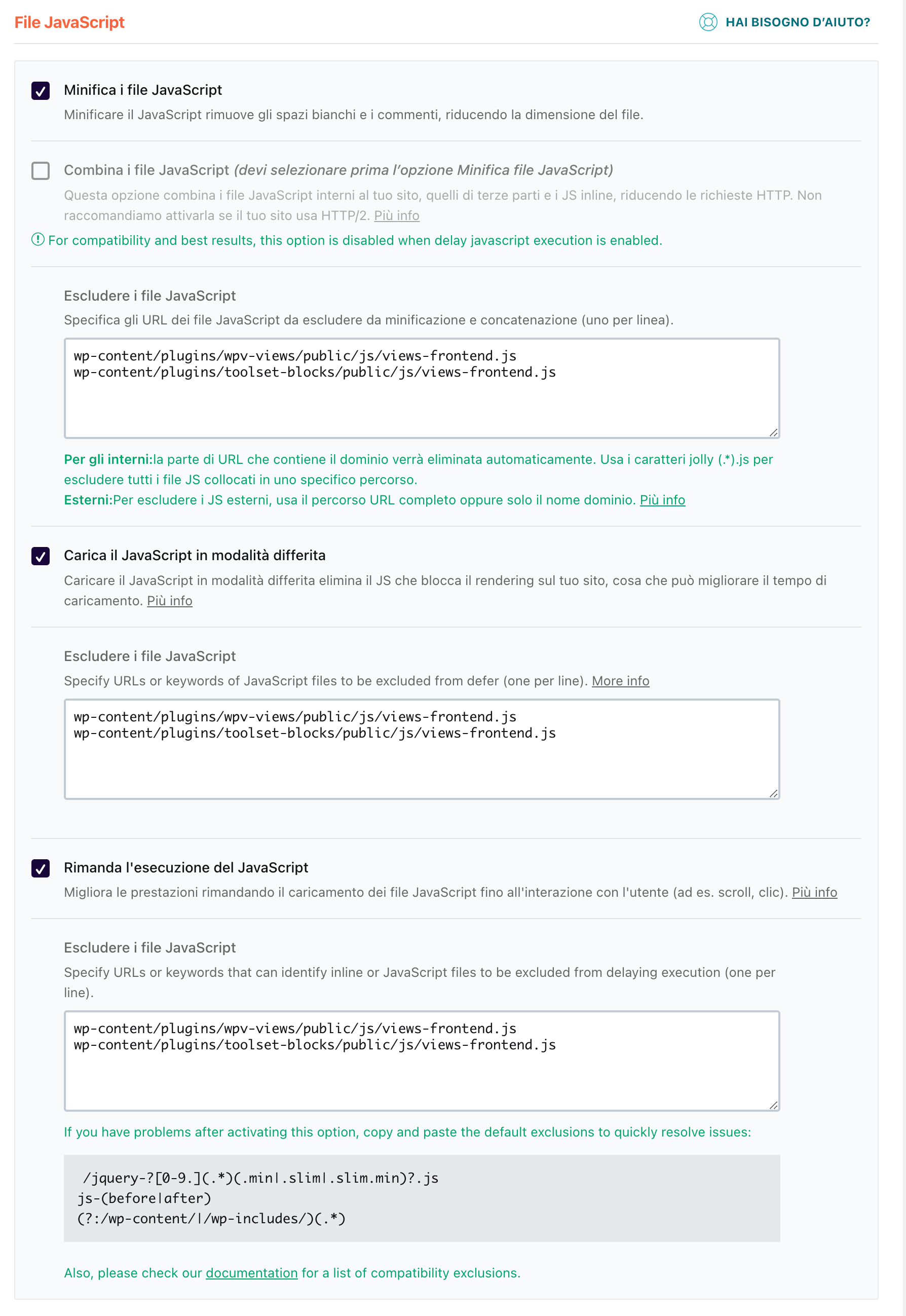
I've done as you suggested (see screenshot 1). But still I get errors about the very files I've excluded from minification ect. (screenshot 2).
Can you please help me with this? You can see the errors for yourself..
thank you

#2569325

Minesh
Supporter

Languages: English (English )

Timezone: Asia/Kolkata (GMT+05:30)

Can you please share problem URL where I can see the issue?

#2569335

hidden link
hidden link
hidden link

#2569343

hidden link and all the Negozi
hidden link and all the Servizi

#2569349

Minesh
Supporter

Languages: English (English )

Timezone: Asia/Kolkata (GMT+05:30)

I do not see any error with any of those links you shared. It seems that it should be from cache.

Can you please try to delete the cache or check with the different browser as its seems working fine at this end.

#2569351

I had already emptied all caches and checked from different browsers (emptied cache here as well). I've tried again and I still see the errors. I've checked from another device and still see the errors..
Can you check again and try emptying your caches?

thanks

(in the screenshot you can see the wrong layout on this page for example: hidden link

#2569389

Minesh
Supporter

Languages: English (English )

Timezone: Asia/Kolkata (GMT+05:30)

Can you please check now: hidden link

I've excluded all the JS files coming from the types and blocks plugin as you can see with the following WP Rocket plugin settings:
- hidden link

/wp-content/plugins/toolset-blocks/(.*).js
/wp-content/plugins/types/(.*).js

Can you please confirm it works at your end now.

#2569391

Thank you Minesh. It seems it's now working fine. Only on Safari the section "I marchi dei Rossignol Pro Shop" at the bottom of the Home page and Servizi pages are not fully displayed, but only display the first image.. Any idea why?

#2569427

Minesh
Supporter

Languages: English (English )

Timezone: Asia/Kolkata (GMT+05:30)

That is a different issue. You should report every new issue with the new ticket. This will help other users searching on the forum as well as help us to write correct problem resolution summery.

#2569429

My issue is resolved now. Thank you!