In a case like this you will need to manually update the plugins.
To do this you will need to download the zip file from our downloads page and then upload it to your wordpress website by going to Plugins -> Add New. https://toolset.com/account/downloads/
An issue like this usually occurs when you're using older versions of Types that may have issues with the built in installer which would require you to perform a manual update of the Types plugin before you can use the installer to update the remaining plugins.
Yes, Shane. We've attempted the manual approach numerous times. We've also had the ceiling for uploads raised to 12mb to account for the largest of Toolset's ZIPs, the largest of which is just over 11mb. Attempted from two computers in two locations. (I've got two savvy tech people working on this with me. )
Hi Shane
(Stepping in for Tricia here, my name is Jeff, responsible for the WordPress website)
I can create an ADMIN User for you if you can provide me an email address. However, I am not able to provide you with FTP access. I have been told that if you provide me with an IP address, I can have you Whitelisted.
It's Thanksgiving Day here tomorrow (a holiday), and my replies may be somewhat delayed.
I was able to update the Types plugin through the backend so you should now be able to update your other plugins without any issues from the screen below. hidden link
Hi Shane, Jeff here.
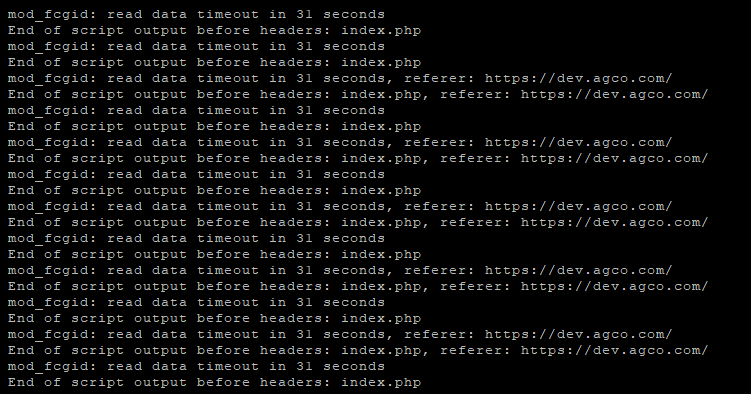
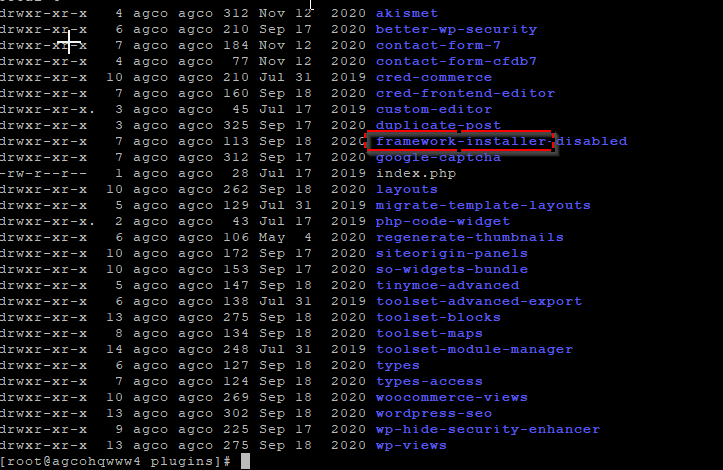
Thanks for your help. My CTO and I need to get a handle on several issues which we think are coming from Toolset. We had the website go down out of nowhere last week because of an issue with "Toolset Framework Installer", which was identified by our CTO. We're all now very concerned about using Toolset going forward.
I'm the one responsible for maintaining the WordPress site. And I'm hoping you'll make my work easier with answers to these questions:
1. Can you tell us what you did to successfully install that Types Plugin?
2. I'd like to know if there are any incompatible Plugins we have running?
3. Is Toolset having any issues that we should be aware of (ie: Frameworks, which I have deactivated)?
Thanks for your assistance.
Jeff Wiener,
Webmaster: ACGO.com, Dev.agco.com