Skip Navigation

[Resolved] Update Types from 3.3.10 to 3.4.7

This support ticket is created 4 years, 11 months ago. There's a good chance that you are reading advice that it now obsolete.

This is the technical support forum for Toolset - a suite of plugins for developing WordPress sites without writing PHP.

Everyone can read this forum, but only Toolset clients can post in it. Toolset support works 6 days per week, 19 hours per day.

Sun Mon Tue Wed Thu Fri Sat
- 9:00 – 12:00 9:00 – 12:00 9:00 – 12:00 9:00 – 12:00 9:00 – 12:00 -
- 13:00 – 18:00 13:00 – 18:00 13:00 – 18:00 14:00 – 18:00 13:00 – 18:00 -

Supporter timezone: America/Jamaica (GMT-05:00)

Tagged: 

This topic contains 10 replies, has 2 voices.

Last updated by danielC-16 4 years, 11 months ago.

Assisted by: Shane.

Author
Posts
#1938305
Toolsetupdate.JPG

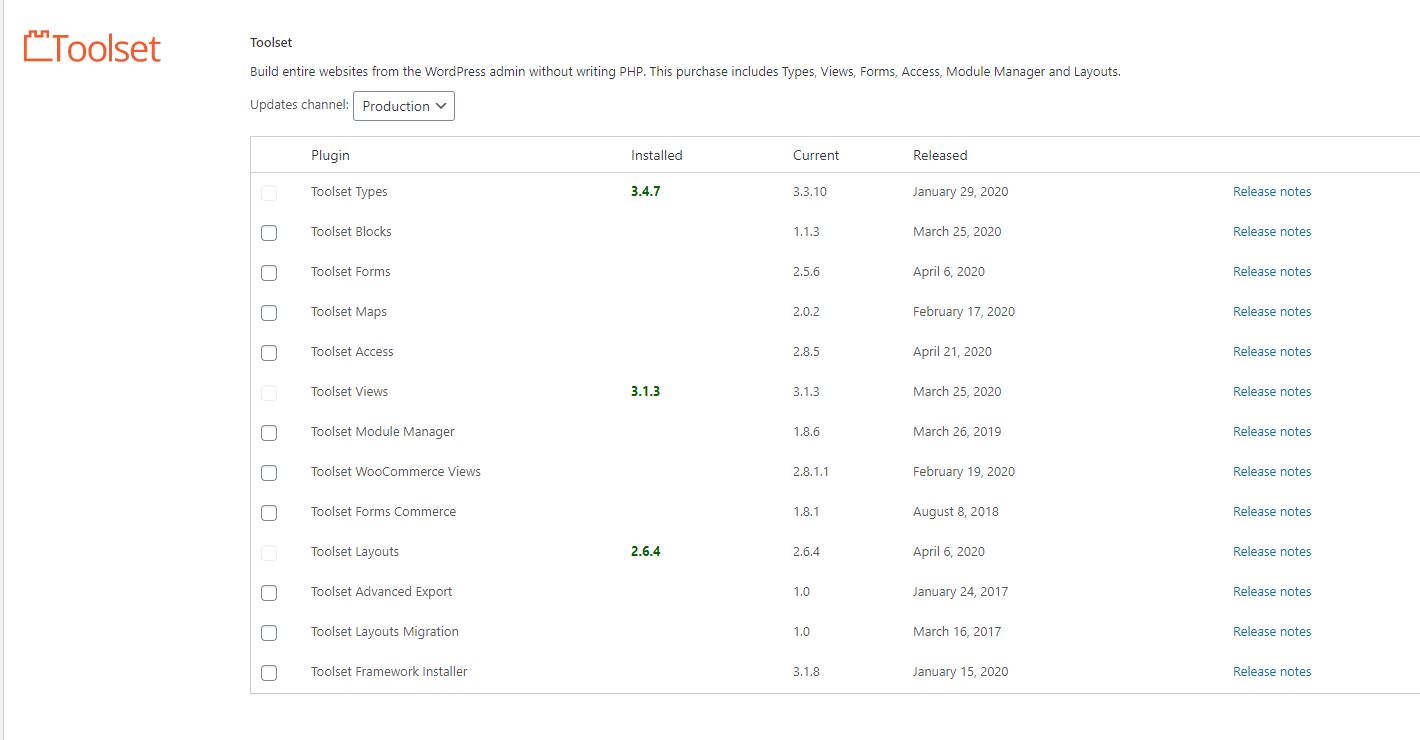
Hi, I've been trying to update Toolset Types on our development server and running into an issue. The only way I can apply a new update is not through the automatic detection and update, but by disabling, deleting and installing the new version. I previously had version 3.3.10 and have been trying to update to 3.4.7. When I attempt to to a manual update by disabling and deleting 3.3.10, then uploading and activating 3.4.7, the auto updater shows 3.4.7 is installed, but it lists 3.3.10 as the current version. No matter what I did during my attempts to use the normal update process it would never show the current version higher than 3.3.10. Is this a bug, or is there something I'm doing wrong with this update process?

The URL for our development site is hidden link

#1938397

Shane
Supporter

Languages: English (English )

Timezone: America/Jamaica (GMT-05:00)

Hi Daniel,

Thank you for getting in touch.

In a case like this I would recommend that you manually update your Types plugin to the latest version, from there you should be able to update your other Toolset plugins.

The latest types version will also carry the latest version of our installer for Toolset.

Please do this and let me know if you're able to successfully update your other Toolset plugins.

Thanks,
Shane

#1938399

Hi, thanks for the fast response. I did a manual update before sending in the help request. If you look at the attached JPG file, it shows the Toolset update page with the newest Types version (3.4.7) installed. However, it also lists 3.3.10 as the current version. All other operations of the 3.4.7 update seem to be working properly, but the update page shows the wrong current version at this URL hidden link

#1938401

I can offer login credentials for our development site if you'd like to explore the issue in real time. Let me know the best way to communicate those credentials if that is useful.

#1938445

Shane
Supporter

Languages: English (English )

Timezone: America/Jamaica (GMT-05:00)

Hi Daniel,

Yes please provide the credentials so that I can have a look.

Thanks,
Shane

#1938595

Shane
Supporter

Languages: English (English )

Timezone: America/Jamaica (GMT-05:00)

Hi Daniel,

Thank you for the credentials, however they dont seem to work.

Can you check them on your end and let me know if they work for you ?

Thanks
Shane

#1938603

Sorry about that, I was moving too fast with my password generator. I updated and checked it. Those credentials will work now.

#1938631

Shane
Supporter

Languages: English (English )

Timezone: America/Jamaica (GMT-05:00)

Hi Daniel,

Please re-add you site key to the plugins and the installer should now be working correctly. I've tested it with a site key I generated and its showing the latest versions of our plugins. So it should work when you add your site key.

What I did was to go to Dashboard -> Updates and click Check Again.

Please let me know if this helps.
Thanks,
Shane

#1938651

That worked, thanks. What did you do to reset the site key? I need to replicate it for our production server when it is upgraded.

#1938663

Shane
Supporter

Languages: English (English )

Timezone: America/Jamaica (GMT-05:00)

Hi Daniel,

What I did was to go to Dashboard -> Updates and click Check Again.
Once I did that I just went back to the installer at Plugins -> Add New -> Commercial.

Thanks,
Shane

#1938665

My issue is resolved now. Thank you!





