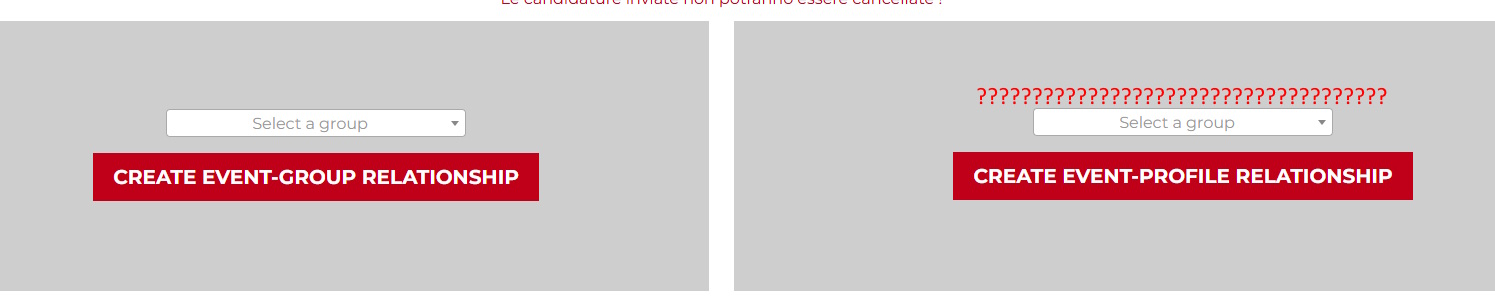
Hi all,
I have two different relationship forms on the same page (see picture). The first one has a parent selection, the second doesn't need it. The first one works perfectly, the second one would also, but the parent selection dropbox of the first one appears also on the other form preventing it to work because the selection is mandatory. If I delete the dropdown in the console also the second form works fine. I think this happens because Toolset generates the forms with the same code and I cannot hide the second with CSS because also the first one disappears. Is there anything I can do to work around this issue ? thanks
Regards
Nicola
Hello. Thank you for contacting the Toolset support.
Can you please share problem URL where you added both the relationship forms and admin access details. Please share what parent dropdown you want to remove.
Once I review your current structure I will be able to guide you in the right direction.
*** Please make a FULL BACKUP of your database and website.***
I would also eventually need to request temporary access (WP-Admin and FTP) to your site. Preferably to a test site where the problem has been replicated if possible in order to be of better help and check if some configurations might need to be changed.
I have set the next reply to private which means only you and I have access to it.
That form creates the relationship between event and profile and has nothing to do with the b.... If in the browser you delete that select field the button works and the relationship is regularly created. That select is not needed because it belongs to the other form on the left only
What is your exact need - you want to have both forms but only display the child select fields with both the form and hide/remove the parent select field with both the form - is that correct?
Minesh,
Parent (event9 to stay hidden for both forms. The form on the left is for a many to many relationship, so user needs to select one child from many (dropdown box). The form on the right doesn't need any selection because there is only one profile to associate (current user profile). The dropdown here is a copy of the one on the left form, just find the way to remove it, if you manage to the button on the right will work
thanks
No - I suggest you create a two different page. In one page add the band relationship form and on another page padd the profile relationship form.
And add two anchor links when user click on APPLY AS A BAND it should redirect to the page where you added the band relationship form and when user click on APPLY AS A MUSICIAN link user should redirected to page where ou added the profile relationship form.
Hello Minesh,
meanwhile I was setting up two pages as you prescribed, I made a further test in the original content template deleting the event-bands relationship form (left) and I could see that the other form still shows the event-band select even though now is the only form in the content template. This means that the issue is not related to the presence of two forms on the same content template, but it's probably an issue generated by the fact that there are two relationships with the same parent, the event.
It looks like Toolset generates the dropdown from the first relationship he finds in the db regardless of which one is selected when creating the form. I have also created a new vanilla form with the same structure and also that one shows the band select for no reason. Please also note that removing the band select from the page code and clicking on the button the form SEEMS to generate the relationhip (the feedback message appears), but the post relationship is NOT created actually.
Reading the code of the form in the editor, I don't see any indication about which child to use for the relationship even though the relationship is selected at the top of the page. I also referred to the [cred-relationship-role] documentation to check if it’s possible to specify the child in a parameter, but no.
Please try to replicate this issue in your vanilla environment, because it could be a bug and let me know
thanks
Can you please create two pages and add your both forms to it and share the link of those pages and then I will guide you how to set the parent event to both of those pages.